Virtual environment issue #16

Description

Running conda env create --file environment.yml to create the virtual environment completes successfully (link to full terminal output), however when trying to run proswap field-maps-scripts I get the following error:
proswap: C:\Program Files\ArcGIS\Pro\bin\Python\envs\field-maps-scripts environment doesn't appear to contain ArcGIS Pro
In ArcGIS Pro when I go to Package Manager > Environment Manager I get the following error:
Broken Environment. Cannot be activated.
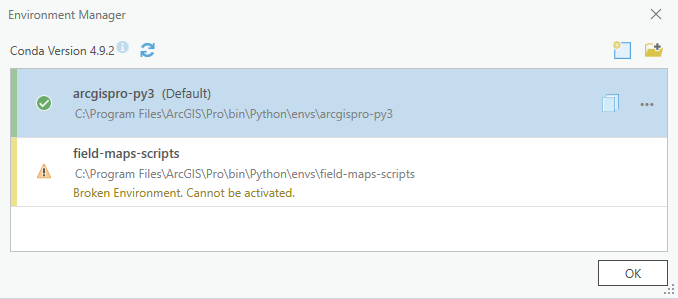
Additionally when activating the environment in the Python Command prompt I also get this message:
(arcgispro-py3) C:\Program Files\ArcGIS\Pro\bin\Python\envs\arcgispro-py3>activate field-maps-scripts
Current directory is another environment, changing directory to active environment.

(field-maps-scripts) C:\Program Files\ArcGIS\Pro\bin\Python\envs\field-maps-scripts\etc\conda\activate.d>rem proj-data is installed because its license was copied over
Is there anything I'm missing? Any help will be appreciated.
To Reproduce
Steps to reproduce the behavior:
- Install ArcGIS Pro 3.0
- Run
conda env create --file environment.ymlto create the virtual environment with the correct dependencies - Run
activate field-maps-scriptsto activate the environment - Run
proswap field-maps-scriptsto activate the environment - See error
- Open ArcGIS Pro, go to Package Manager > Environment Manager
- See error
Expected behavior
A working virtual environment which can be activated in ArcGIS Pro.