more substantive display-based improvements #105

Description

-
ARTICLE PAGE alignment issues (see screenshot below) 20 points
-
activate full-screen mode on ARTICLE PAGE page load (if full-text embedabble content is available) 50 points
- example: https://curatescience.org/app/article/12 : this page should automatically display the full-text embed viewer panel because it does have one available (https://open.lnu.se/index.php/metapsychology/article/view/843/1835), so it should look like this on page load:
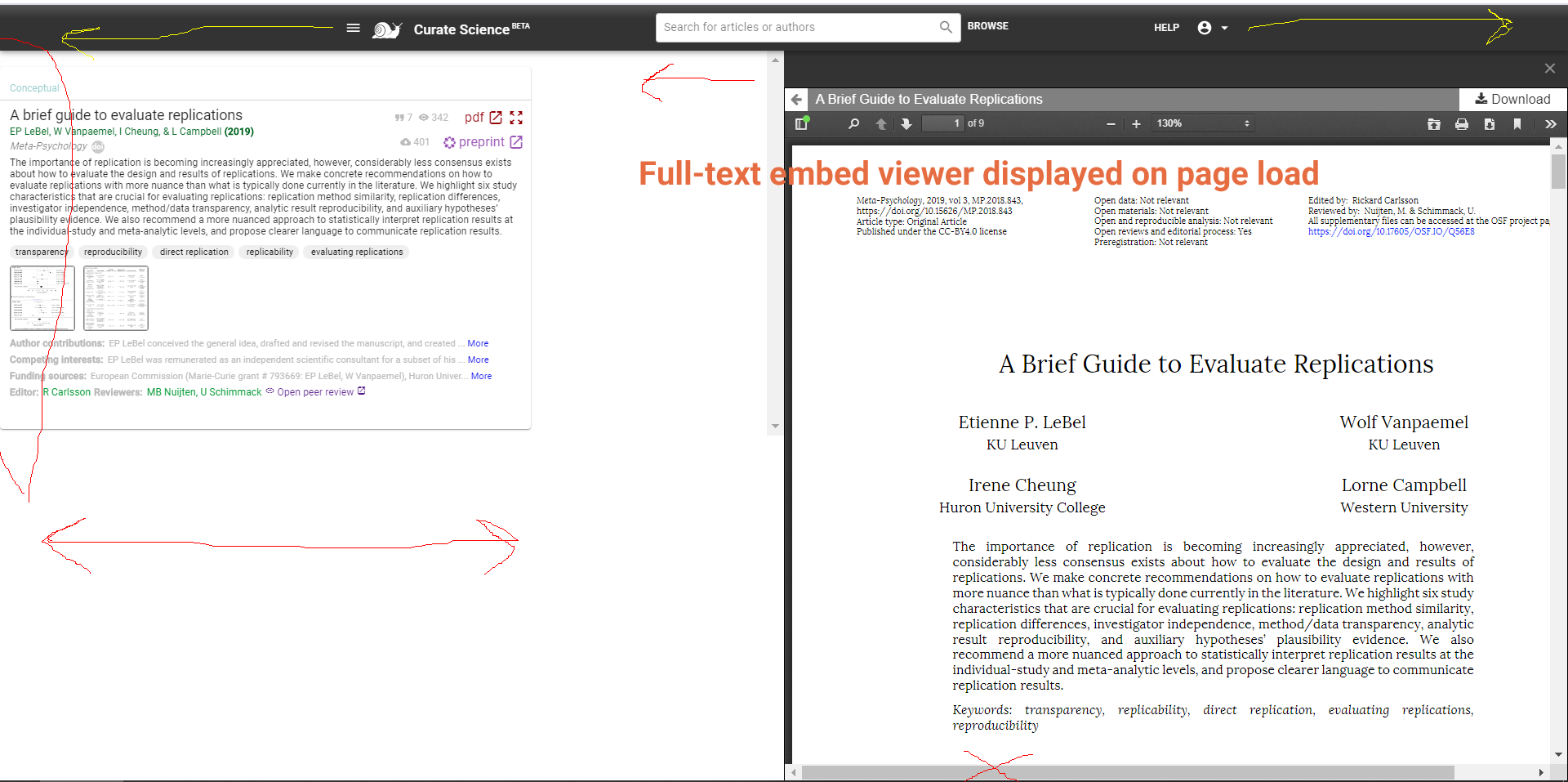
if more than 1 full-text embed link is available, show HTML as top priority, then PDF, and then Preprint as last resort (though extremely rare to have all 3)

- example: https://curatescience.org/app/article/12 : this page should automatically display the full-text embed viewer panel because it does have one available (https://open.lnu.se/index.php/metapsychology/article/view/843/1835), so it should look like this on page load:
-
add search icon, which expands search box on mobile (mockup to be posted) 100 points
-
article title and author list/pub year text trimming (will soon provide actual character limits for different viewport sizes) 30 points
-
display all Transparency (T) badges (preregistration, materials, data, code, and reporting standards) as bonus badges for ALL article types (to be more charitable/generous, as per beta user feedback); 50 points
- this means no more light grey unavailable badges, because if an article doesn't have Transparency information for a specific badge category (e.g. open data), then nothing is displayed at all (rather than a light grey unavailable badge). (the way it currently works for "Conceptual" and "Commentary" article types!)
- for non-transparency exemptions (darker grey badges), also do NOT show these for now (later can start re-showing these darker grey non-transparency exemption badges in the context of the transparency compliance system)
-
Add new supported HTML embedded content: 15 points
- Add Distill.pub HTML articles to supported full-screen HTML links (which feature some of the most delicious/impressive interactive charts in the world!)! Example URLs that should display an full-screen icon:
- https://distill.pub/2019/computing-receptive-fields/
- https://distill.pub/2020/attribution-baselines/
(So i guess would just add an additional OR case to existing logic, i.e., "or if (contains "distill.pub")
code logic: show full-screen icon: if (ends w/ ".html") or if (contains "frontiersin.org/articles" and ends w/ "full") or if (contains "github.io")
- Add Distill.pub HTML articles to supported full-screen HTML links (which feature some of the most delicious/impressive interactive charts in the world!)! Example URLs that should display an full-screen icon:
-
display rep taxonomy infographic via fancyBox viewer! So within replication article type popup and within article editor for Replication articles (i.e., when article type = Replication), clicking on "replication taxonomy" will display the rep taxonomy infographic within fancyBox media viewer instead of just opening image in a new tab (https://curatescience.org/sitestatic/infographics/replication-taxonomy-v0.4.0.png). 15 points
-
Fix flicker/minor movement in (right-panel) embed viewer for PDFs (only) when hovering over transparency badges in article list (left-panel). Steps: Open full-text PDF in full-screen mode, then hover over the transparency badges (move left-to-right, then right-to-left) in article cards in the left panel, and you should see the flicker/minor movement in the full-text PDF displayed in the right-panel embed viewer. Somehow this doesn't happen for HTML articles displayed in embed viewer. 20 points
