You can use Postman to test the FHIR server. If you have deployed with Authentication/Authorization enabled, you will need to configure Azure AD authorization to obtain a token. Use type "OAuth 2.0":
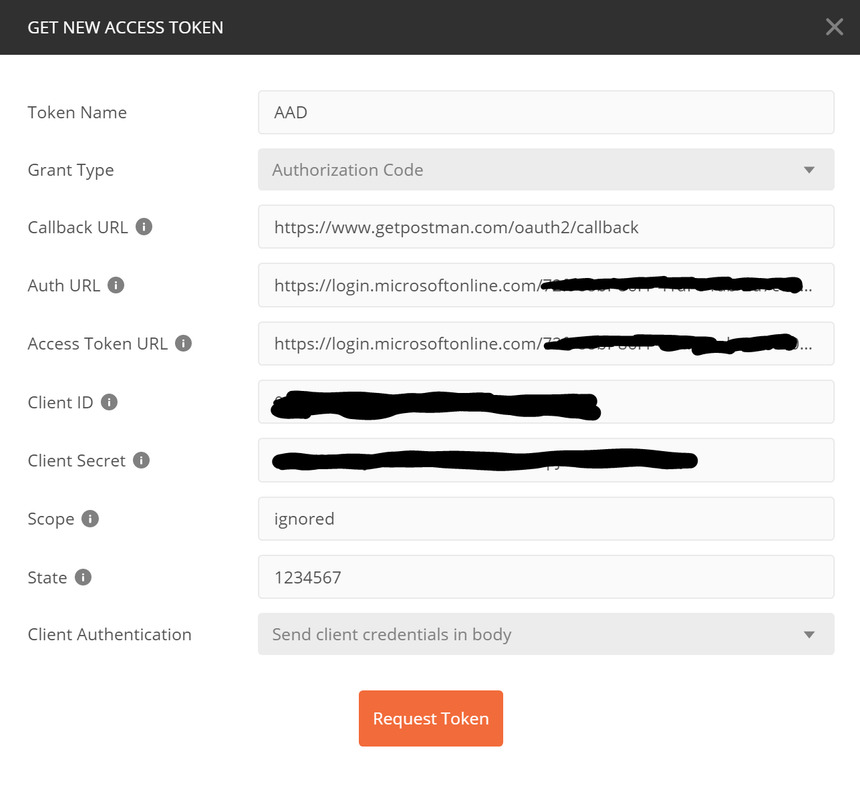
The parameter settings should be:
- Grant Type:
Auhorization Code - Callback URL:
https://www.getpostman.com/oauth2/callback - Auth URL:
https://login.microsoftonline.com/{TENANT-ID}/oauth2/authorize?resource={AUDIENCE} - Access Token URL:
https://login.microsoftonline.com/{TENANT-ID}/oauth2/token - Client ID:
CLIENT-APP-ID($clientAppReg.AppId) - Client Secret:
SECRET($clientAppReg.AppSecret) - Scope:
Ignored(not used for Azure AD v1.0 endpoints) - State: e.g.,
12345 - Client Authentication:
Send client credentials in body
Verify that the following requests return status 200 OK:
GET https://myfhirservice.azurewebsites.net/metadata
GET https://myfhirservice.azurewebsites.net/Patient