UI: Preserve position during alignment change#4734
UI: Preserve position during alignment change#4734Oekn5w wants to merge 1 commit intoobsproject:masterfrom
Conversation


|
Can you explain why it's bad that the transform window live-updates the scene item transform? My impression is that live updating is preferred behavior. I have never heard someone complain about this behavior, and would challenge the notion that this PR improves usability. |
|
Nevermind, I misread the description and didn't realize that this only applied specifically to Positional Alignment property. I'm unsure what the proper behavior should be here, though. I feel like the position shouldn't change, but also the setting itself might need to be renamed to something more descriptive, such as "Transform anchor point" or something. Just spitballing. My mind is immediately drawn to the grid-style controls in something like Photoshop:
|
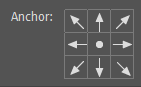

 Oekn5w
force-pushed
the
feat-trafo-alignment
branch
from
Oekn5w
force-pushed
the
feat-trafo-alignment
branch
from
d04483d to
4476e82
Compare
|
@dodgepong Good points about the visual redesign of the drop down and the rename. I wanted to add a bit of information anyway to that dialog afterwards (Original size, scaling). If you don't mind, I'd include your proposed changes with that PR then, independent of this one. |
|
I think it's fine for a separate PR -- my comment was more a response to the source of my own confusion on what this PR did. |
|
Blocked for now, I didn't take rotation and scaling into account. |
Oekn5w
force-pushed
the
feat-trafo-alignment
branch
from
4476e82 to
8dbf8fd
Compare
Oekn5w
force-pushed
the
feat-trafo-alignment
branch
from
8dbf8fd to
eb1544a
Compare
|
Fixed missing rotation and scaling, rebased onto master |


|
I tried this PR and noticed an issue. Condition:
Expected behavior: Actual behavior: |

|
Hi there @Oekn5w - just wanted to check in to see if you plan on solving the mentioned issue above. No rush, just wanted to know. |
|
@WizardCM ty for checking back, I'm looking into utilizing the existing transform function, but didn't find the time yet to implement this fully. (And tbh, I had forgotten about this PR.) |
|
No problem, thanks for providing an update. |
Oekn5w
force-pushed
the
feat-trafo-alignment
branch
2 times, most recently
from
4b27a6c to
cb1e4f3
Compare
Oekn5w
force-pushed
the
feat-trafo-alignment
branch
from
cb1e4f3 to
9659f00
Compare
|
The issue I reported at #4734 (comment) looks solved. |
Oekn5w
force-pushed
the
feat-trafo-alignment
branch
from
9659f00 to
9425937
Compare

| ui->cropTop->setValue(int(crop.top)); | ||
| ui->cropBottom->setValue(int(crop.bottom)); | ||
|
|
||
| oti_save = osi; |

There was a problem hiding this comment.
Please use a more informative variable name here and use camelCase instead (we tend to prefer camelCase for C++ and ObjC and snake_case for pure C).
| // -> | ||
| // M_pos_12 = (T_2*)^(-1) * T_1 | ||
|
|
||
| struct matrix4 mat_T1, mat_T2_star, mat_t12; |
There was a problem hiding this comment.
Do not use comma-based declaration, you can also write out matrix in the variable names (using matrix_T1 itself is ok because it follows the formulas in the comment above).
I also think it should be ok to disable clang-format for that comment block to make the formulas more readable.

|
@Warchamp7 Would like to hear your take on this regarding UX - if I change the alignment anchor, I currently don't know if I'd expect the position coordinates to be adapted to the changed alignment or instead be kept as is and thus the source position changes implicitly. |

I approve of the behaviour conceptually where the source does not move when changing the anchor point. |
|
@PatTheMav Thanks for the review, I'll try and rebase the change to the current master but I'll have to fix my local dev environment first. |
|
@Warchamp7 Is this PR possibly superseded by your recent transform window PR? |
Yes |
Feel free to close it with an appropriate comment then. |
|
Never got around to trying to implement the Photoshop's UI in QT, and this is now vastly out of date. |
7 participants


Description
Changing the alignment of a scene item in the edit transformation dialog now no longer moves the position of the item in the scene.
Motivation and Context
Better usability of the edit transformation dialog. No issue or idea has been raised as far as known.
How Has This Been Tested?
This was tested by visually checking for movement of the scene item when changing
Developed and tested on 64-bit Ubuntu 20.04 (VM).
Types of changes
Checklist: