The Artekit AK-TMP116N is a breakout board for the Texas Instruments TMP116N temperature sensor. The TMP116N is a low-power, high-precision temperature sensor with integrated EEPROM memory. The sensor provides a 16-bit temperature result with a resolution of 0.0078 °C and an accuracy of up to ±0.3°C with no calibration.
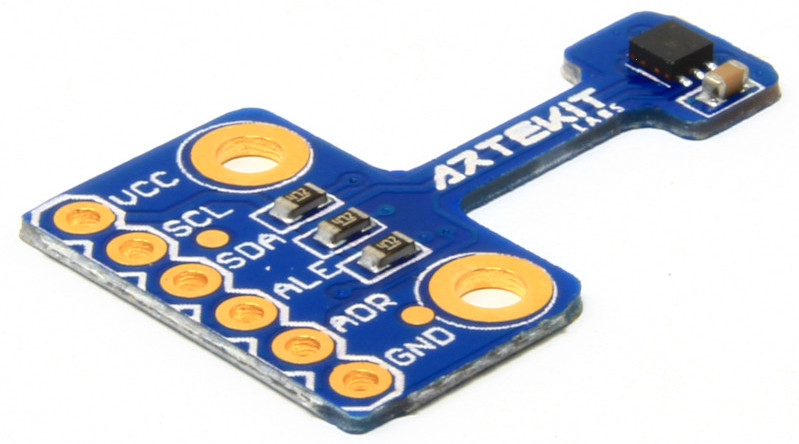
The functions to access the temperature sensor are enclosed in the Artekit_TMP116 class. To access the functions, instantiate the class this way:
Artekit_TMP116 temp_sensor;Now every function can be accessed like this:
temp_sensor.begin();If you have modified the address of the TMP116N (with the ADDRESS pin), you have to instantiate the class specifying the new address, like this:
Artekit_TMP116 temp_sensor(0x79);Here is a list and detailed explanation of the library functions you can use in your sketches:
bool begin();
void end();

float readTemperature();
bool readTemperature(float* temperature);

bool setLowLimit(float low);
bool setHighLimit(float high);
TMP116_Alert getAlertType();
bool setLowHighLimit(float low, float high);
void clearAlert();

uint16_t readRegister(uint8_t address);
bool readRegister(uint8_t address, uint8_t* valueL, uint8_t* valueH);
bool readRegister(uint8_t address, uint16_t* value);
bool writeRegister(uint8_t address, uint16_t value);
bool writeRegister(uint8_t address, uint8_t valueL, uint8_t valueH);-
Artekit_TMP116::begin()-- call this function to initialize the library. -
Artekit_TMP116::end()-- call this function to de-initialize the library. -
Artekit_TMP116::readTemperature()- returns the current temperature in Celsius degrees. -
Artekit_TMP116::readTemperature(float* temperature)-- does the same as the above function but it checks if there is new conversion data available. The function returns immediately with false if the temperature data wasn't ready yet, or true if there was a successful temperature reading. The temperature will be stored in a variable pointed by the temperature pointer. For example:float temp; if (temp_sensor.readTemperature(&temp)) { // Temperature successfully read Serial.print("Temperature read! It is = "); Serial.println(temp); }
-
Artekit_TMP116::setLowLimit(float low)- this function sets a low temperature limit (in Celsius degrees). If the temperature goes below this limit, the ALERT pin will be asserted. -
Artekit_TMP116::setHighLimit(float high)- this function sets a low temperature limit (in Celsius degrees). If the temperature goes above this limit, the ALERT pin will be asserted. -
Artekit_TMP116::setLowHighLimit(float low, float high)- this function does the same as the above two functions, but in a single function call. -
Artekit_TMP116::getAlertType()- returns the type of alert. The return value can be:TMP116_NoAlert- No alert happened.TMP116_AlertLow- Temperature crossed the low-limit (configured with thesetLowLimitfunction).TMP116_AlertHigh- Temperature crossed the high-limit (configured with thesetHighimitfunction).
-
Artekit_TMP116::clearAlert()- call this function after detecting an alert to clear the alert state. The ALERT pin will go back to the rest (low) level and will be asserted by the next ALERT condition.
You can eventually set your own sensor configuration by directly accessing the sensor registers using the following functions. Note that in normal use cases you won't need to use them.
Artekit_TMP116::readRegister(uint8_t address, uint8_t* valueL, uint8_t* valueH)Artekit_TMP116::readRegister(uint8_t address, uint16_t* value)Artekit_TMP116::writeRegister(uint8_t address, uint16_t value)Artekit_TMP116::writeRegister(uint8_t address, uint8_t valueL, uint8_t valueH)