The WaveTooEasy - Generic C Library allows you to communicate with the WaveTooEasy board using serial communication (UART).
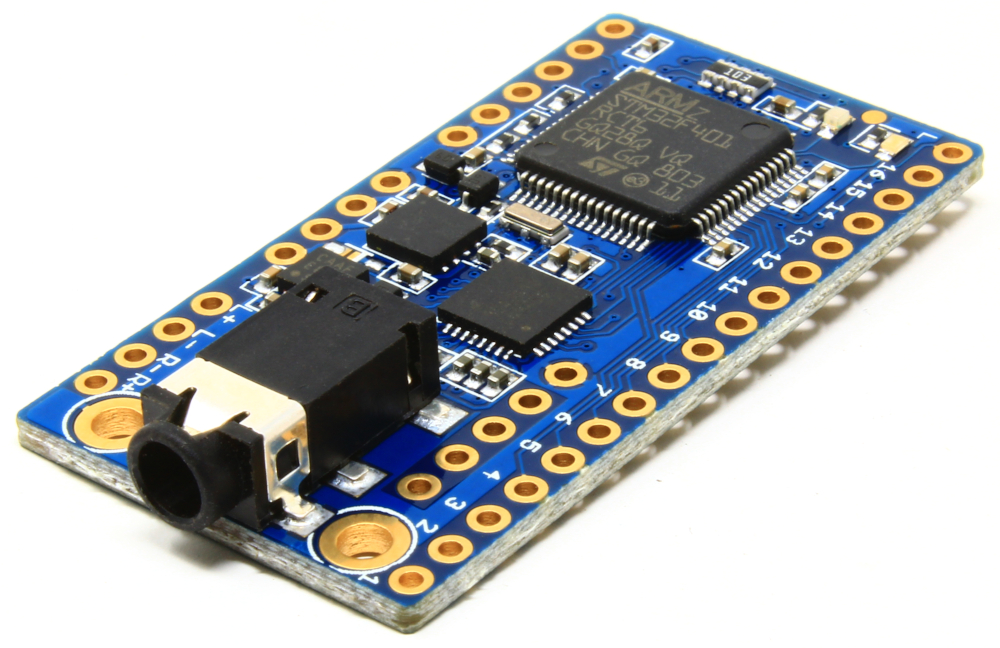
The library consists in two source files: WaveTooEasy_protocol.c and WaveTooEasy_protocol.h that you can include in your project. The library doesn't require any particular dependency and it's suitable for both desktop and embedded projects (for example, the WaveTooEasy - Library for Arduino is based on this C library).
A full implementation example is provided in the wavetooeasy_serial directory. It's a Visual Studio 2019 project for Windows that allows you to test all the available commands.

The easiest way to connect the WaveTooEasy to a PC is to use an USB-to-Serial converter like the AK-FT232RL board. The AK-FT232RL converter can be connected directly to the WaveTooEasy since both boards share the same pinout and it also provides 5V/500mA.
- WaveTooEasy product page
- WaveTooEasy manual
- WaveTooEasy - Library for Arduino
- WaveTooEasy - Generic C library
The library requires 3 callback functions you have to define:
-
typedef uint32_t (*cbMillis)()should return an incremental milliseconds counter (likeGetTickCount()on Windows ormillis()on Arduino). It is used to calculate timeouts. -
typedef uint8_t (*cbSerialReceiveChar)(uint8_t*, void*)is a function that will be called to receive one character from the UART.-
The first parameter is a pointer to
uint8_twhere you will store the received character. -
The second parameter is a
voidpointer to an optional parameter that will be passed when this function is called from the library. You will provide this pointer when calling thewteInit()function. It's usually a pointer to a structure or class where you keep your context. -
You must return 1 if a character was successfully read from the UART. Return 0 if the character could not be read.
-
The function should exit immediately if there are no available characters to be read from the UART.
-
-
typedef void (*cbSerialSend)(uint8_t*, size_t, void*);is a function that will be called when one or more characters have to be sent through the UART.-
The first parameter is a pointer to an array of
uint8_twith the data to be transmitted. -
The second parameter is the size or length of the array to be transmitted.
-
The second parameter is a
voidpointer to an optional parameter that will be passed when this function is called from the library. The same as with thecbSerialReceiveChar()callback function. -
You have to guarantee that the characters are sent immediately to the UART (for example, if you have a flush function, you have to call it within this function call).
-
After you have defined the above functions, call the wteInit() function to initialize the library. Refer to the following example:
#include "WaveTooEasy_protocol.h"

// This function returns an incremental milliseconds counter
uint32_t myMillisFunction()
{
    // User implemention example
    return milliseconds_counter();
}

// This function receives a byte from the serial port
uint8_t mySerialReceiveFunction(uint8_t* c, void* param)
{
    // User implemention example
    if (hasCharsInUART())
    {
        *c = readCharFromUART();
        return 1;
    }

    return 0;
}

// This function sends bytes to the serial port
void mySerialSendFunction(uint8_t* data, size_t data_size, void* param)
{
    // User implemention example
    sendCharsToUART(data, data_size);
}

int main()
{
    // Call the initialization function and pass the above three functions
    wteInit(myMillisFunction, mySerialReceiveFunction, mySerialSendFunction, NULL);

    while (TRUE)
    {
        // Your code...
    }

    return 0;
}
After calling the wteInit() function you can call any other function of the library.
// Initialization
void wteInit(cbMillis cbTicks, cbSerialReceiveChar cbReceive, cbSerialSend cbSend, void* param);

// Commands
uint8_t wteHello();
uint8_t wteGetVersion(uint8_t* major, uint8_t* minor, uint8_t* fix);
uint8_t wtePlayFile(char* file, uint8_t channel, uint8_t mode);
uint8_t wtePlayChannel(uint8_t channel, uint8_t mode);
uint8_t wteStopChannel(uint8_t channel);
uint8_t wteStopAll();
uint8_t wtePauseChannel(uint8_t channel);
uint8_t wtePauseAll();
uint8_t wteResumeChannel(uint8_t channel);
uint8_t wteResumeAll();
uint8_t wteGetAllChannelsStatus(WTE_CHANNELS_STATUS* channels);
uint8_t wteGetChannelStatus(uint8_t channel, uint8_t* status);
uint8_t wteGetChannelVolume(uint8_t channel, float* volume);
uint8_t wteSetChannelVolume(uint8_t channel, float volume);
uint8_t wteSetSpeakersVolume(float volume);
uint8_t wteSetHeadphoneVolume(float volume);
uint8_t wteGetSpeakersVolume(float* volume);
uint8_t wteGetHeadphoneVolume(float* volume);Use this function to poll for a WaveTooEasy board. Useful to check if the communication is working as it should.
Asks for the WaveTooEasy software version.
major, minor and fix are three pointers to numbers representing the WaveToEasy version in Semantic Versioning 2.0.0 format.
uint8_t major, minor, fix;

wteGetVersion(&major, &minor, &fix);Plays a file on a give channel.
file is a null-terminated string containing the full path of the file to play.
channel is the channel number (from 1 to 10).
mode can be PLAY_MODE_NORMAL for normal playback or PLAY_MODE_LOOP for looped playback.
// Play beep.wav on channel 2
wtePlayFile("beep.wav", 2, PLAY_MODE_NORMAL);Plays the file that corresponds to a given channel. This channel<->file mapping is configured in the configuration file. Refer to [WaveTooEasy documentation] to learn how to map a file to a channel. In case there is no file mapped to a channel, WaveTooEasy will try to play the [channel].wav file, where channel is the number you provide to this function.
channel is the channel number (from 1 to 10).
mode can be PLAY_MODE_NORMAL for normal playback or PLAY_MODE_LOOP for looped playback.
// Play the file mapped to channel 1
wtePlayChannel(1, PLAY_MODE_NORMAL);Stops the playback on a given chanel.
channel is the channel number (from 1 to 10).
// Stop playback on channel 1
wteStopChannel(1);Stops the playback on all the channels.
wteStopAll();Pauses the playback on a given channel.
channel is the channel number (from 1 to 10).
// Play beep.wav on channel 2
wtePlayFile("beep.wav", 2, PLAY_MODE_NORMAL);

// Wait one second
delay(1000);

// Pause playback of channel 2
wtePauseChannel(2);Pauses the playback on all the channels.
// Play beep.wav on channel 2
wtePlayFile("beep.wav", 2, PLAY_MODE_NORMAL);

// Play music.wav on channel 3
wtePlayFile("music.wav", 3, PLAY_MODE_LOOP);

// Wait one second
delay(1000);

// Pause all
wtePauseAll();Resumes a paused channel.
channel is the channel number (from 1 to 10).
// Play beep.wav on channel 2
wtePlayFile("beep.wav", 2, PLAY_MODE_NORMAL);

// Wait one second
delay(1000);

// Pause playback of channel 2
wtePauseChannel(2);

// Wait one second
delay(1000);

// Resume playback on channel 2
wteResumeChannel(2);Resumes all the channels that were put in pause with the wtePauseChannel() or the wtePauseAll() functions.
// Play beep.wav on channel 2
wtePlayFile("beep.wav", 2, PLAY_MODE_NORMAL);

// Play music.wav on channel 3
wtePlayFile("music.wav", 3, PLAY_MODE_LOOP);

// Wait one second
delay(1000);

// Pause all
wtePauseAll();

// Wait one second
delay(1000);

// Resume all
wteResumeAll();Retrieve the status code for all the channels.
channels is a pointer to an struct of type WTE_CHANNELS_STATUS.
The WTE_CHANNELS_STATUS structure is defined in the following way (in the WaveTooEasy_protocol.h file):
typedef struct wteChannelsStatus
{
	uint8_t channel1;
	uint8_t channel2;
	uint8_t channel3;
	uint8_t channel4;
	uint8_t channel5;
	uint8_t channel6;
	uint8_t channel7;
	uint8_t channel8;
	uint8_t channel9;
	uint8_t channel10;
} WTE_CHANNELS_STATUS;WTE_CHANNELS_STATUS status;
// Retrieve the status code for all the channels
wteGetAllChannelsStatus(&status);
// Check if channel 5 AND 6 are playing a file, otherwise make
// them play their corresponding WAV files.
if (status.channel5 == STATUS_STOPPED && status.channel6 == STATUS_STOPPED)
{
wtePlayChannel(5, PLAY_MODE_NORMAL);
wtePlayChannel(6, PLAY_MODE_NORMAL);
}Retrieves the status code for a given channel.
channel is the channel number (from 1 to 10).
status is a pointer to a variable receiving to the status code.
uint8_t status;

// Retrieve the status code for channel 7
wteGetChannelStatus(7, &status);

// Check if channel 7 is paused. If so, resume it.
if (status == STATUS_PAUSED)
wteResumeChannel(7);Gets the base volume for a given channel.
channel is the channel number (from 1 to 10).
volume is a pointer to a floating point variable that will receive the volume value. It's a floating point value between 0 and 2. 0 it's the lowest value and means no audio output. 1 is the default volume.
float volume;

// Retrieve the volume of channel 2
wteGetChannelVolume(2, &volume);Sets the volume of a given channel.
channel is the channel number (from 1 to 10).
volume It's a floating point value greater or equal than 0. 0 it's the lowest value and means no audio output. 1 is the default volume.
// Set the channel 1 volume to the half (0.5)
wteSetChannelVolume(1, 0.5f);Sets the volume of the speakers.
volume is a floating point number representing the speakers volume in dB, ranging from -53 dB up to 24 dB. The default value is 0.
You can use any dB value, but know that the WaveToEasy amplifier (the Texas Instruments LM49450) can only accept a predefined set of values for the speakers. In case you want to know, these values are:
-53, -42, -34.5, -28.5, -24, -21, -18, -15, -12, -9, -7.5, -6, -4.5, -3, -1.5, 0, 1.5, 3, 4.5, 6, 7.5, 9, 10.5, 12, 13.5, 15, 16.5, 18, 19.5, 21, 22.5, 24
WaveTooEasy will pick the next lower available value. This means that if you pass 5dB to this function, the resulting volume would be 4.5dB.
// Set the speakers volume to -3 dB
wteSetSpeakersVolume(-3.0f);Set the volume of the headphone output.
volume is a floating point number representing the headphone volume in dB, ranging from -59 dB up to 18 dB. The default value is 0.
You can use any dB value, but know that the WaveToEasy amplifier (the Texas Instruments LM49450) can only accept a predefined set of values for the headphone. In case you want to know, these values are:
-59, -48, -40.5, -34.5, -30, -27, -24, -21, -18, -15, -13.5, -12, -10.5, -9, -7.5, -6, -4.5, -3, -1.5, 0, 1.5, 3, 4.5, 6, 7.5, 9, 10.5, 12, 13.5, 15, 16.5, 18
WaveTooEasy will pick the next lower available value. This means that if you pass 5dB to this function, the resulting volume would be 4.5dB.
// Set the headphone volume to -3 dB
wteSetHeadphoneVolume(-3.0f);Retrieves the current volume of the speakers.
volume is a pointer to a floating point number that will receive the current speakers volume.
float volume;

// Get the speakers volume
wteGetSpeakersVolume(&volume);Retrieves the current headphone volume.
volume is a pointer to a floating point number that will receive the current headphone volume.
float volume;

// Get the headphone volume
wteGetHeadphoneVolume(&volume);These are the status codes returned by the wteGetAllChannelsStatus() and wteGetChannelStatus() functions:
STATUS_STOPPEDSTATUS_PLAYINGSTATUS_PAUSED
All the function returns ERROR_NONE on success. Otherwise it returns an error code like the following:
-
ERROR_PLAYING: it means that the file cannot be found, or cannot be played because an error occurred (for example, the WAV file has a sampling rate different than the one in the configuration file). -
ERROR_INVALID_FILE_LENGTH: the filename passed to theplayFile()function is too long. -
ERROR_INVALID_CHANNEL: the channel number is invalid. -
ERROR_INVALID_MODE: the playback mode used in theplayFile()orplayChannel()function is invalid. -
ERROR_NOT_PAUSED: returned whenpauseChannel()is called on an already paused channel. -
ERROR_NOT_PLAYING: returned whenpauseChannel()andstopChannel()are called on a channel that is not currently playing. -
ERROR_PARAM: there is an error with some or all of the parameters supplied. -
ERROR_RX_TIMEOUT: WaveTooEasy is not responding to commands.
You can report bugs here by creating a new issue or in the Artekit forum.
Released under MIT license.
Copyright (c) 2021 Artekit Labs.