Akka Based Message Classifier Project Overall Design
Despite for messaging system, even in real life it’s important to classify messages we get. By classifying messages we can easily get an idea about what’s inside the messages, organize messages and store separately for future use. Considering about current implementations we can see email spam classifiers, mail client filters as examples. The limitation and a main fact that a classifier need to consider is the processing time. The implementation of message classifier is CPU bounded inherently. To address this issue, we believe that using Akka – a powerful distributed event-driven application building framework will help to speedup this process.
-
Java
-
Akka tool
-
Play framework
-
uClassifier (online service for classifying messages)
-
Understanding how Actors can be used for this

Intermediate Actors no need to limit for 3. Classifiers in the image are also actors, strongly connected to an Intermediate Actor. Each Intermediate Actor must contain all for types of Classifying Actors.

-
Client – generate and push the messages to Message Receiver
-
Message Receiver – Receive messages from Client and Pass it to Main Actor
-
Main Actor + Others – Classify Messages
-
Message Collector – Collects all messages after classification
-
Message Filter – Filter messages according to classification and pass to relevant queues
-
Message Queues – Messages of same type stored in same queue


Messages are posted to the Main Controller by a separate client. Main Controller Processes the messages, creates the Work Object and sends it to the Frontend (1).
Then the Frontend actor sends the work (2) to the active master via the DistributedPubSubMediator. The message is sent with ask/? to be able to reply to the Main Controller when the job has been accepted or denied by the master.
There should be many worker nodes to accept the jobs from the master. At the same time it should be considered that the worker nodes can go down or disconnected. Therefore we don't let the worker nodes be members of the cluster, instead they communicate with the cluster through the Cluster Client. Using this pattern the worker doesn't have to know exactly where the master is located.
The worker register itself periodically to the master, using registerTask message. Master keeps a Hashmap of Worker Status and also keeps a queue of incoming jobs/work.
When the master receives Work from front end it adds the work item to the queue of pending work and notifies workers with WorkIsReady message. Master to be fail safe, it keeps a log of events in case of failure, until new master is taken over.
This has the characteristic that master and worker can be started in any order, and in case of master fail over the worker re-register itself to the new master. Once the worker is registered to the master, Master sends a “WorkIsReady” Message to the Worker (5) and
if the worker is idle it can again request work from the master by sending “WorkerRequestsWork” to the master (6).
Master then sends work to the Worker actor (8).
When the worker receives work from the master it delegates the actual processing to a child actor, WorkExecutor, to keep the worker responsive while executing the work (8). Worker extracts the original text message from the Work Object and send it to the WorkExecutor.
Work executor will then delegate the work to the Broadcasting actor (9) and waits for a timeout until it receives the classified results back.
Broadcasting actor then broadcasts (10) the TextMessage object to the Classifiers group which consists of 4 classifying actors (Spam, Context, Gender, and Language) and
after classifying is done each of the classifiers returns their results back to the broadcasting actor (11). The classifiers used in the system uses an Abstract Factory pattern so that existing classifiers can be either removed, changed or new classifiers can be incorporated easily according to the user needs.
Broadcasting actor aggregates the results from separate classifiers and sends the modified TextMessage object with the results to the WorkExecutor (12).
WorkExecutor will then delegate the results to the MessageCollectingActor which will store the final resulting message in a database for further processing (13).
Once the results are being sent to the MessageCollectingActor, WorkExecutor sends a message to the worker saying job is done (14).
Finally the worker sends WorkIsDone to the master (15) and
it updates its state of the worker and sends acknowledgement back to the worker (16). Now the worker is again ready to accept new jobs from the master.
This solution facilitates elastic addition or removal of the front end as well as many worker nodes and supervisor strategy makes sure that the work is not lost if a worker fails in the meantime.
[1] https://github.com/typesafehub/activator-akka-distributed-workers-java/
[2] http://letitcrash.com/post/29044669086/balancing-workload-across-nodes-with-akka-2
Supervision Strategy (Fault Tolerance) in Broadcasting Actor(Parent) and Classifying Actor(Child)
- Detect failures in the Child Actors (Classifiers) using the framework.
- Try to re-start failed actor.
- When re-started, child actor(Classifying Actor) will request the message again, then the Broadcasting Actor will re-send the message only to that classifier.
- If it fails again, parent (Broadcasting Actor) will try maximum of 4 attempts.
- If the child (Classifying Actor) failed even after the 4 attempts, parent will give-up that child.
- Then the message will not be classified for the service given by the faulty classifier.
- Broadcasting actor will aggregate messages from the working classifiers and will forward it to the Work Executor to store classified messages.
Normal distributed akka projects use separate JVMs and/or separate physical machines for the nodes in the cluster. System administrator has to start those nodes manually at the beginning. But distributed-worker (master-worker) example has simplified this aspect by running all nodes in the same JVM. We realized this at the latter stages of the project.
At that stage in order to support separate JVMs for separate actor systems we had to change the entire project structure. Since this was not in our main project scope and we were lacking the time, we decided to keep the project structure as it was and not to deploy it on separate nodes.
Akka also supports the concept called "remote actors" where master can deploy actors on remote nodes without manually setting them up. For that we have to use the actor provider "akka.remote.RemoteActorRefProvider". But the example which we built on uses the actor provider "akka.cluster.ClusterActorRefProvider". "akka.remote.RemoteActorRefProvider" cannot be used with "akka.cluster.ClusterActorRefProvider" because the latter internally uses the prior. Therefore that approach too was not feasible.
References
- https://groups.google.com/forum/#!topic/akka-user/9tonp_5LOWE
- http://doc.akka.io/docs/akka/snapshot/java/remoting.html
- http://doc.akka.io/docs/akka/snapshot/java/cluster-usage.html
Implementation tasks are carried on in a public Github code repository. It can be found via following link: https://github.com/Buddhima/MessageClassifier
Some of the solved & unsolved issues along with discussions can be found here: https://github.com/Buddhima/MessageClassifier/issues
Wishlist of this project can be found here: https://github.com/Buddhima/MessageClassifier/issues?labels=wishlist&page=1&state=open
Text files dataset that we used for testing can be found via following link: http://www.filedropper.com/messageclassifierdataset
You can run the application using Typesafe Activator (http://typesafe.com/activator) or Play framework command line tool (http://downloads.typesafe.com/play/2.2.1/play-2.2.1.zip). After running the application you can access the admin console using the following URL. http://ip_address:9000
Following diagram shows the main admin UI.
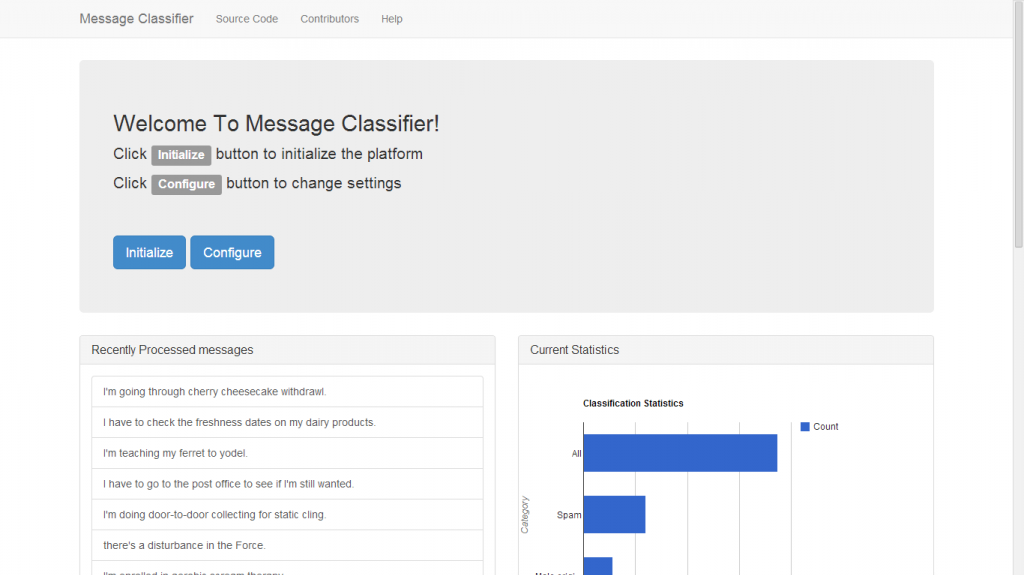
You can start the platform by clicking the initialize button to start the platform. To change the configuration click the configure button. In addition to that you can view the latest processed messages and statistics of the processed messages using the UI.

To send messages you can send http get requests as following URL : http://ip_address:9000/process/msg
In the configurations section you can dynamically add workers to the system. Initially system starts with only one worker and you can increase the number of workers using add workers button. Note that system has to be initialized to add workers. In addition to that you can change the following configurations.
-
Define a timeout until uClassify service reply comes (default value is 5 seconds)
-
Enabling/Disabling classifiers

You can download the application that act as client from http://s000.tinyupload.com/?file_id=03756234868339692381
The main ui of the client application is shown in the diagram.

-
For the "URL to send Get " text box the URL to send http get requests.
-
For the "text file path" text box enter the path of a folder containing message text files.
-
For the "frequency" text box enter the number of messages you want to send per second.
-
Then click start to start sending the requests. The application will read all the text files in the specified folder and send them ass http get requests to the specified URL.
-
If you want to stop click the stop button.
-
If you want to clear the list click the clear button.
This is a brief overview of how contribution to the project progressed so far:
-
Lasindu Vidana Pathiranage - Implementing master/worker scenario & message protocol
-
Prabhath Pathirana - Implementing Frontend, Main Controller & UI
-
Akila Iroshan - Design & Implementing Message Collector & Store
-
Jayamal De Vas Gunawardhana - Research and Implementing Supervising Strategy across the system
-
Manjula De Silva - Design Main Controller functionality, implementing system initializing phase & Researching about deployment
-
Shakya Senarathna - Implementing Java client for the system & Researching about deployment
-
Tishan Dahanayakage - Implementing backend of the system with Thrift services
-
Buddhima Wijeweera - Implementing Broadcasting, Message Classifying & classifier web-service connections