Tool for creating and editing haxball maps (.hbs). It let you use all new features added in latest HaxBall updates - HaxBall .hbs file wiki
Main page with canvas and all the tools you need to create a new map. If you want to load already existing map, click Text Mode button and upload the file.
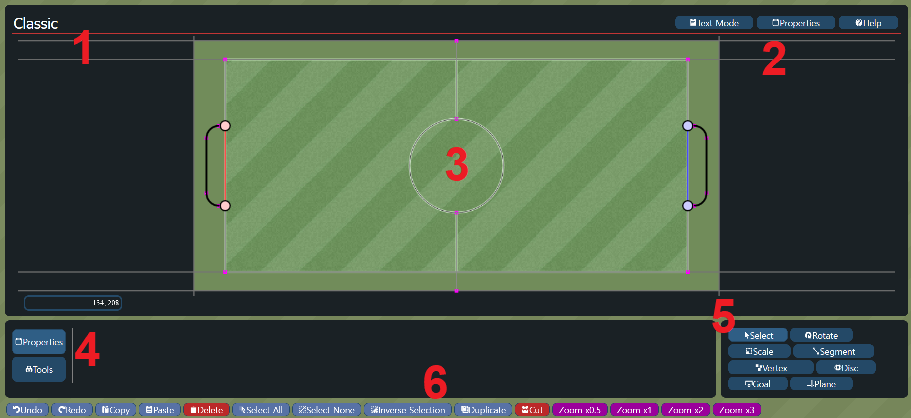
- 1 - Map name, click to edit
- 2 - Main tabs - Stadium Creator, Text Mode, Properties Tab and Help tab
- 3 - Canvas - everything you do with stadium will appear here
- 4 - Left tools:
- Properties - click on any element to change its properties
- Tools:
- SpawnPoints: you can create them by entering {x,y} coordinates and clickick "Add Red/Blue Spawnpoint". Buttons "Reset spawnpoints" will delete all spawnpoints for choosen team
- Joints - tab for creating joints (physical connections between two Discs). 2 discs have to be selected.
- Automatic Mirror - everything you create will be mirrored in both X and Y axis. Helpful when creating symmetric stadiums.
- Preview - look how your stadium will be displayed in Haxball game
- 5 - Right tools:
- Select - default one, click to select one object, or drag to select multiple elements (if they are fully marked by selection rectangle)
- Rotate - move rotation axis and drag to rotate selected objects
- Scale - move anchor point and drag to scale selected objects
- Segment - line (curved or straight) that connects two vertexes. Discs can collide with segments and they can also be used as decoration. If you start/stop close to existing vertexes, it will use them instead of creating new ones
- Vertex - the most basic element of stadium. Point which can collide with discs but cannot move and is not visible. Used to create segments and goal lines
- Disc - circular physical objects that are placed in the stadium, they can move and collide with other discs
- Goal - lines belonging to a team, when the ball crosses this line the opossite team scores a goal. Draw between two vertexes.
- Plane - collision objects that divide the map in two by an infinite line. They are useful for creating the boundaries of the stadium
- 6 - Bottom tools:
- Undo - delete your last change
- Redo - well, maybe you deleted it by accident
- Copy - copy selected object with all its properties
- Paste - paste copied object
- Delete - delete all selected objects
- Select All
- Select None
- Inverse Selection
- Duplicate - copy and paste all selected objects. They will be pasted in the exactly the same coordinates as parent elements.
- Cut - just like Copy, but delete seleced objects
- Zoom buttons - zoom out or zoom in
Text area, where you can directly change your stadium JSON file, download the .hbs file and upload existing stadium from your computer.
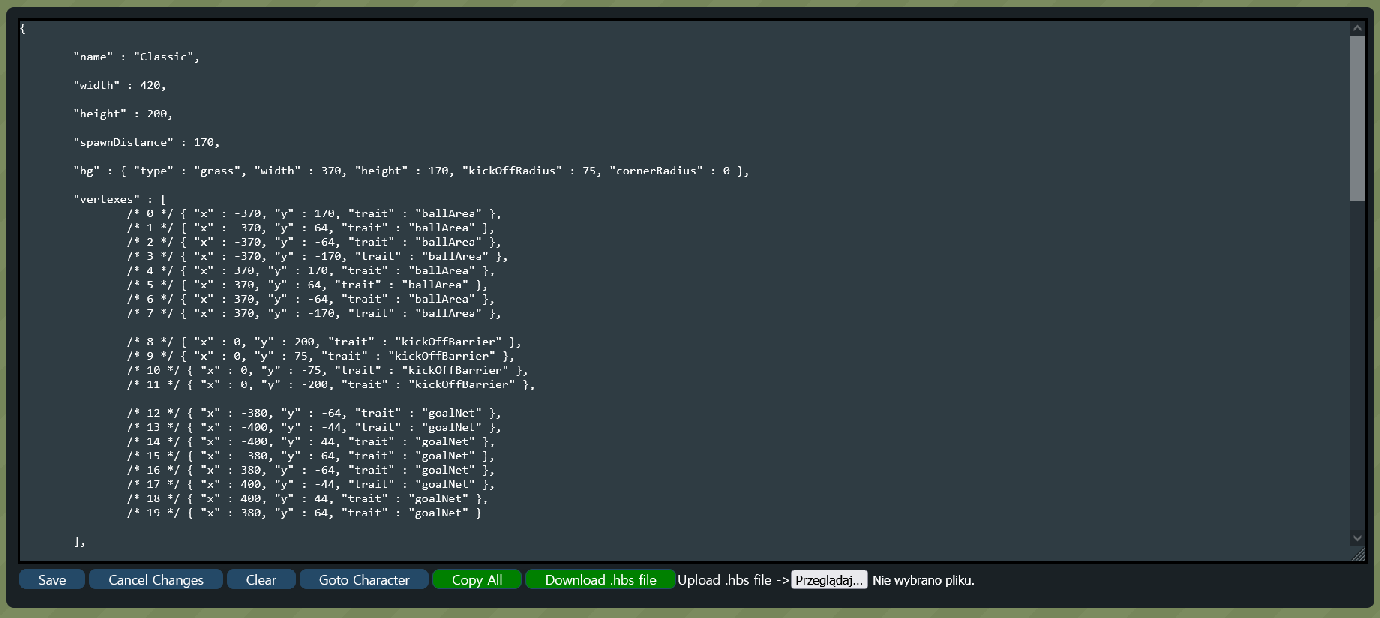
- Save - go back to Stadium Creator
- Cancel Changes - undo changes. Helpful when you edit some values, that cause an error to be displayed
- Clear - delete all the text and start from scratch
- Goto Character - this function is currently under development
- Copy All - copy all the text area
- Download .hbs file - your stadium is converted to .hbs file, so you can load it in Haxball
- Upload .hbs file - loads the existing stadium from your computer. You can find them at HaxMaps, Haxmods or in the sample stadiums folder
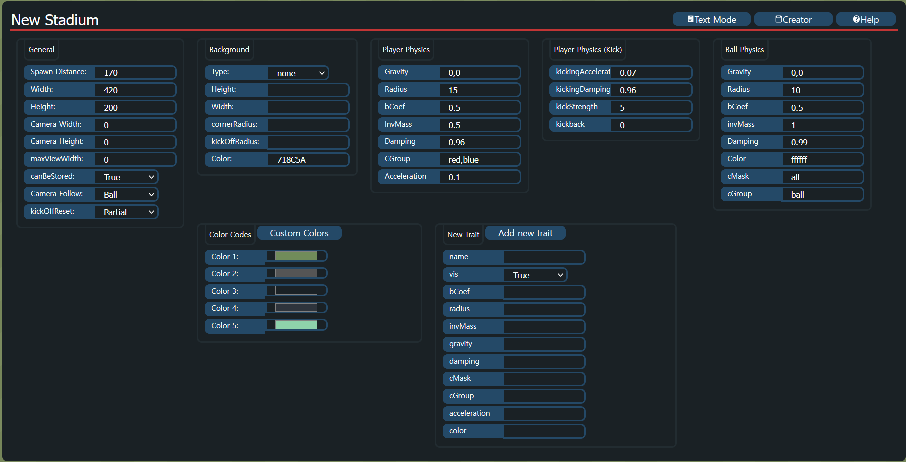
Modify your stadium just like you want. Every property has a built-in error checker, so if you enter a wrong value, it will switch back to previous one. Read more about the stadium properties on the .hbs file wiki page.
https://github.com/haxball-stadium-editor/haxball-stadium-editor.github.io/wiki - every important information about .hbs format
Features that I will be working on in the near future:
- uploading directly to Haxmaps.com
- increasing zooming capabilities
- extracting stadiums from .hbr recordings (but I'll limit it to those stadiums, that don't have the 'canBeStored' property set to false)
- loading basic haxball stadiums
- spawnpoints - to make them more visible and placeable