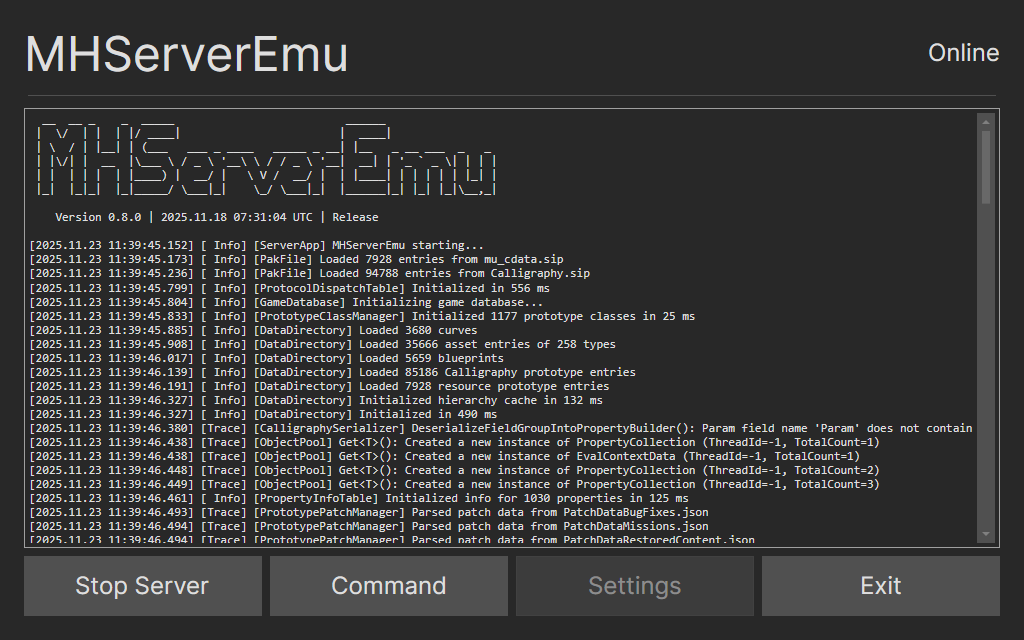
Graphical user interface implementation for MHServerEmu, powered by the Avalonia framework.
-
Launching MHServerEmu and tracking its status.
-
Command input with presets for important commands.
-
Server configuration with support for overriding
Config.iniwithout making changes to it. -
AOT publishing compatibility for fast startup.
-
Works natively on both Windows and Linux with touch screen support.
-
Designed with Steam Deck and other handheld PCs in mind, but can also be used on desktops.
-
Download the latest release here and extract it.
-
Create a new subdirectory named
MHServerEmuin the GUI directory if it does not already exist. -
Copy or move a build of MHServerEmu to the
MHServerEmusubdirectory. -
Run
MHServerEmu.Gui.Avalonia.exe(Windows) orMHServerEmu.Gui.Avalonia(Linux).
MHServerEmu.Gui is made with AOT publishing in mind. Here are the recommended commands for building it:
-
Windows:
dotnet publish -c Release -r win-x64 -p:PublishAot=true. -
Linux:
dotnet publish -c Release -r linux-x64 -p:PublishAot=true.
-
MHServerEmu.Gui does not contain a reverse proxy. You need to do one of the following in order to connect to the server:
-
Patch the client executable to enable authentication over port 8080.
- This option disables encryption of account credentials and should be used only for offline play.
-
When running the server on Linux without a reverse proxy, the
Addresssetting of theWebFrontendsection needs to be set to127.0.0.1instead oflocalhostfor it to be accessible to clients running under Wine/Proton on the same machine. -
When running the server on Linux, we recommend to use self-contained nightly builds of MHServerEmu.