



Plugin Header
Plugin URI: https://eacdoojigger.earthasylum.com/eacreadme/
Author: EarthAsylum Consulting
Stable tag: 1.5.1
Last Updated: 08-Aug-2025
Requires at least: 5.8
Tested up to: 6.8
Requires PHP: 7.4
Requires EAC: 3.0
Contributors: kevinburkholder
Donate link: https://github.com/sponsors/EarthAsylum
License: GPLv3 or later
License URI: https://www.gnu.org/licenses/gpl.html
Tags: readme, markdown, parsedown, {eac}Doojigger, code-highlighting, github, svn
WordPress URI: https://wordpress.org/plugins/eacreadme
GitHub URI: https://github.com/EarthAsylum/eacReadme
{eac}Readme loads and translates a WordPress markdown 'readme' file providing shortcodes and embedding URLs to access header lines and section blocks.
{eac}Readme is an {eac}Doojigger extension which loads and translates a WordPress markdown 'readme' file providing shortcodes and embedding URLs to access header lines and section blocks.
The first used shortcode must indicate the file to load...
[eacReadme file='/docfolder/readme.txt']        # file is relative to the WordPress document root folder
[eacReadme content='/contentfolder/readme.txt'] # content file is relative to the WordPress content folder (wp-content/)
[eacReadme plugin='/pluginfolder/readme.txt']   # plugin file is relative to the WordPress plugins folder (wp-content/plugins/)
[eacReadme theme='/themefolder/readme.txt']     # theme file is relative to the WordPress themes folder (wp-content/themes/)
[eacReadme wpsvn='/slugname/trunk/readme.txt']  # load file from WordPress SVN repository
[eacReadme github='/owner/repository/main/readme.txt']      # load file from a github repository
After which, headers and sections may be pulled from that file...
[eacReadme]All Headers[/eacReadme]              # parses all header lines
[eacReadme]headerName[/eacReadme]               # gets the value of the named header line

[eacReadme]All Sections[/eacReadme]             # parses all section blocks
[eacReadme]sectionName[/eacReadme]              # parses the content of the named section block
[eacReadme]sectionName/sub-section[/eacReadme]  # parses the content of the named sub-section within section block
One shortcode can do it all...
[eacReadme plugin='/pluginfolder/readme.txt']Document[/eacReadme] # loads the file and parses the entire document
Or load the entire file as a single code block...
[eacReadme theme='/themefolder/functions.php']Code File[/eacReadme]
Get header values...
[eacReadme]Contributors[/eacReadme]
[eacReadme]Donate link[/eacReadme]
[eacReadme]Requires at least[/eacReadme]
[eacReadme]Stable tag[/eacReadme]
Get unnamed segments...
[eacReadme]Title[/eacReadme]                    # gets the '=== plugin name ===' line (before headers)
[eacReadme]Short Description[/eacReadme]        # gets the short description (between headers and first section block)
Get section blocks...
[eacReadme]Description[/eacReadme]
[eacReadme]Installation[/eacReadme]
[eacReadme]Screenshots[/eacReadme]
[eacReadme]Changelog[/eacReadme]
Get multiple blocks and/or sub-sections...
[eacReadme plugin='/eacReadme/readme.txt']Short Description,Description[/eacReadme]
[eacReadme plugin='/eacReadme/readme.txt']Short Description,Description/Shortcode Examples[/eacReadme]
Get a file as a code block...
[eacReadme theme='/my-child-theme/functions.js' lang='js']Code File[/eacReadme]
[eacReadme theme='/my-child-theme/style.css' lang='css']Code File[/eacReadme]
Change the default cache time-to-live by adding to wp-config.php:
define('EAC_README_CACHE_LIFETIME',$seconds); # default: 1-day (DAY_IN_SECONDS).
Override the default cache time-to-live
[eacReadme ttl=$seconds ...] # minimum: 1-minute (MINUTE_IN_SECONDS).
Set the default GitHub access token (for private repositories):
define('GITHUB_ACCESS_TOKEN',$token);
Set/override the GitHub access token
[eacReadme token=$token ...]
Override option to parse markdown when retrieving a segment
[eacReadme parse='true|false' ...]
Set class='language-*' on code blocks
[eacReadme lang='php|js|css|html' ...]
Translate header/section names when retrieving All Headers, All Sections, or Document
[eacReadme translate='name=newname,...']
[eacReadme translate='Requires at least=Requires WordPress Version,Screenshots=Screen Shots']
Erase default translation table
[eacReadme translate='no|none|false']
Default translation table
[
    'Headers'               => 'Document Header',
    'Plugin URI'            => 'Homepage',
    'Stable tag'            => 'Current Version',
    'Requires at least'     => 'Requires WordPress Version',
    'Tested up to'          => 'Compatible up to',
    'Requires PHP'          => 'Requires PHP Version',
    'WC requires at least'  => 'Requires WooCommerce',
    'Requires EAC'          => 'Requires {eac}Doojigger',
    'Changelog'             => 'Change Log',
    'Screenshots'           => 'Screen Shots',
];
{eac}Readme can also be used to embed URLs in a WordPress Post or Page. Simply paste the url in the Embed URL block.
- Navigate to the post or page where the readme content is to be embedded.
- Click the '+' (Block Inserter) icon and search for "Embed" or type /embed.
- Select the "Embed" block.
- Paste the URL to the readme file into the provided field.
- Click the "Embed" button. WordPress will automatically display the unformatted content.

The shortcut to this is to simply paste the URL at the end of the page/post where it says "Type / to choose a block". WordPress will automatically convert your URL to an embed block.
Files can be embedded from your site, from the WordPress repository or from Github. Embedded URLs are transformed internally to the appropriate format.
From your site
https://<your_site_url>/plugins/<plugin_slug>/readme.txt
https://<your_site_url>/themes/<theme_name>/readme.txt
From the Wordpress Repository
https://ps.w.org/<plugin_slug>/readme.txt
https://plugins.svn.wordpress.org/<plugin_slug>/readme.txt
From a GitHub Repository
https://github.com/<owner>/<repository>/blob/main/readme.md
https://github.com/<owner>/<repository>/main/readme.md
To load only specific sections of the readme file, append a fragment to the url:
https://<your_site_url>/plugins/<plugin_slug>/readme.txt#allheaders
https://ps.w.org/<plugin_slug>/readme.txt#description
https://github.com/<owner>/<repository>/main/readme.md#screenshots
{eac}Readme expects a well-formed readme.txt file that follows the WordPress readme file standard...
=== title ===
header: value
header: value
short Description
== section ==
= sub-section =
...but supports some extensions to that standard:
-
Author & Author URI
Authorheader may be a simple name or a markdown link:[Author](Author URI).
- The
Author&Author URIheaders, if present, are combined as a markdown[Author](Author URI).
-
Homepage
- Looks for
HomepageorPlugin URI.
- Looks for
-
Version
- Looks for
VersionorStable tag.
- Looks for
-
Contributors
profileId- wordpress profile (standard)profileId@youremaildomain.com- gravatar profileprofileId@wordpress- wordpress profileprofileId@gravatar- gravatar profileprofileId@github- github profile[display name](mailto:email@address.com)or[display name](http://www.gravatar.com/profileId/)[display name](http://profiles.wordpress.org/profileId/)[your name]((http://your/profile/url)
-
A "banner" section may be included between the top title line and the first header line.
=== title ===
[](//link_url)
header: value
header: value
short Description
== section ==
= sub-section =
- The header block may be enclosed in an html
<header>or<details>tag, opening and closing each on a single line. These tags are ignored by the eacParseReadme parser but may be beneficial if posting your readme file elseware. See {eac}Readme on Github.
Note: these extensions are not supported by the WordPress Plugin Repository.
{eac}Readme supports standard markdown (readme.md) formatting for section identification.
=== title ===and## titleare equivalent== section ==and### sectionare equivalent= sub-section =and#### sub-sectionare equivalent
When retrieving the header block with ...
[eacReadme]All Headers[/eacReadme] or \eacParseReadme::getAllHeaders()
Or when retrieving all sections with ...
[eacReadme]All Sections[/eacReadme] or \eacParseReadme::getAllSections()
Or when retrieving the entire document with ...
[eacReadme]Document[/eacReadme] or \eacParseReadme::getDocument()
Additional html tags and classes are added, including wrapping blocks within a <details> tags, adding readme-* class names, and adding <a> anchor links.
3rd-party actors may load and use the parser class included in {eac}Readme...
    do_action('eacReadme_load_parser');     // loads \eacParseReadme static class
    if (class_exists('\eacParseReadme'))
    {
        \eacParseReadme::loadFile($readme,$context);
        $html_document  = \eacParseReadme::getDocument();
        $title          = \eacParseReadme::getTitle();
        $version        = \eacParseReadme::getVersion();
        $donations      = \eacParseReadme::getHeader('donate_link');
        $description    = \eacParseReadme::getSection('description');
    }
{eac}Doojigger Readme Extension is an extension plugin to and requires installation and registration of {eac}Doojigger.
This plugin is available from the WordPress Plugin Repository and can be installed from the WordPress Dashboard » Plugins » Add New page. Search for 'EarthAsylum', click the plugin's [Install] button and, once installed, click [Activate].
See Managing Plugins -> Automatic Plugin Installation
Installation of this plugin can be managed from the WordPress Dashboard » Plugins » Add New page. Click the [Upload Plugin] button, then select the eacreadme.zip file from your computer.
See Managing Plugins -> Upload via WordPress Admin
You can install the plugin manually by extracting the eacreadme.zip file and uploading the 'eacreadme' folder to the 'wp-content/plugins' folder on your WordPress server.
See Managing Plugins -> Manual Plugin Installation
Once installed and activated options for this extension will show in the 'General' tab of {eac}Doojigger settings.
-
Readme Extension
-
Readme Help

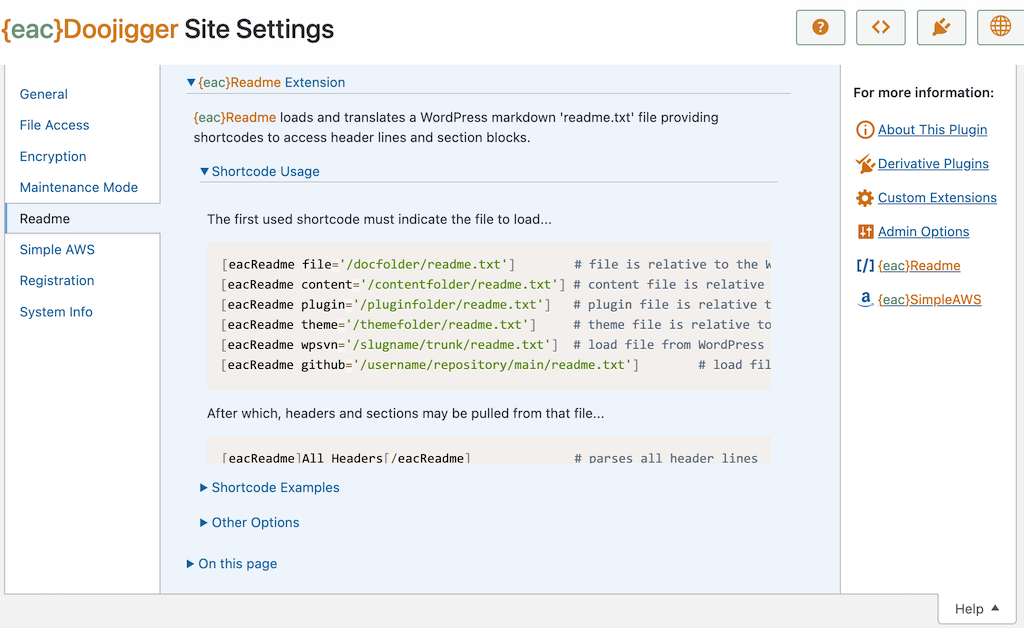
-
{eac}Readme is an extension plugin to and requires installation and registration of {eac}Doojigger.
-
{eac}Readme uses Parsedown 1.7.4, Copyright (c) 2013-2018 Emanuil Rusev
-
{eac}Readme uses Prism syntax highlighter, Copyright (c) 2012 Lea Verou
-
The {eac}SoftwareRegistry Software Product Taxonomy plugin uses {eac}Readme to parse readme markdown files hosted on Github to provide plugin information and automated updates to WordPress for self-hosted plugins.
This program is free software: you can redistribute it and/or modify it under the terms of the GNU General Public License as published by the Free Software Foundation, either version 3 of the License, or (at your option) any later version.
This program is distributed in the hope that it will be useful, but WITHOUT ANY WARRANTY; without even the implied warranty of MERCHANTABILITY or FITNESS FOR A PARTICULAR PURPOSE. See the GNU General Public License for more details.
You should receive a copy of the GNU General Public License along with this program. If not, see https://www.gnu.org/licenses/.