
WhatChord listens to live MIDI input and identifies the most musically plausible chord as you play. It is optimized for speed and accuracy, favoring stable, conventional interpretations over simple note-matching.
-
Real-time MIDI analysis
Connect a Bluetooth MIDI keyboard and see chords update instantly as you play. -
Musically informed chord detection
Goes beyond simple note-matching by ranking and resolving ambiguous interpretations using smart musical rules (e.g., inversions, extensions, upper structures, diatonic preference). -
Ambiguity-aware user interface
When multiple interpretations are plausible, WhatChord surfaces alternative candidates rather than hiding uncertainty. -
Context-aware spelling
Notes and chord symbols are spelled using the current key signature and the identified chord context, producing appropriate enharmonic spellings. -
Notation style preferences
Supports multiple chord symbol conventions (e.g., textual vs. symbolic), balancing readability with precision.
Here's WhatChord in action:
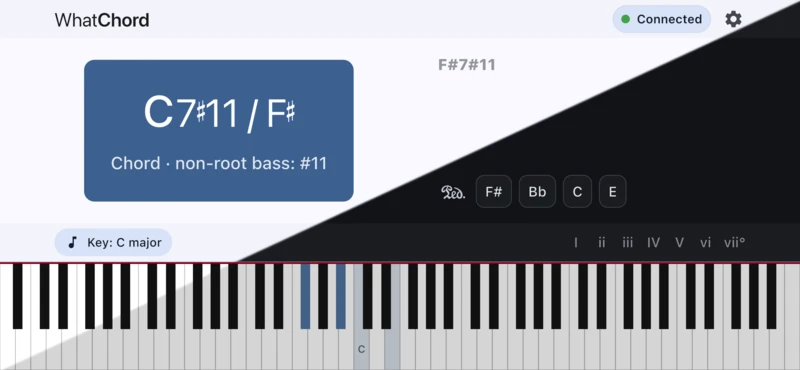
WhatChord is distributed as a signed Android APK (app package) and is not currently published on the Google Play Store. Installation is intended to be handled via a standard third-party updater workflow.
Obtanium allows you to securely track and install APK releases directly from GitHub while verifying developer signatures.
Workflow:
- Install Obtanium on your Android device.
- Add the WhatChord GitHub repository as an App source URL.
- Obtanium will automatically detect new releases and prompt you to update.
- Verify the APK signature against the published developer key (see below).
Automated, signed APK builds are published as GitHub Releases.
All official builds are signed with a consistent developer key. You are encouraged to verify the signing certificate fingerprint for this key using Obtanium's AppVerifier integration or Android's native tooling.
Signing Certificate Fingerprint (SHA-256)
com.earthmanmuons.whatchord
E8:21:56:94:BA:A2:E0:A3:48:E6:97:49:3E:8B:A9:92:94:93:5E:46:DD:17:03:2C:3C:67:F3:63:9F:A1:3E:F8
⚠️ Do not install builds whose signing key does not match the fingerprint published here.
WhatChord is particularly useful for:
- Pianists and keyboardists exploring harmony at the instrument
- Students learning chord construction, extensions, and inversions
- Educators demonstrating harmonic concepts in real time
- Composers and improvisers checking complex voicings
It provides immediate, intelligent feedback while you play. It is not intended to replace formal analysis tools or notation software, but to complement your practice and exploration.
WhatChord is under active development. The app is free to use, contains no advertisements, and does not collect or transmit any personal data. Scoring heuristics and user interface details may evolve as edge cases and real-world usage inform improvements.
If you believe a chord has been identified incorrectly, please open an issue on the GitHub repository. When possible, include the notes you played, the key signature, and the chord WhatChord reported versus the expected result. You can also long-press the chord identity card to access detailed analysis information. Sharing this data helps diagnose edge cases and improve the engine.
WhatChord is released under the Zero Clause BSD License (SPDX: 0BSD).
Copyright © 2025 Aaron Bull Schaefer and contributors