SecuriNET is a comprehensive network security application designed for Windows systems, providing robust monitoring, firewall management, and access control tools. Its intuitive interface allows both IT professionals and traditional users to maintain a secure environment while keeping track of network activity in real-time. SecuriNET is designed to be both user-friendly and powerful, helping users maintain control over their network security. Whether you’re securing a home network or monitoring multiple endpoints in a small business environment, SecuriNET provides the tools to stay informed, block threats, and maintain peace of mind.
Installation - FAQ - Documentation - Report a Bug


In order to use SecuriNET, you must create an account in the app (no email required). Account creation is performed via Cloudflare to ensure that access to the application’s security features is protected and you are secure.
1. Connection Monitoring
- Real-time monitoring of active TCP connections.
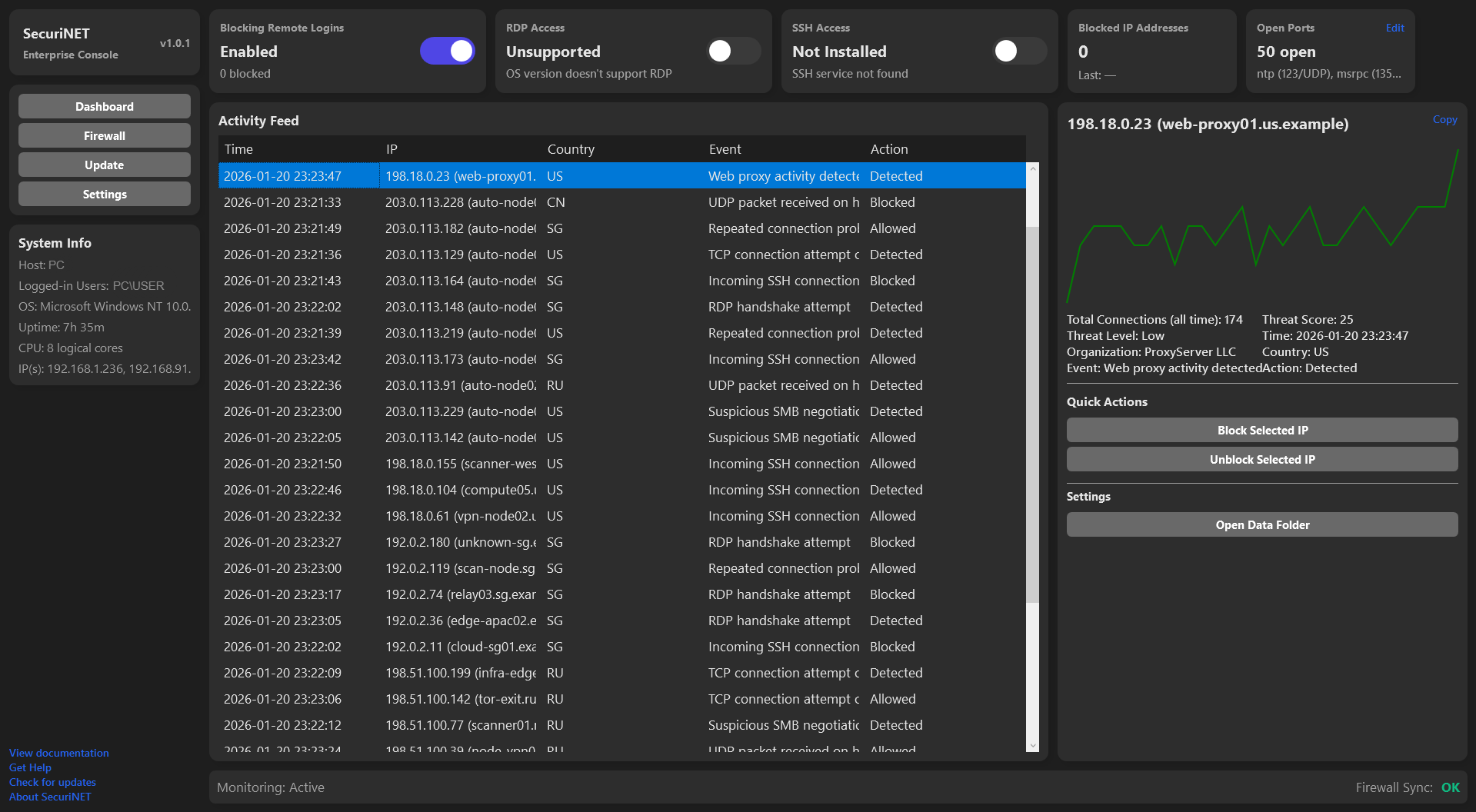
- Logs suspicious connection attempts, including source IP, country, and threat assessment.
- Automatically blocks malicious IPs based on configurable rules.
- Provides visual graphs of connection history and threat levels per IP.
2. Firewall Management
- View and manage inbound and outbound firewall rules for Domain, Private, and Public profiles.
- Create, edit, and delete custom firewall rules with ease.
- Export firewall rules to CSV for auditing or backup.
- Block or unblock IPs directly from the event log.
3. Port & Service Awareness
- Detects open TCP/UDP ports with service mapping.
- Displays a summary of active ports and connected endpoints.
- Allows custom configuration of port mappings for better visibility.
4. Remote Access Control
- Enable or disable RDP (Remote Desktop Protocol) and SSH services safely.
- Automatically adjusts firewall rules when toggling RDP/SSH.
- Provides quick status updates for remote access services.
- Allows remote Login-type connection blocking such as NTLM, RDP, and SSH.
5. System & Network Insights
- Displays system uptime, logged-in users, CPU cores, and local IP addresses.
- Dashboard tiles update dynamically to reflect real-time network and firewall stats.
6. Update Management
- Automatic update feature with configurable maintenance windows.
- Option to manually trigger updates at any time.
- Ensures the application stays up-to-date with minimal intervention.
7. Customizable Interface
- Dark mode and light mode toggle for user preference.
- 12-hour and 24-hour time format support.
- Clean, modern, and interactive dashboard for easy navigation between Firewall, Dashboard, Updates, and Settings.
8. Event Logging & Incident Response
- Maintains a history of suspicious events.
- Provides detailed IP information including organization, threat score, and total connections.
- Supports copying IP addresses directly from the interface for quick action.
Yes. SecuriNET is free to use, with all core security and monitoring features available at no cost.
SecuriNET currently supports Windows-based systems only.
Yes. Administrator privileges are required to manage firewall rules, monitor network activity, and control system-level services.
Yes. SecuriNET integrates directly with Windows Defender Firewall to create, manage, and remove firewall rules according to your preference.
Yes. When blocking is enabled, suspicious or malicious activity can be detected and blocked automatically.
Most operational data is stored locally on your system. Limited account verification data is securely processed via cloud services (Cloudflare) when required.
An account is required to ensure secure and authorized access to SecuriNET’s features and prevent misuse. All you need is to create a username and password.
Yes. SecuriNET allows you to enable or disable RDP and SSH directly from the application when supported by the system.
SecuriNET supports automatic updates, which can be configured within a user-defined maintenance window.
Please submit issues, bug reports, or feature requests via GitHub Issues in the project repository.
You can install SecuriNET using one of the following methods:
1. Download the latest release
- Download the latest release from Releases.
- Download the ZIP file for the latest version.
- Extract the ZIP and run
SecuriNET.exe.
Note: Administrator privileges are required for firewall and network operations.
2. Clone the repository with Git
git clone https://github.com/FreeCoderExperience/SecuriNET.git
cd SecuriNET
3. Download using cURL
curl -LO https://github.com/FreeCoderExperience/SecuriNET/archive/refs/heads/main.zip
unzip main.zip
cd SecuriNET-main
After extracting or cloning, run SecuriNET.exe as an administrator to enable all features.
For detailed instructions on how to use SecuriNET, including setup, configuration, and troubleshooting, please refer to the official documentation. All the information you need to get started and make the most of the application can be found here: Documentation↗.
For further questions, feedback, or support, please open an issue or discussion directly on the GitHub repository. The community and maintainers will be happy to assist.
We welcome contributions, including feedback, feature requests, and suggestions. Please share your input by submitting an issue or a pull request on the GitHub repository↗.
SecuriNET is currently released as proprietary free software. The source code is not open source.
Future versions may be released under a different license and may be made open source (if the community so wishes).
SecuriNET is provided “as is”, without warranty of any kind, express or implied.
The authors, contributors, and maintainers of SecuriNET assume no responsibility or liability for any actions taken by users of the application, nor for any damages, losses, or issues that may occur as a result of installing, running, or using the software. This includes, but is not limited to, direct, indirect, incidental, consequential, or special damages, whether arising from the behavior of the application itself or from user actions performed using the application.
By using SecuriNET, you agree that you will not hold SecuriNET, its authors, or its contributors liable, to the fullest extent permitted by applicable law, for any outcomes resulting from the use or misuse of the software.
While SecuriNET is a network security tool designed to help monitor network activity, manage firewall rules, log connections, and assist in preventing or mitigating certain types of attacks, it does not guarantee the security of any network, system, device, or environment. Security depends on many factors beyond the scope of this application, including system configuration, user behavior, and external threats.
Users are solely responsible for evaluating the suitability of SecuriNET for their specific use case and for implementing additional security measures as necessary.