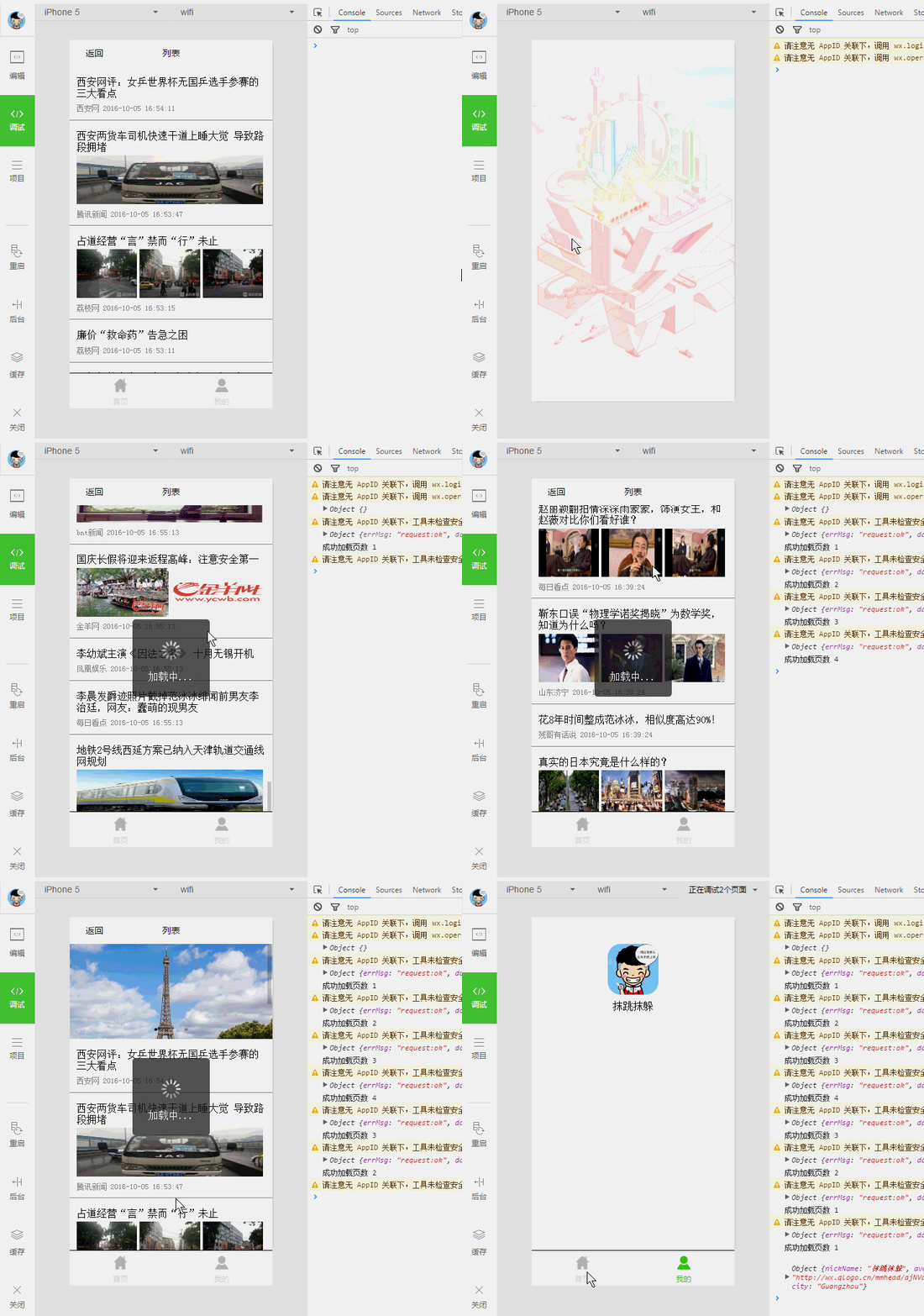
项目为仿今日头条,使用了百度ApiStore接口查询数据,使用微信组件/api有 封装请求方法,底部tab,启动页动画,loading,scroll-view,swiper,列表页支持上下拉加载更多
效果图:
-
启动欢迎页,几行代码可实现旋转与缩放:
//flash.js onReady:function(){ // 页面渲染完成 var that = this,duration = 1500; var animation = wx.createAnimation({ duration: duration, }); //step() 方法表示一组动画的结束 animation.scale(2).rotate(360).step(); animation.scale(1).step(); this.setData({ animationData : animation.export() }); var timestamp = new Date().getTime(); setTimeout(function(){ wx.redirectTo({ url: '../index/index?time='+timestamp }) },duration*2.5); }, //flash.wxml <image class="flash-img" animation="{{animationData}}" src="{{src}}" ></image> -
网络请求方法:
//app.js req: function(url,data,param){ var requestData = { url: url, data: typeof data == 'object' ? data : {}, method: typeof param.method == 'string' && param.method.length > 0 ? param.method.toUpperCase() : 'GET', header: typeof param.header == 'object' ? param.header : {}, success: function(res) { typeof param.success == 'function' && param.success(res); }, fail: function(res){ typeof param.fail == 'function' && param.fail(res); }, complete: function(res){ typeof param.complete == 'function' && param.complete(res); } }; wx.request(requestData); }, -
列表页:
  //index.js
  var app = getApp(),currentPage = 1;
  const URL = "http://apis.baidu.com/showapi_open_bus/channel_news/search_news";

  Page({
    data:{
      imgUrls: [
        'http://img02.tooopen.com/images/20150928/tooopen_sy_143912755726.jpg',
        'http://img06.tooopen.com/images/20160818/tooopen_sy_175866434296.jpg',
        'http://img06.tooopen.com/images/20160818/tooopen_sy_175833047715.jpg'
      ],
      toView: "",
      loadingHidden:true,
      renderData:[],
    },
    onLoad:function(options){
      this.loadDataFromServer();
    },
    //api读取数据
    loadDataFromServer: function(){
      var that = this;
      that.changeLoadingStatus(false);
      app.req(URL,{
        page : currentPage,
        needContent : 1,
      },{
        header: { apikey: app.globalData.apikey },
        success:function(resp){
          console.log(resp);
          console.log("成功加载页数 "+currentPage);
          var tempData = resp.data.showapi_res_body.pagebean.contentlist;
          var toViewId = currentPage % 2 == 0 ? "top-id" : "top-id2"; //需要改变值页面才会重新渲染
          that.setData({
             //renderData: that.data.renderData.concat(tempData),  合并数组容易超出长度,无法做到无限加载
             renderData: tempData,
             toView: toViewId,
          });
          that.changeLoadingStatus(true);
        }
      });

    },
    //加载上一页或者下拉刷新
    refresh:function(e){
        currentPage = currentPage > 1 ? --currentPage : 1;
        this.loadDataFromServer();
    },
    //加载下一页
    loadMore:function(e){
        ++currentPage;
        this.loadDataFromServer();
    },
    //改变loading状态
    changeLoadingStatus: function(bool){
      this.setData({
        loadingHidden: bool
      });
    },
    onReady:function(){
      // 页面渲染完成
      wx.setNavigationBarTitle({
        title: '列表'
      });
    },
  });
	//index.wxml
	<loading hidden="{{loadingHidden}}">
	    加载中...
	</loading>

	<scroll-view scroll-y="true" style="height: 100%;" scroll-into-view="{{toView}}" upper-threshold="5" lower-threshold="5" bindscrolltoupper="refresh" bindscrolltolower="loadMore">

	    <swiper indicator-dots="true" id="swiper-view" autoplay="true" interval="2000">
	        <block wx:for="{{imgUrls}}">
	            <swiper-item>
	                <image src="{{item}}" width="100%" height="150"/>
	            </swiper-item>
	        </block>
	    </swiper>

	    <view id="top-id"> </view>
	    <view id="top-id2"> </view>
	    <block wx:for="{{renderData}}">
	        <view class="container">
	            <view class="title">
	                <text class="title-text">{{item.title}}</text>
	            </view>

	            <view class="images"  wx:if="{{item.imageurls.length > 0}}">
	                <block wx:for="{{item.imageurls}}" wx:for-item="imgItem" wx:for-index="imgIndex">
	                    <image wx:if="{{imgIndex <= 2}}"  src="{{imgItem.url}}"></image>
	                </block>
	            </view>
	            <view class="source">{{item.source}}  {{item.pubDate}}</view>
	        </view>
	    </block>
	</scroll-view>
完!