Deterministic; Textfile based Package Manager. Primarily for Arch pacman or yay.
Install & remove packages using a user-friendly package list file.
# CORE
base linux linux-firmware
sudo make gcc
# GUI
sway swayidle swaylock dmenu
# APPS
xterm
firefox vlc
Packages are simply whitespace separated. # are comments.
: System
        base linux linux-firmware
        : GUI
                : Sway # Cuz sway is the best!
                        sway swayidle swaylock
                        xorg-xwayland
                        dmenu
                xorg-xrdb qt5ct
        xterm
        : Audio
                # Modern pipewire instead of pulseaudio!
                pipewire pipewire-alsa pipewire-pulse
                alsa-utils pavucontrol
                helvum easyeffects
        : Internet
                wpa_supplicant dhcpcd
        : Tools
                : Core
                        zip unzip wget
                        patch
                        sudo inotify-tools
                nano nano-syntax-highlighting
                : Dev
                        git make gcc
                        dmd dub clang
        : Pkgs
                yay-git
        fakeroot


: Media
        vlc mpv
        : Games
                steam

: Dev
        textadept vscode

: Terminal
        !xterm
        kitty

: Web
        firefox
        !chromium
        vivaldi
Lines which begin with : are groups. Groups are merely symbolic help in organizing the packages. Groups use tab indentation and are nestable.
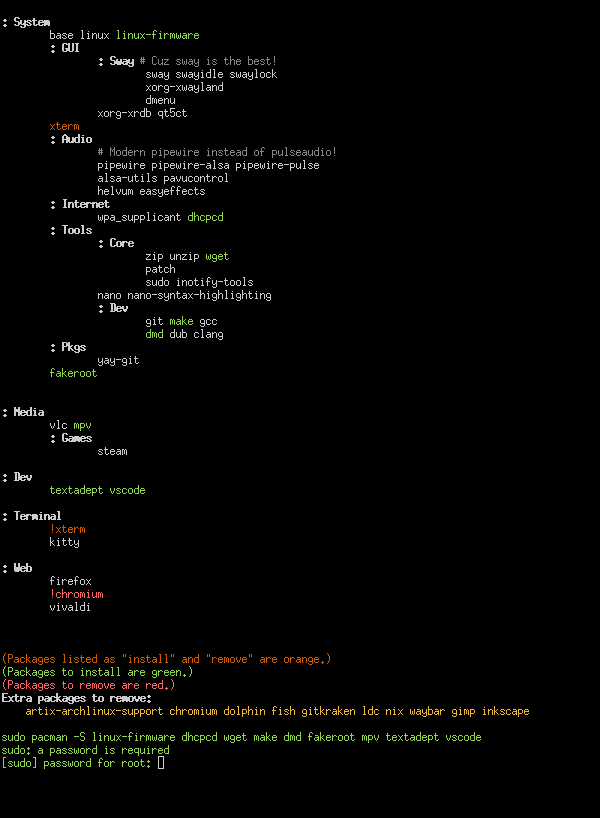
When running as a root daemon. Your install process is: sudo nano /etc/pacman.txt, add a package name, and save. Pactxtman will automagially install the added package. (todo: implement pactxtman -S [package(s)] which will add the packages to the end of pacman.txt to be organized later.)
When running as a daemon, saving the file will automagically trigger pactxtman to install missing packages.
Run as root: pactxtman --daemon --removeExtras. (todo: implement as a SystemD service!)
--daemon|-d tells pactxtman to watch the file for changes and run pacman with --noconfirm. --removeExtras|-e will have pactxtman remove installed packages which are not listed (The alternative is to explicitly mark for removal with !, for example !xterm|!chromium.).
When running as a root daemon pacman.txt should only have root write permitions!
Not tecnically a daemon... if you run pactxtman in a terminal, then anytime you edit pacman.txt you can go the that terminal to enter your password.
Run with pactxtman --daemon --file ~/.config/pactxtman/pactxtman.txt --pacman "sudo pacman --noconfirm (todo: When running as a user --file should default to ~/.config and pacman should use sudo by default.)
Whenever you change pacman.txt run pactxtman explicitly.
When pactxt man is executed or when pacman.txt changes (if -w) it runs its process.
- It gets a list of explicitly installed packages by running
pacman -Qe(Command can be configure with--query|-q.) - It parses the
pacman.txtfile (Configured with--file|-f.) - It calculates packages which should be installed or removed.
- It prints a the
pacman.txtwith colored highlighting of packages which need to be installed/removed. - It executes
pacman -S(oryay) for packages which need installed allowing pacman to request confirmation (unless running as a daemon or with--noconfirm). - It executes
pacman -Rfor packages which are marked explicitly for removal (!, see above). - It executes
pacman -Rfor packages which are installed but not listed (implicit removal). If running as a daemon it will skip this step unless--removeExtras|-eis specified. - If
--watch|-wor--daemon|-dit will watch for changes and repeat.
(Install & remove commands can be specified with --pacman|-m or --install|i and --remove|r.)
I am developing pactxtman because I wished to use it. I am already using it now on my computer. It should be noted that it is still in development and will have bugs, especially in areas I do not use directly myself. The "More Elaborate Example" above is very close to what I am using myself.
The project source is super small, abiding by the UNIX philosofy (do one thing, and do it well).
If you want to add a feature, have at it! Feel free to submit a pull request!
I hope to have an AUR package shortly.