


Sync GitHub Projects V2 with Markdown stories. Licensed under the MIT License.
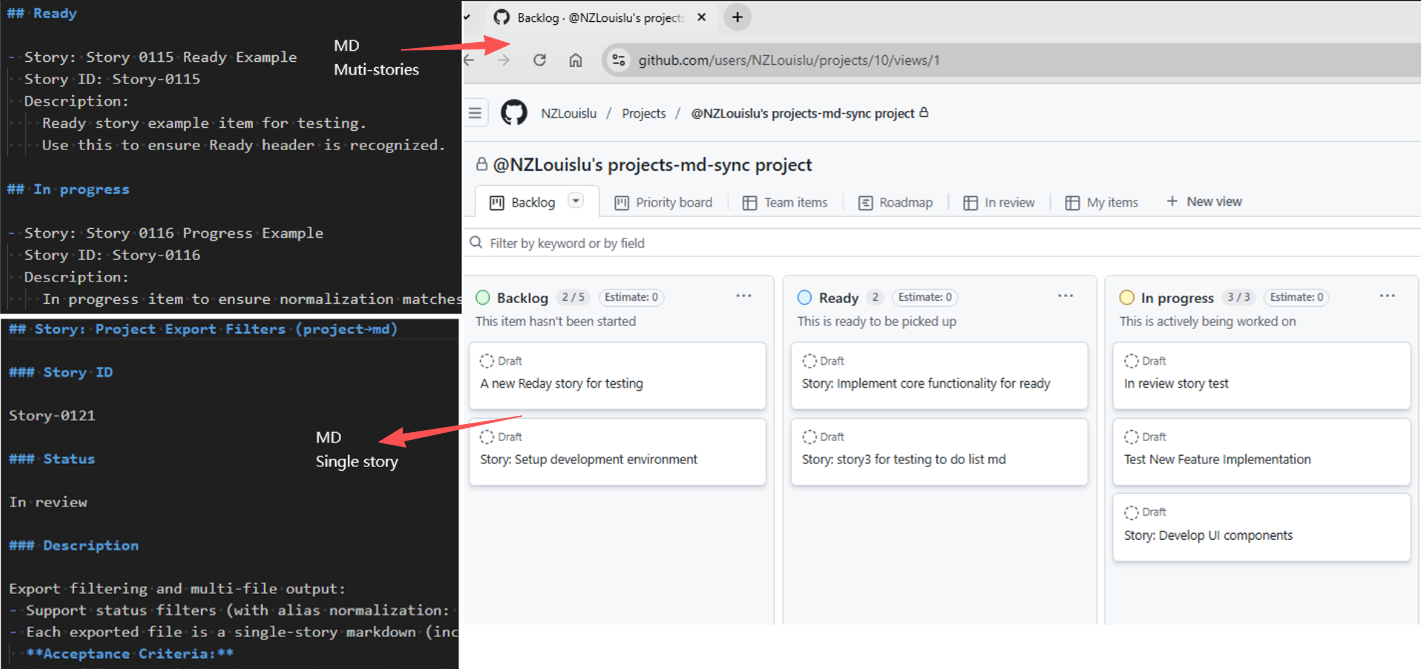
The latest release introduces a safer, clearer sync model:
- Single entry for md→project with create-only enforcement
- Separated formats: Multi-Story for import, Single-Story for export
- Dry-run diagnostics for CI and previewing plans
This tool synchronises Markdown documents and GitHub Projects (V2) so teams can manage work in text while keeping the project board current.
- Node.js 18 or newer
- Create-only import: Multi-Story Markdown → GitHub Project items by Story ID
- Read-only export: GitHub Project → Single-Story Markdown files
- Status mapping: Backlog, Ready, In progress, In review, Done (with aliases)
- Deterministic, idempotent behaviour keyed by Story ID
- Dry-run with structured logs for CI gates
- TypeScript API and runnable examples
- Install the package in a Node.js workspace:
npm install github-projects-md-sync- Create a
.envfile in the project root with credentials that can access GitHub Projects V2:
GITHUB_TOKEN=your_github_token
PROJECT_ID=your_project_id- Run the CLI commands or consume the TypeScript API as described below.
| Command | Purpose | Key options |
|---|---|---|
npm run md -- <path> |
Import Multi-Story Markdown into a project (create-only) | --dry-run to print the plan without calling the API |
npm run project [-- <Story-ID>] [<outputDir>] |
Export all stories or a single story into Markdown files | Positional Story-ID selects a single story, positional outputDir overrides the destination |
npm run project:story -- [Story-ID] [outputDir] |
Convenience wrapper for single-story export | Accepts Story-ID and outputDir as positional args or via --story, --output |
npx ts-node src/project-to-stories.ts [Story-ID] [outputDir] |
Low-level script that powers the exports | Requires PROJECT_ID and GITHUB_TOKEN env vars; positional arguments follow the same rules |
- Import Multi-Story Markdown to a GitHub Project (create-only):
npm run md -- stories/test-multi-stories-0.1.11.md- Optional dry-run plan: simulates the sync and prints the intended GitHub mutations without executing API writes:
npm run md -- stories/test-multi-stories-0.1.11.md --dry-run- Export GitHub Project items to Single-Story Markdown files:
npm run project
npm run project -- <Story-ID>import {
mdToProject,
projectToMdWithOptions,
projectToMdSingleStory
} from "github-projects-md-sync";
const projectId = process.env.PROJECT_ID!;
const githubToken = process.env.GITHUB_TOKEN!;
const mdResult = await mdToProject(projectId, githubToken, "./markdown-files");
const exportAllResult = await projectToMdWithOptions({
projectId,
githubToken,
outputPath: "./output-dir",
logLevel: "info"
});
const exportSingleResult = await projectToMdSingleStory(
projectId,
githubToken,
"Story-1234",
"./single-story"
);
mdResult.logs.forEach((entry) => {
console.log(`[${entry.level.toUpperCase()}] ${entry.message}`, ...entry.args);
});
if (!mdResult.result.success) {
console.error("Import run failed", mdResult.result.errors);
}
if (exportAllResult.result.success) {
console.log(`Exported ${exportAllResult.result.files.length} files to ${exportAllResult.result.outputDir}`);
} else {
console.error("Bulk export failed", exportAllResult.result.errors);
}
if (!exportSingleResult.result.success) {
console.error("Single story export failed", exportSingleResult.result.errors);
}The examples/ workspace demonstrates end-to-end usage with ready-made scripts:
examples/md-to-project.ts— imports markdown fromexamples/md/into a project.examples/project-to-md.ts— exports project items intoexamples/items/.examples/tests/— Mocha scenarios that validate the flows.
Sample package.json scripts (from examples/package.json):
{
  "scripts": {
    "md": "ts-node ./md-to-project.ts",
    "project": "ts-node ./project-to-md.ts",
    "project:story": "ts-node ./project-to-md.ts --story"
  }
}
Run them from the examples/ directory once .env is configured:
npm run md            # imports multi-story markdown from examples/md/
npm run project       # exports all stories to examples/items/
npm run project:story # exports a single story, prompting when IDs are missingnpm run project:story -- Story-1234- Prompts for GitHub token and project ID if env vars
GITHUB_TOKENandPROJECT_IDare not set - Generates markdown for the specified story ID under
stories/by default - Accepts
Story-XXXXvia positional arg or--story Story-XXXX - Overrides the output directory via positional path or
--output ./custom-dir
Parameter rules:
Story-IDpositional detection checks for values that match/^Story-/i. If omitted, all stories are exported.- The first remaining positional argument is treated as the output directory. Without it, files are written to
./stories. - Flags
--story=value/--output=valueare equivalent to their spaced counterparts.
Examples:
npm run project -- Story-0456
npm run project ./stories/out-story -- Story-0112
npm run project:story -- Story-0112 ./stories/single
npm run project:story -- --story Story-0112 --output ./stories/single- Create a new issue in your repository first
- Then go to Projects settings -> Manage access, your GitHub username should appear with Admin role
PowerShell to query PROJECT_ID:
$owner = "your_github_username"
$repo = "your_repo_name"
$token = "your_github_token_with_repo_and_projects_access"
$headers = @{
    Authorization = "Bearer $token"
    "User-Agent"  = "PowerShell"
    Accept        = "application/json"
}

$query = @"
{
  repository(owner: "$owner", name: "$repo") {
    projectsV2(first: 10) {
      nodes {
        __typename
        id
        title
      }
    }
  }
}
"@

$body = @{ query = $query } | ConvertTo-Json -Depth 5 -Compress

$response = Invoke-RestMethod `
    -Uri "https://api.github.com/graphql" `
    -Method POST `
    -Headers $headers `
    -Body $body `
    -ContentType "application/json"

$response.errors
$response.data.repository.projectsV2.nodes | Select-Object id, titleImport Multi-Story markdown files from a directory into a GitHub Project. Create-only and idempotent by Story ID.
- projectId: GitHub Project V2 ID
- githubToken: GitHub personal access token
- sourcePath: Path to directory containing markdown files
Export GitHub Project items to Single-Story markdown files. Defaults to writing into ./stories when no output path is provided.
- projectId: GitHub Project V2 ID
- githubToken: GitHub personal access token
- outputPath (optional): Output directory path. Defaults to './stories'
Two complementary formats are supported:
- Multi-Story files (for
mdToProject()import) - Single-Story files (for
projectToMd()export)
Sections represent status. Each story must include - Story:, story id:, and description:.
## Backlog

- Story: Setup development environment
  Story ID: Story-001
  Description:
    - Install required tools
    - Configure IDE
    - Setup version control

## Ready

- Story: Implement authentication
  Story ID: Story-002
  Description:
    - Design flows
    - Implement backend
    - Integrate frontend

## In review

- Story: Improve accessibility
  Story ID: Story-003
  Description:
    - Audit key screens
    - Fix critical issues
Rules:
- Allowed headings: Backlog, Ready, In progress, In review, Done
- Aliases:
To do → Ready,In Progress/in progress → In progress - Unrecognised headings map to Backlog
story idmust be unique; existing IDs in Project are skipped (no update, no delete)- Within a file, duplicate IDs: only the first entry is honoured; later duplicates are skipped
description:content is free-form Markdown and preserved verbatim
Each file contains exactly one story and includes a Story ID section.
## Story: Setup development environment

### Story ID

Story-001

### Status

In progress

### Description

- Install required tools
- Configure IDE
- Setup version control
This format is generated by export and must not be used for import.
mdToProject() normalises headings/status strings using the logic in src/markdown-to-project.ts:
| Input heading / status | Stored status |
|---|---|
Backlog |
Backlog |
Ready, To do, Todo |
Ready |
In progress, In Progress |
In Progress |
In review |
In review |
Done |
Done |
| Any other heading | Treated as Backlog |
- md→project (import)
- Input: Multi-Story files only
- Action: Create new items when
story iddoes not exist in Project; skip otherwise - No updates or deletes from Markdown
- project→md (export)
- Output: Multiple Single-Story files, each with
### Story ID - Read-only: do not feed these files back into import
- Output: Multiple Single-Story files, each with
- The importer is create-only. Updating or deleting existing project items must be done in GitHub Projects.
- Exporters overwrite files with the same name inside the target directory.
- All commands expect
PROJECT_IDandGITHUB_TOKENto be available; the GitHub token must allow Projects and repo read access. - Large exports/imports may trigger GitHub API rate limits. Use
--dry-runto validate before executing. story idmatching is case-insensitive, but duplicates in the same markdown file keep only the first occurrence.
- Matching uses Story ID only; titles never overwrite existing items
- If an item with the same ID exists in Project: skip
- Missing
story id: strictly skipped and logged with file name, start line, and title - Missing ID plus exact title match triggers an additional "Possible title duplicate" warning
Use dry-run to preview planned operations, with logs covering create plans, skip reasons, missing IDs, duplicates, and unknown keys. Ideal for CI gates and author feedback.
- Move from per-story import files to a Multi-Story import file
- Ensure each story has a unique
story id - Keep edits and deletions within GitHub Project; do not attempt to overwrite via Markdown
- Update scripts or automation to use the new CLI entry points
src/story-to-project-item.tsis deprecated as an import entry. Usesrc/markdown-to-project.tsvia the CLI or library.
name: MD Sync
on:
  push:
    paths:
      - examples/md/**/*.md
  workflow_dispatch:
jobs:
  sync:
    runs-on: ubuntu-latest
    steps:
      - uses: actions/checkout@v4
      - uses: actions/setup-node@v4
        with:
          node-version: 20
          cache: npm
      - run: npm ci
      - env:
          PROJECT_ID: ${{ secrets.PROJECT_ID }}
          GITHUB_TOKEN: ${{ secrets.GH_TOKEN }}
run: npx ts-node examples/md-to-project.tsname: Daily Project to MD
on:
schedule:
- cron: "0 16 * * *"
workflow_dispatch:
jobs:
export:
runs-on: ubuntu-latest
steps:
- uses: actions/checkout@v4
- uses: actions/setup-node@v4
with:
node-version: 20
cache: npm
- run: npm ci
- env:
PROJECT_ID: ${{ secrets.PROJECT_ID }}
GITHUB_TOKEN: ${{ secrets.GH_TOKEN }}
run: npx ts-node examples/project-to-md.ts examples/items- Requires Node.js 18+
- Runs in Node.js/server environments, not in the browser
If you encounter any problems during use, or have suggestions for improvement, feel free to contact me:
- 🌐 Personal Website: https://nzlouis.com
- 📝 Blog: https://blog.nzlouis.com
- 💼 LinkedIn: https://www.linkedin.com/in/ailouis
- 📧 Email: nzlouis.com@gmail.com
You are also welcome to submit feedback directly in GitHub Issues 🙌
If you find this tool helpful, please consider giving it a ⭐️ Star on GitHub to support the project, or connect with me on LinkedIn.