AI-powered meeting transcription with speaker diarization and intelligent summarization
Features • Quick Start • Usage • Documentation




A meeting transcription application that runs entirely offline. It converts speech to text, identifies different speakers (diarization), and generates intelligent summaries of discussions. Connect it to your local LLM server for customized summarization. Perfect for meetings, interviews, lectures, or any audio where you need a clear transcript and actionable insights.
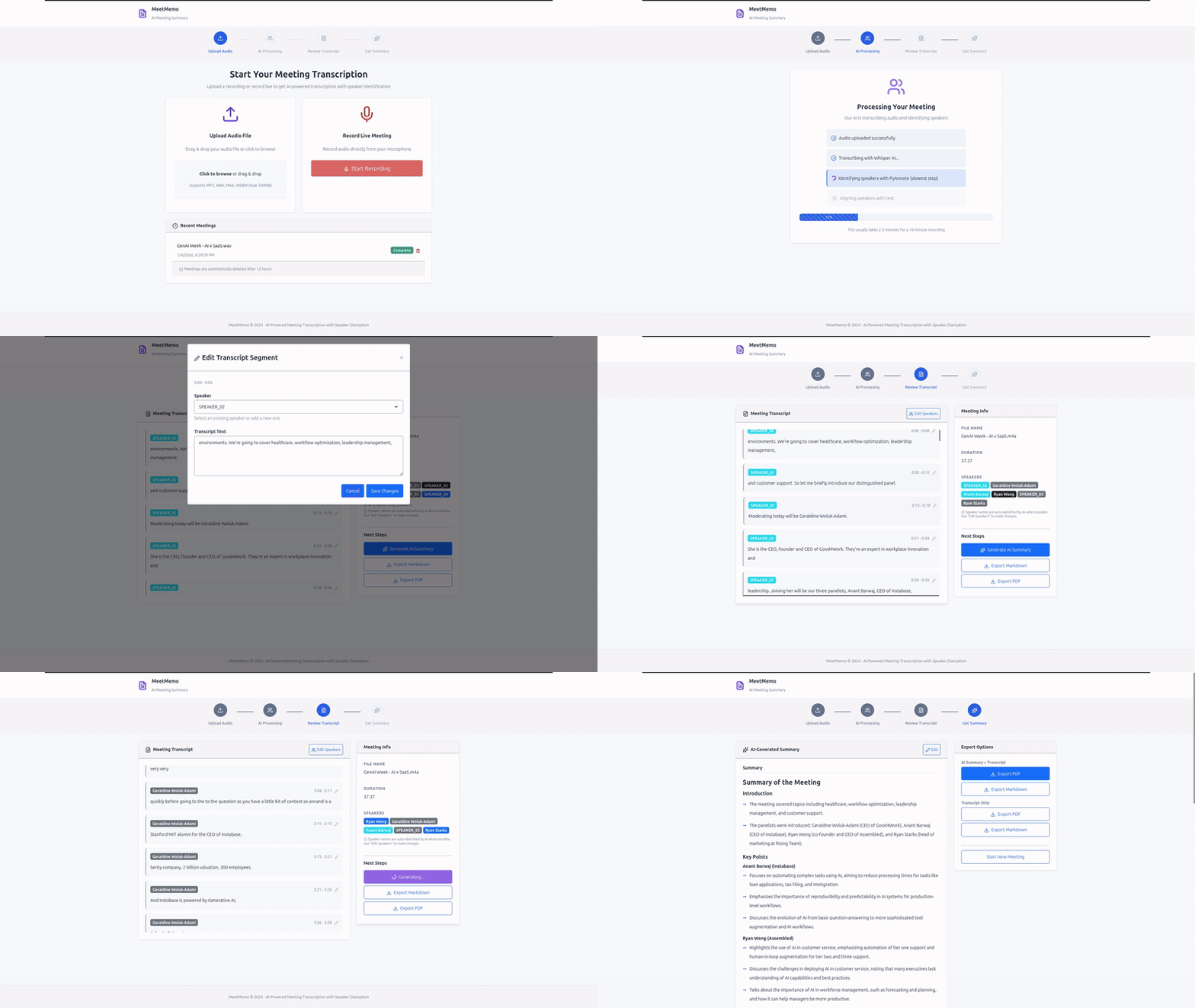
| Feature | Description |
|---|---|
| Audio Recording & Upload | Record meetings directly in browser or upload files (MP3, WAV, M4A, FLAC, WebM, OGG) |
| Speech Recognition | faster-whisper with CTranslate2 (4x speedup, 99+ languages) |
| Speaker Diarization | PyAnnote.audio 3.1 for automatic speaker identification and labeling |
| Audio Playback & Sync | Built-in audio player with transcript synchronization - click any segment to jump to that timestamp |
| AI Summarization | LLM-powered summaries with key points, action items, and insights |
| Real-time Progress | Live status updates and job management for long-running tasks |
| Speaker Management | Edit speaker names with persistent storage across sessions |
| Export Options | Professional PDF and Markdown exports for transcripts and summaries |
| Multi-language | Automatic language detection or specify target language |
| Software | Version | Purpose |
|---|---|---|
| Docker | Latest | Container runtime |
| Docker Compose | Latest | Multi-container orchestration |
| NVIDIA GPU | CUDA 12.1+ | ML model inference (optional, CPU fallback available) |
| LLM Server | Any OpenAI-compatible API | Summarization (e.g., LM Studio, Ollama, OpenAI) |
Minimum Hardware:
- GPU: 4GB VRAM (8GB+ recommended)
- RAM: 8GB (16GB+ recommended)
- Storage: 10GB (for models and data)
1. Clone and setup:
git clone https://github.com/NotYuSheng/MeetMemo.git
cd MeetMemo
cp example.env .env
2. Accept Hugging Face model licenses:
- Visit speaker-diarization-3.1 → Accept
- Visit segmentation-3.0 → Accept
- Create token at HF Tokens with Read access
3. Configure .env:
# Required
HF_TOKEN=hf_your_token_here
LLM_API_URL=http://localhost:1234
LLM_MODEL_NAME=qwen2.5-14b-instruct
LLM_API_KEY=

# Optional
POSTGRES_PASSWORD=changeme      # Change in production!
TIMEZONE_OFFSET=+8              # Your timezone
4. Start the application:
docker compose up -d5. Access MeetMemo:
Open https://localhost in your browser.
Note: You'll see a certificate warning (self-signed SSL). Click "Advanced" → "Proceed" - this is expected and required for microphone access.
graph LR
    A[Upload/Record Audio] --> B[Transcribe]
    B --> C[Review Transcript]
    C --> D[Edit Speaker Names]
    D --> E[Generate Summary]
    E --> F[Export PDF/Markdown]
- Upload or Record - Upload an audio file or record directly in browser (HTTPS required)
- Transcribe - Click "Start Transcription" to process with Whisper + PyAnnote
- Review - View diarized transcript with speaker labels and timestamps
- Playback - Use the audio player to listen while following along with highlighted transcript segments
- Customize - Click speaker names to rename them (persists across sessions)
- Summarize - Generate AI summary with key insights and action items
- Export - Download professional PDF or Markdown files
MP3, WAV, M4A, FLAC, WebM, OGG (max 100MB default)
| Component | Technology |
|---|---|
| Backend | FastAPI, Python 3.10+, Uvicorn, Pydantic Settings |
| Architecture | Layered architecture (API → Service → Repository → Database) |
| Frontend | React 19, Vite, Lucide Icons |
| Reverse Proxy | Nginx with SSL/TLS (self-signed certs included) |
| ML Models | faster-whisper with CTranslate2, PyAnnote.audio 3.1 |
| Database | PostgreSQL 16 with asyncpg |
| Containerization | Docker, Docker Compose, NVIDIA Container Toolkit |
| PDF Generation | ReportLab, svglib |
Comprehensive documentation is available in the docs/ directory:
| Document | Description |
|---|---|
| Architecture | System architecture, design patterns, data flow |
| API Reference | Complete REST API documentation with examples |
| Configuration | Environment variables, model selection, settings |
| Database | Schema, queries, backup/restore, maintenance |
| Deployment | Production deployment with HTTPS options |
| Development | Developer guide for contributing |
| Troubleshooting | Common issues and solutions |
# All services
docker compose logs -f

# Specific service
docker compose logs -f meetmemo-backend# Restart all
docker compose restart
# Restart backend only
docker compose restart meetmemo-backend# Backup database
docker exec meetmemo-postgres pg_dump -U meetmemo meetmemo > backup.sql
# Backup all volumes
sudo tar -czf meetmemo_backup.tar.gz /var/lib/docker/volumes/meetmemo_*docker exec -it meetmemo-postgres psql -U meetmemo meetmemoMeetMemo includes HTTPS with self-signed certificates out of the box. For production:
- Internal/Development: Use built-in self-signed certs (works immediately)
- Production: Replace with real certificates or use Cloudflare Tunnel
See Deployment Guide for detailed instructions.
- Local Processing: Transcription runs entirely on your server
- Data Privacy: Audio never leaves your infrastructure (except LLM summarization)
- HTTPS: SSL/TLS enabled by default
- Database: PostgreSQL not exposed outside Docker network
- No Authentication: Add auth layer for multi-user deployments
- GPU Acceleration: Automatic CUDA support for faster processing
- Model Caching: ML models loaded once at startup
- Async I/O: All operations use async/await for concurrency
- Background Cleanup: Automatic cleanup of old jobs and exports
Having issues? Check the Troubleshooting Guide for solutions to:
- Microphone/recording not working
- GPU not detected
- Model download failures
- Container startup issues
- Performance problems
Contributions are welcome! Please see Development Guide for:
- Development setup
- Code structure
- Testing guidelines
- Commit conventions
The sample-files/ directory contains example outputs:
- Sample audio files (MP3, WAV)
- Generated transcripts (PDF, Markdown)
- AI summaries with action items
- Application demo GIFs
If you find MeetMemo useful, consider giving it a star! ⭐
This project is licensed under the MIT License. See LICENSE for details.