
Pack Smart is an application that allows uers to fill out a short survey about an upcoming trip and then provides a list of items to bring broken down into various categories. Users can then edit and save their packing lists.
- Project Description
- Setup Instructions
- Runing the tests
- Learning Goals
- Functionality
- Programming Languages Used
- Key Takeaways
- Next Steps
- Contributors
- Acknowledgements
Description...Coming Soon!
- Project Brief and Rubric
- [Deployed Github Page...Coming Soon!]
These instructions will get you a copy of the project up and running on your local machine for development and testing purposes. This app is built with Python using a PostgreSQL database, so please make sure you have those installed. You can download Python here, and make sure to download version 3.9.1. You may also want to download the venv module which provides support for creating lightweight virtual environments.
python3 -m venv ./venv will download the venv module, and if you have a xcrun: error: invalid active developer path error you can run this command: xcode-select --install.
You can follow directions via the Setup documentation, and please see below for some helpful commands if you run into any errors.
- Clone down this repository to your local machine:
git clone git@github.com:Pack-Smart/pack-smart-be.git - Change into the directory:
cd pack-smart-be - Activate the virtual environment:
source venv/bin/activate - Install requirements:
pip3 install -r requirements.txt - Create the database:
createdb pack_smart_dev - Set the database URL:
export DATABASE_URL=postgresql://localhost:5432/pack_smart_dev - Upgrade the database:
python3 manage.py db upgrade - Create the test database:
createdb pack_smart_test - Install a tool to help import csv file:
pip3 install psycopg2-binary - Seed the database:
python3 manage.py db_seed - Spin up the local server:
python3 run.py - In Postman, create a new request by clicking
New,Request - Enter your request URL endpoint - it is most likely
http://127.0.0.1:5000/api/v1/list/new - In
Body, set torawandJSON - Data structure should be in the following format:
{
  data: {
    id: 0,
    type: 'survey',
    attributes: {
      gender: ['All', quizData.gender],
      weather: ['All', ...modifyWeatherData],
      tripDetails: {
        title: quizData.name,
        destination: quizData.destination,
        duration: quizData.duration,
      },
      categories: [
        'Accessories',
        'Clothing',
        'Essentials',
        'Toiletries',
        'Misc.',
        ...quizData.categories
      ]
    }
  }
}
To shut off your virtual environment, run deactivate.
Note: This project was created using a starter repo. Please check it out for more details and context about the setup.
Learning Goals...Coming Soon!
This API will return data broken down into categories that are specified in the call from the frontend.
/api/v1/list/new
An example of a call from the frontend might look like:
{
   "data": {
     "id": null,
     "type": "survey",
     "attributes": {
        "gender": ["All"],
        "weather": ["All", "%hot%"],
        "destination": "Miami",
        "tripDetails": {
            "title": "Night life",
            "destination": "Vice city",
            "number_of_days": "7"
          },
        "number_of_days": "7",
        "categories": ["Clothing", "Accessories"]
      }
   }
 }
The response may look like:
{
    "data": {
        "attributes": {
            "categories": {
                "Accessories": [
                    {
                        "is_checked": false,
                        "item_id": 1,
                        "name": "Belts",
                        "quantity": 0
                    },
                    {
                        "is_checked": false,
                        "item_id": 3,
                        "name": "Hats",
                        "quantity": 0
                    }
                ],
                "Clothing": [
                    {
                        "is_checked": false,
                        "item_id": 131,
                        "name": "Work Out Tops",
                        "quantity": 0
                    },
                    {
                        "is_checked": false,
                        "item_id": 132,
                        "name": "Work Out Undergarments",
                        "quantity": 0
                    }
                ]
            },
            "tripDetails": {
                "destination": "Vice city",
                "number_of_days": "7",
                "title": "Night life"
            }
        },
        "id": "202103-0219-3915-f3b87005-78f1-468e-9005-865f56576f3f",
        "type": "Survey_Results"
    }
}
/api/v1/packing_lists/new
An example of a call from the frontend might look like:
{
  "data": {
      "userID": 1,
      "tripDetails": {
          "title": "Mars",
          "destination": "Mars",
          "duration": 2
      },
      "items": [
          {
              "is_checked": true,
              "item_id": 1,
              "quantity": 100
          },
          {
              "is_checked": false,
              "item_id": 2,
              "quantity": 100
          }
      ]
  }
}
The response may look like:
{
    "data": {
        "listId": 3,
        "message": "Packing List Saved!",
        "status_code": 200
    }
}
/api/v1/users/<user_id>/packing_lists
The response may look like:
{
  "data": {
      "attributes": {
          "PackingLists": [
              {
                  "destination": "Mars",
                  "duration": 2,
                  "list_id": 3,
                  "title": "Mars"
              }
          ]
      },
      "id": "202103-0220-2819-98d6a11b-9a9e-4eb8-b991-bf4e66fb2288",
      "type": "Packing_Lists"
  }
}
/api/v1/packing_lists/<packing_list_id>
To Get a Item list the response may look like:
{
    "data": {
        "attributes": {
            "categories": {
                "Accessories": [
                    {
                        "id": 1,
                        "is_checked": true,
                        "item_id": 1,
                        "name": "Belts",
                        "quantity": 100
                    },
                    {
                        "id": 2,
                        "is_checked": false,
                        "item_id": 2,
                        "name": "Gloves",
                        "quantity": 100
                    }
                ]
            },
            "tripDetails": {
                "destination": "Mars",
                "duration": 2,
                "listId": 3,
                "title": "Mars"
            }
        },
        "id": "202103-0220-3329-dcd6f36f-7f6b-456e-9f0c-134631e8c732",
        "type": "Item_List"
    }
}
To Update a Packing List
An example of a call from the frontend might look like:
{
    "title": "To Jupiter",
    "duration": 4,
    "destination": "Jupiter"
}
The response may look like this:
{
    "list_id": 3,
    "title": "To Jupiter",
    "duration": 4,
    "destination": "Jupiter"
}
To Delete a Packing List
The response may look like this:
{
    "success": "Packing list has been deleted"
}
/api/v1/item_list/update
To Update a Item List
An example of a call from the frontend might look like:
Updating a Bulk of Items
{
      "data": {
        "item": [
          {
            "id": self.custom_item.id,
            "is_checked": True,
            "quantity": 32,
            "category": "something"
          },
          {
            "id": self.item_list_1.id,
            "is_checked": True,
            "quantity": 16
          }
        ]
      }
    }
Updating a Single Item
self.single_item_payload_custom = {
      "data": {
        "item": [
          {
            "id": self.custom_item.id,
            "is_checked": True,
            "quantity": 32,
            "category": "something"
          }
        ]
      }
    }
The Response for Both may look like:
{
    "success": "Items have been updated"
}

{
    "success": "Item has been updated"
}
For Deleting a Item
The response may look like:
{
    "success": "Packing list item has been deleted"
}
/api/v1/custom_item/new
Creating a Custom Item
An example of a call from the frontend might look like:
{
    "data": {
        "type": "custom item",
        "attributes": {
            "item": "PS5",
            "quantity": 1,
            "category": "video games",
            "packing_list_id": 1
        }
     }
}
The response may look like:
{
    "message": "Custom Item Saved!",
    "status_code": 200
}
-
Python3 3.9
-
Flask
Wireframes created using Excalidraw.
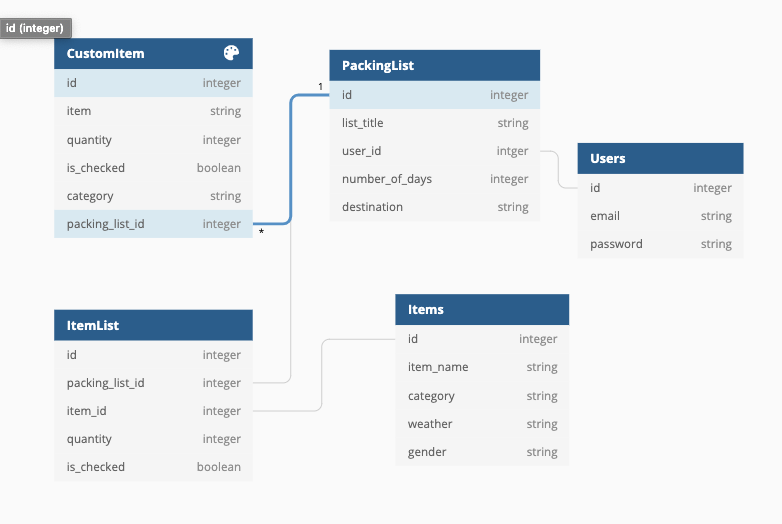
Database schema:
- Working with Flask
- Learning SQLAlchemy
- Learning Python Syntax
- Testing
- Complete MVP
- Complete at least one Extension
- Connecting FE with BE
- Great Communication
- Exposed new Technologies
- Fully implement a User
- Use the Weather API
- Will Mitchell - Project Manager
- Ian Douglas - flask-restful-travis-heroku Starter Repo