

-blue)
-blue)
Real-time novel view synthesis (NVS) and depth estimation are pivotal for immersive applications, particularly in augmented telepresence. While state-of-the-art monocular depth estimation methods could be employed to predict depth maps for novel views, their independent processing of novel views often leads to temporal inconsistencies, such as flickering artifacts in depth maps. To address this, we present a unified multimodal framework that generates both novel view images and their corresponding depth maps, ensuring geometric and visual consistency.
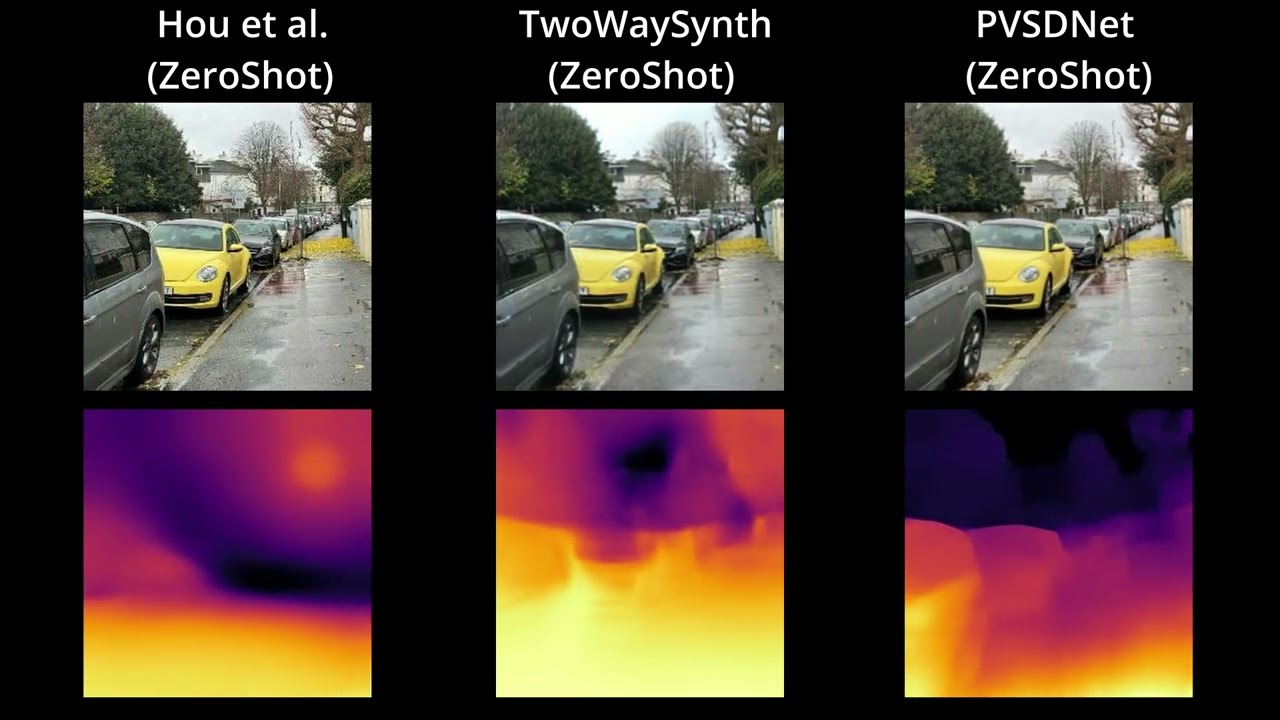
-
Clone the repo and navigate into the directory
git clone https://github.com/Realistic3D-MIUN/PVSDNet.git cd PVSDNet -
Install the basic libraries using
pip install -r requirements.txt
-
Download Checkpoints and place them into
./checkpoint/directoryModel Type Size Checkpoint Resolution PVSDNet Novel View+Depth 1.54 GB Download 256x256 PVSDNet-Lite Novel View+Depth 755 MB Download 256x256 PVSDNet-Depth-Only Zero-Shot Depth Estimation 1.11 GB Download Variable (upto 2048+) PVSDNet-Depth-Only-Lite Zero-Shot Depth Estimation 279 MB Download Variable (upto 2048+)
This model predicts both the novel view and the depth map for the novel view simultaneously.
Run the Gradio app to visualize the results in a web interface. You can generate videos with "Circle" or "Swing" trajectories.
python app_pvsdnet.pyThe app will look like this:

Run the mouse control script to interactively explore the view and depth synthesis.
- Arguments:
--model_type: Choose betweenpvsdnet(default) andpvsdnet_lite.--input_image: Path to the input image (default:./samples/16.jpeg).
# For Standard Model
python renderViewAndDepthWithMouseControl.py --input_image ./samples/PVSDNet_Samples/person.jpeg

# For Lite Model
python renderViewAndDepthWithMouseControl.py --model_type pvsdnet_lite --input_image ./samples/PVSDNet_Samples/person.jpegFor maximum performance, you can use TensorRT.
-
Build the Engine: First, build the TensorRT engines for both standard and lite models.
python build_trt_pvsdnet.py
This will save engines in
./TRT_Engine/pvsdnet/. -
Run Inference: Run the TensorRT-optimized interactive script.
# For Standard Model
python renderViewAndDepthWithMouseControlTensorRT.py --model_type pvsdnet --input_image ./samples/PVSDNet_Samples/person.jpeg

# For Lite Model
python renderViewAndDepthWithMouseControlTensorRT.py --model_type pvsdnet_lite --input_image ./samples/PVSDNet_Samples/person.jpeg
Generate a video traversing a circular path around the object.
python genCircularVideo.py --model_type pvsdnet --input_image ./samples/PVSDNet_Samples/person.jpeg --output_file my_video.mp4This model is a variant of the original PVSDNet model, where we only predict depth and not the target views. The model core is similar except the rendering network and the positional encoding are removed, hence model can be queried for variable set of resolutions.
Run the Gradio app for Zero-Shot Depth Estimation with multi-resolution fusion.
python app_depth.pyThe app will look like this:

Visualize depth prediction on a single image.
python renderDepthWithMouseControl.py --input_image ./samples/Wild/plant.jpegYou need to setup your own TRT Engine for this purpose.
-
Make sure you modify the
depth_only_parameters.pyto set resolution you need if different from default. -
Create the engine directory (if not exists)
mkdir TRT_Engine
-
Run
build_trt_depth_models.pyto convert the normal pytorch models into onnx, and build TRT engine.python build_trt_depth_models.py
The build script will save the built engines in
./TRT_Enginedirectory. -
Run
renderDepthWithMouseControlTensorRT.pyto estimate depth maps at max FPS.# Standard Model python renderDepthWithMouseControlTensorRT.py --model_type regular --input_image ./samples/Wild/plant.jpeg # Lite Model python renderDepthWithMouseControlTensorRT.py --model_type lite --input_image ./samples/Wild/plant.jpeg
We run the scripts inside the depth_dataset_predictor directory. There are two sample images for each dataset to test the code.
- First we build the TRT engine for each dataset as we use multi-resolution fusion.
python depth_dataset_predictor/build_trt_<dataset_name>.py
- Then we run the prediction script
python depth_dataset_predictor/predict_<dataset_name>_TensorRT.py
| Dataset | Step 1 (Build Engine) | Step 2 (Predict) |
|---|---|---|
| ETH3D | python depth_dataset_predictor/build_trt_ETH3D.py |
python depth_dataset_predictor/predict_ETH3D_TensorRT.py |
| Sintel | python depth_dataset_predictor/build_trt_Sintel.py |
python depth_dataset_predictor/predict_Sintel_TensorRT.py |
| KITTI | python depth_dataset_predictor/build_trt_KITTI.py |
python depth_dataset_predictor/predict_KITTI_TensorRT.py |
| DIODE | python depth_dataset_predictor/build_trt_DIODE.py |
python depth_dataset_predictor/predict_DIODE_TensorRT.py |
| NYU | python depth_dataset_predictor/build_trt_NYU.py |
python depth_dataset_predictor/predict_NYU_TensorRT.py |
Similar to datasets, we can use the multi-resolution fusion to predict on 1080p In-The-Wild Images/Videos.
- First we build the trt engine
python depth_in_wild_predictor/build_trt_1080p.py
- For Images:
python depth_in_wild_predictor/predict_1080p_TensorRT.py
- For Videos:
python depth_in_wild_predictor/predict_video_1080p_TensorRT.py
- For any other resolutions, you can modify the resolutions in these above scripts to suit your needs. We have kept the default resolution as 1080p for this example.
- We recommend 3-6 resolutions for best results, but you can use 1-2 smaller resolutions if working with low resolution images/videos since receptive field of the network can handle that without any issues.