
Kassets is an implementation of Scriptable Object Architecture. Scriptable Object Architecture provides a clean and decoupled code architecture. It is implemented based on Ryan Hipple's talk at Unite Austin 2017.
Though Kassets can function independently, it was originally developed to extend the functionality of the libraries UniRx and UniTask into the Scriptable Object Architecture. Therefore, it is recommended for enhanced functionality to use Kassets in conjunction with either or both the UniRx and UniTask. To do so, simply import any or both of these libraries along with Kassets.
Note
From v2.7.0, Kassets also supports R3 as an alternative to UniRx. Being marked as public archive, UniRx is now considered obsolete. Hence, all functionality of UniRx is now being forwarded to R3.
R3 The new future of dotnet/reactive and UniRx.
UniRx is a Reactive Extensions for Unity.
UniTask provides an efficient allocation free async/await integration to Unity.
- Unity 2021.3+
- Note that this GitHub project cannot be opened directly in Unity Editor. See Installation for cloning.
For further details, see Documentation
Add from OpenUPM | Import via scoped registry. Update from Package Manager.
To add OpenUPM to your project:
- open
Edit/Project Settings/Package Manager - add a new Scoped Registry:
Name: OpenUPM
URL:  https://package.openupm.com/
Scope(s):
  - com.kadinche
  - com.cysharp.r3 (optional)
  - com.cysharp.unitask (optional)
- click Save
- open Package Manager
- Select
My Registriesin top left dropdown - Select
Kassetsand clickInstall - Select
R3and clickInstall(Optional) (see: Note) - Select
UniTaskand clickInstall(Optional)
[!NOTE] Installation for R3 requires dependency imports from NuGet. See R3 Unity Installation for further detail.
Add from GitHub | Use github link to import. Update from Package Manager on Unity 2021.2 or later.
The package can be added directly from GitHub on Unity 2019.4 and later versions. To update to the main branch, use the Package Manager in Unity 2021.2 or later. Otherwise, you need to update manually by removing and then adding back the package.
- Open the Package Manager
- Click the
+icon - Select the
Add from Git URLoption - Paste the following URL:
https://github.com/kadinche/Kassets.git - Click
Add
To install a specific version, you can refer to Kassets' release tags.
For example: https://github.com/kadinche/Kassets.git#2.6.1
Clone to Packages Folder | For those who want to make and manage changes.
Clone this repository to Unity Project's Packages directory.
Modify source codes from containing Unity Project. Update changes to/from github directly just like usual github project. You can also clone the project as Submodule.
- clone this project to
YourUnityProject/Packages/
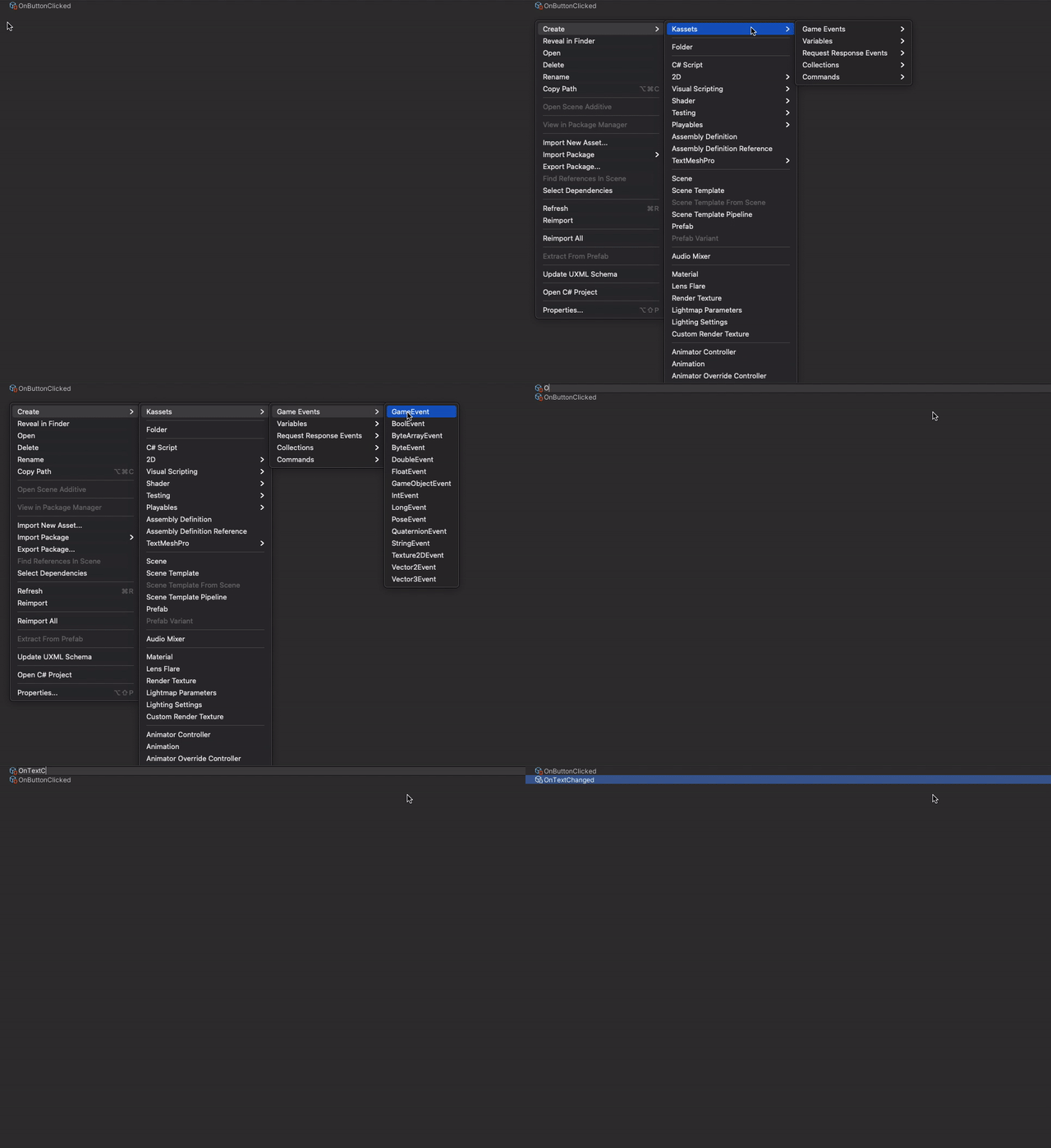
Kassets instances can be created from Create context menu or from Assets/Create menu bar. Simply right click on the Project window and select any instance to create. For Event instances, select any of event types from Create/Kassets/Game Events/
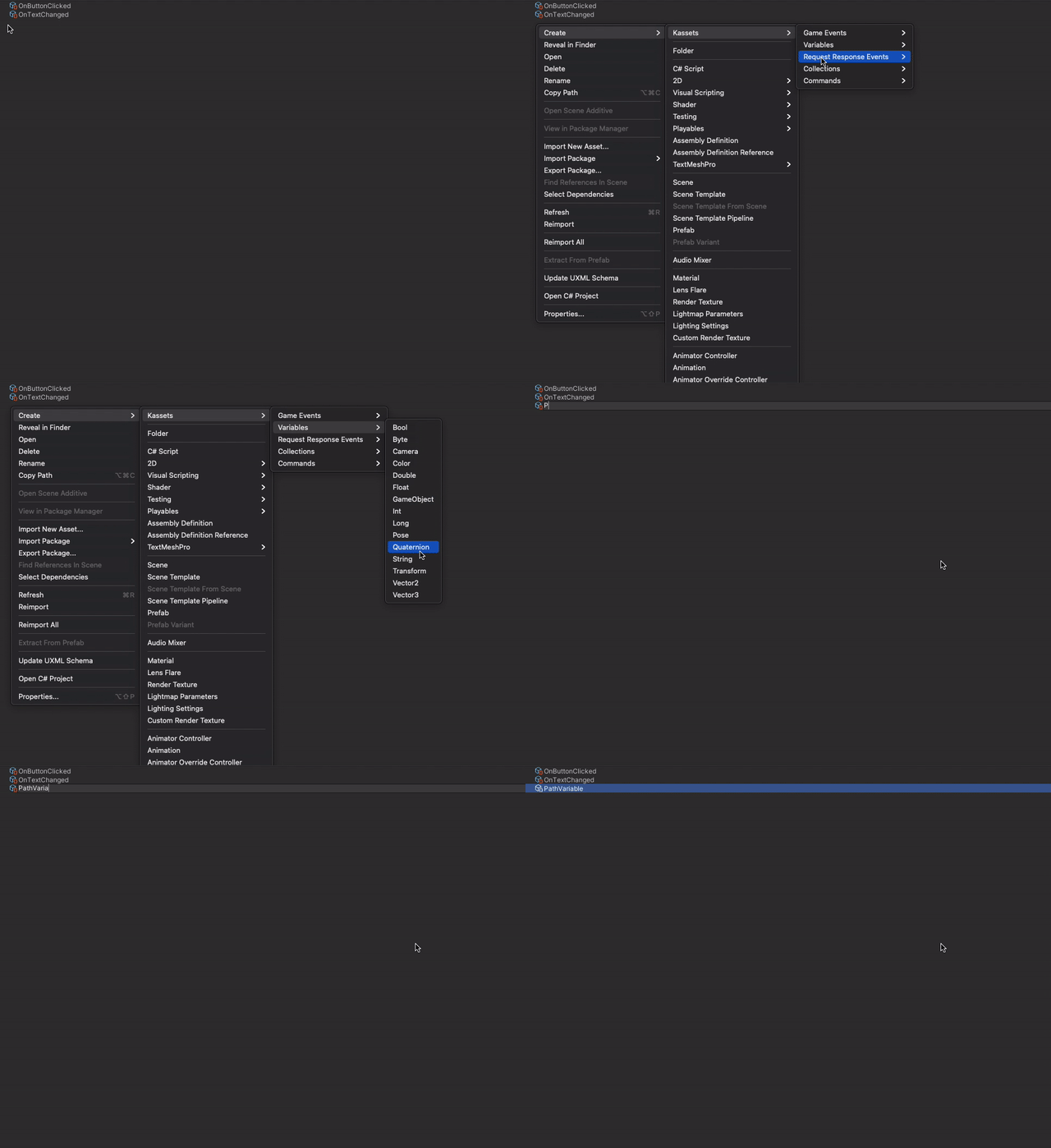
For Variables instances, select any of available types from Create/Kassets/Variables/
Kassets' Variable instance on Inspector window

Other available Kassets' ScriptableObjects are
- Command. An Abstract class that contains an
Execute()method. - Collection. Can be either a List or Dictionary.
- Transaction. A Request-Response event.
Create a MonoBehavior Script and add Kassets' instance as a serialized field.
Player.cs :
public class Player : MonoBehavior
{
    public FloatVariable health;
}
HealthBarUI.cs :
public class HealthBarUI : MonoBehavior
{
    public FloatVariable health;
}
Drag and drop PlayerHealth (FloatVariable) to Player's Health field :

Drag and drop PlayerHealth (FloatVariable) to HealthBarUI's Health field :

From example above, Player component's field Health and HealthBarUI component's field Health both refer to the same FloatVariable ScriptableObject instance PlayerHealth. Since both component refer to the same variable instance, the float value they refer to is shared. Each component then manage their own need with the value without any coupling between components. I.e. HealthBarUI doesn't have to request the Health value to Player component and Player component can manage its own Health without the need to distribute its value to other components.
Kassets’s instance is a ScriptableObject asset. It can be referenced to UnityEvent via Inspector. You can aslo use dynamic method call on UnityEvent to pass a parameter.


Note
Being marked as public archive, UniRx is now considered obsolete.
If UniRx are imported together with R3, All functionality of UniRx is being forwarded to R3.
Use AsSystemObservable() to convert to IObservable and continue using UniRx.
If you had R3 imported, you can use Reactive on Kassets' instances.
First, make sure to import R3 to your project. Upon import, Kassets will adjust internally to support R3 using scripting define KASSETS_R3. It would normally be defined when R3 is imported using package manager. If somehow KASSETS_R3 is undefined, add it to Scripting Define Symbols on Project Settings.
To use Kassets reactively, simply Subscribe to a GameEvent instances or its derivation.
public class HealthBarUI : MonoBehavior
{
    [SerializeField] private FloatVariable health;
    [SerializeField] private FloatVariable maxHealth;
    [SerializeField] private Image healthBar;

    private IDisposable subscription;

    private void Start()
    {
        subscription = health.Subscribe(UpdateHealthBar);
    }

    private void UpdateHealthBar(float currentHealth)
    {
        var rt = healthBar.rectTransform;

        var sizeDelta = rt.sizeDelta;
        sizeDelta.x = 2 * (currentHealth / maxHealth);

        rt.sizeDelta = sizeDelta;
    }

    private void OnDestroy()
    {
        subscription?.Dispose();
    }
}If you had UniTask imported, you can use Asynchronous on Kassets' instances. First, make sure to import UniTask to your project. Upon import, Kassets will adjust internally to support UniTask using scripting define KASSETS_UNITASK. It would normally be defined when UniTask is imported using package manager. If somehow KASSETS_UNITASK is undefined, add it to Scripting Define Symbols on Project Settings.
To use Kassets Asynchronously, use the method EventAsync() and add await in front of it. Any Kassets' instances that derived from GameEvent can be used asynchronously. (For Command, use method ExecuteAsync())
public class CounterAttackSkill: MonoBehaviour
{
    [SerializeField] private GameEvent counterActivateEvent;
    [SerializeField] private FloatGameEvent attackGameEvent;
    [SerializeField] private FloatVariable health;

    private IDisposable subscription;

    private void Start()
    {
        // When using subscribe await, next event raise will wait for current activated counter to end.
        subscription = counterActivateEvent.SubscribeAwait(async _ => await OnCounterActivate());
    }

    // Activate counter.
    private async UniTask OnCounterActivate()
    {
        var currentHealth = health.Value;

        // asynchronously wait until damaged, which indicated by health value changed event.
        var afterDamaged = await health.EventAsync(cancellationToken);

        var damage = currentHealth - afterDamaged;

        // raise attack event with damage value of damage received.
        attackGameEvent.Raise(damage):
    }

    private void OnDestroy()
    {
        subscription?.Dispose();
    }
}
In the example above, an asynchronous operation EventAsync() on variable means to wait for its value to change. GameEvent in general, will wait for an event to fire.
According to this slide (Japanese), It is a best practice to always use cancellation token on every UniTask's asynchronous operation. Since Unity is not asynchronous, any asynchronous operation can be left behind waiting infinitely when the process is not stopped.
UniTask v2 has support for Asynchronous LINQ. Asynchronous LINQ is an extension to IUniTaskAsyncEnumerable<T> and its usage can be very similar to UniRx, but the process behind it is different (UniRx is push-based while UniTask is pull-based).
Kassets' ScriptableObject also make use of Asynchronous LINQ. Kassets' ScriptableObject derived from IUniTaskAsyncEnumerable<T> so it is possible to directly apply various features of UniTask as explained in its github page or from this slide (Japanese).
As an example, the sample class CounterAttackSkill above used SubscribeAwait which is part of UniTask.Linq. Since it is pull-based, when the process of OnCounterActivate is still running, it won't be called again until it is over no matter how many times the event has been raised during the process. Reversely, push-based will execute every event raise.
When both UniRx and UniTask are imported together, It can be confusing which of the Subscription behavior is in effect (pull-based or push-based?). To use Kassets' instance as IObservable, use AsObservable(). To use Kassets' instance as IUniTaskAsyncEnumerable use AsAsyncEnumerable(). Unless referenced by interface, Kassets instances Default Subscribe Behavior can be selected from the inspector window.

Note
UniTask Asynchronous LINQ is part of Cysharp.Threading.Tasks.Linq namespace. To use, add UniTask.Linq as reference to your project's Assembly Definition.
Note
From v2.7.0, Upon importing R3, handling pull/push based can be done by converting Kassets instances using AsObservable() for push-based, and ToAsyncEnumerable() for pull-based.
- https://github.com/roboryantron/Unite2017
- https://www.slideshare.net/RyanHipple/game-architecture-with-scriptable-objects
- R3 — A New Modern Reimplementation of Reactive Extensions for C#
- https://forpro.unity3d.jp/unity_pro_tips/2019/07/27/57/ (Japanese/日本語)
- https://github.com/neuecc/UniRx
- https://github.com/Cysharp/UniTask
- https://speakerdeck.com/torisoup/unitask2020 (Japanese/日本語)
- Kassets is Licensed under MIT License
- R3 is Licensed under MIT License
- UniRx is Licensed under MIT License
- UniTask is Licensed under MIT License