This is a folder/repo scanner for secrets and file permissions. Written in python3.
- Scan for files with permissions (777)
- Scan for secrets/PII in files (passwords, address, phone number, AWS keys, AWS buckets, server IP)
- Directory or Github repo (or both) can be passed as CLI arguments.
- Can be installed as CLI
- Run test cases for your repo from test.py
- Can check for file permissions other than 777.
- AWS keys
- Private keys
- Phone Numbers
- Email Address
- Aws Buckets
- Server IPs
git clone https://github.com/Siddharth-Rajput/sscanner.git
cd sscanner
sudo pip3 install .It can be used a cli tool to scan for folder permissions and files secrets. Both folder name and repo url can be passed as argument for scanning. It has two mode normal and quiet mode. ⇒ Normal mode (default) displays a scan summary which includes all the details of scan ⇒ Quiet mode only displays the scan summary
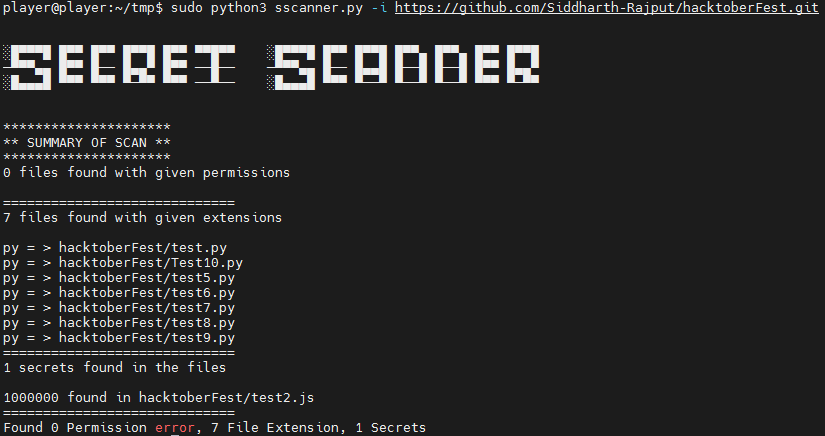
It takes folder or github repo as input to scan. For github is clones the repo scan it and delete it afterwards. It takes octal permission for file permission scan. By default it searches for file with 777 permission. For this scan to work properly scanner needs sudo permissions.
It also looks for specific file type which is hard coded for now. But will be passed as argument in near future.
User can easily use —help argument for information about the scanner and the argument to use.
You can install the scanner as cli or move this to your bin file to access it from anywhere. Here we are using samplefolder as placehoder for actual folder name to scan.
sudo sscanner --help
sudo sscanner -i sample
sudo sscanner -i exfolder -q true
sudo sscanner -i exfolder -p 700,555
sudo sscanner -i exfolder --quiet false --permissions 600,666

sudo sscanner -i https://github.com/Siddharth-Rajput/hacktoberFest.git -p=766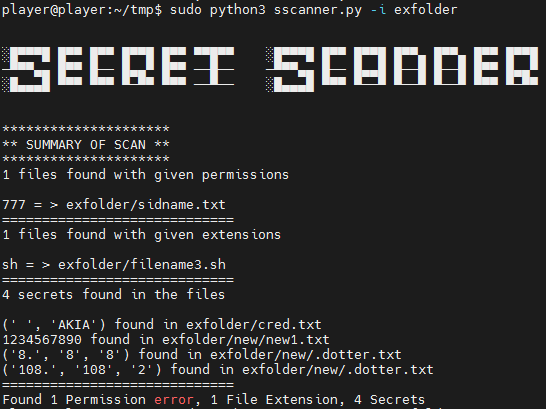
For testing we are using unittest and have a test.py for the same. In test.py there are three unit test cases written. To run unittest sun the following command.
sudo python3 -m unittestTo get indepth working of the code please see codeExplained.md Added comments plz see