Using the Editor Utility
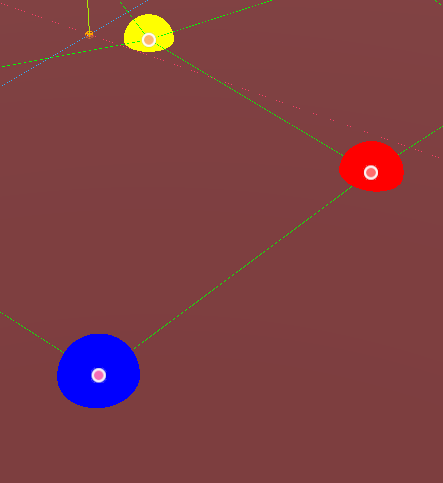
The gizmo shows the network as a series of color-coded points, and lines between each node as they are connected. You can manipulate points by dragging the handles, and they will snap to any surface with a collider underneath your mouse cursor.
Most nodes are blue, and they are like this by default.
The red node is your most recently selected node. You can select a node by moving it around a bit.
The yellow node is your second most recently selected mode.
These two selected nodes inform the behavior of the toolbar functions. See that below.
There is another shape of node, however: this cylinder is the portal. Portals allow you to link different networks together by giving it a reference to another point's resource that it connects to. This connection is 0 distance and 0 cost, so think of it as the other side of the portal.
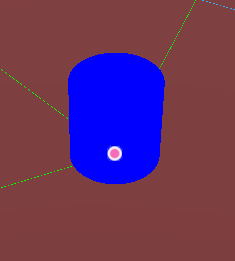
You can edit these in the inspector under the portals array, but at the moment it may be a bit difficult to tell which is which.

This is the toolbar that appears when you select a NetworkInstance. Let's go trough each button:
Pressing this turns on Add mode. Any click on the scene will add a point under the mouse cursor, and automatically link it to the most recently selected node. However, if you mouse is close enough to a point, it will link to the point you are clicking instead of adding a new point. Click the button again to turn it off.
Removes the red node, and all associated connections. Also see "Dissolve".
Connects the red and yellow nodes. The cost is, by default, 1. See "Cost" to change that.
Unlinks the red and yellow nodes.
Merges the red and yellow nodes, producing a new node in between them, and restoring all connections the two nodes had before (connecting the new node wil all nodes the red and yellow nodes were connected to), except obviously any they had with eachother. Will reset any cost value.
Will delete the red node, but will connect all nodes the red node was connected to to eachother. Resets all cost values.
Splits a link between the red and yellow nodes into two connections, with a new node in the middle. Resets all cost values.
The next added node will be a portal. Behaves the same as Add mode otherwise, but if you link to a node instad of adding a new one, it will not turn that node into a portal.
Will create a popup allowing you to edit the cost value of a connection between the red and yellow node. Must have a red and yellow node that has a connection between them to have any effect.