Real-time broadcast graphics engine for live production




| File | Description | |
|---|---|---|
| Installer | DaroEngine2-v0.1.1-Setup.exe | Windows installer — installs to Program Files, creates Start Menu shortcut, includes uninstaller. Recommended for most users. |
Requires: Windows 10/11 (x64), .NET 10 Desktop Runtime, DirectX 11 GPU
DaroEngine2 is an open-source real-time graphics engine built for broadcast and live production workflows. It combines a native C++ DirectX 11 rendering engine with a C# WPF designer application, allowing you to create animated graphics, build reusable templates, manage playlists, and send the final output to OBS (or any Spout-compatible application) at 1920x1080 @ 50 FPS.
Think of it as an open-source alternative to commercial broadcast graphics systems — design your lower thirds, titles, and overlays in the visual editor, then play them out live.
Built in 7 days using vibecoding with Claude Code — from zero to a working broadcast graphics engine.
Early Release / Work in Progress This version is fully functional and usable in production — you can design scenes, build templates, run playlists, and output via Spout right now. However, this is an unfinished project. Some features are missing entirely, and some existing features don't work perfectly yet. Known rough edges include:
- Texture offset/panning not working correctly
- Animation easing curves not properly tuned
- UI polish and edge cases in various areas
Contributions, bug reports, and feedback are very welcome — this is exactly why we're open-sourcing it.
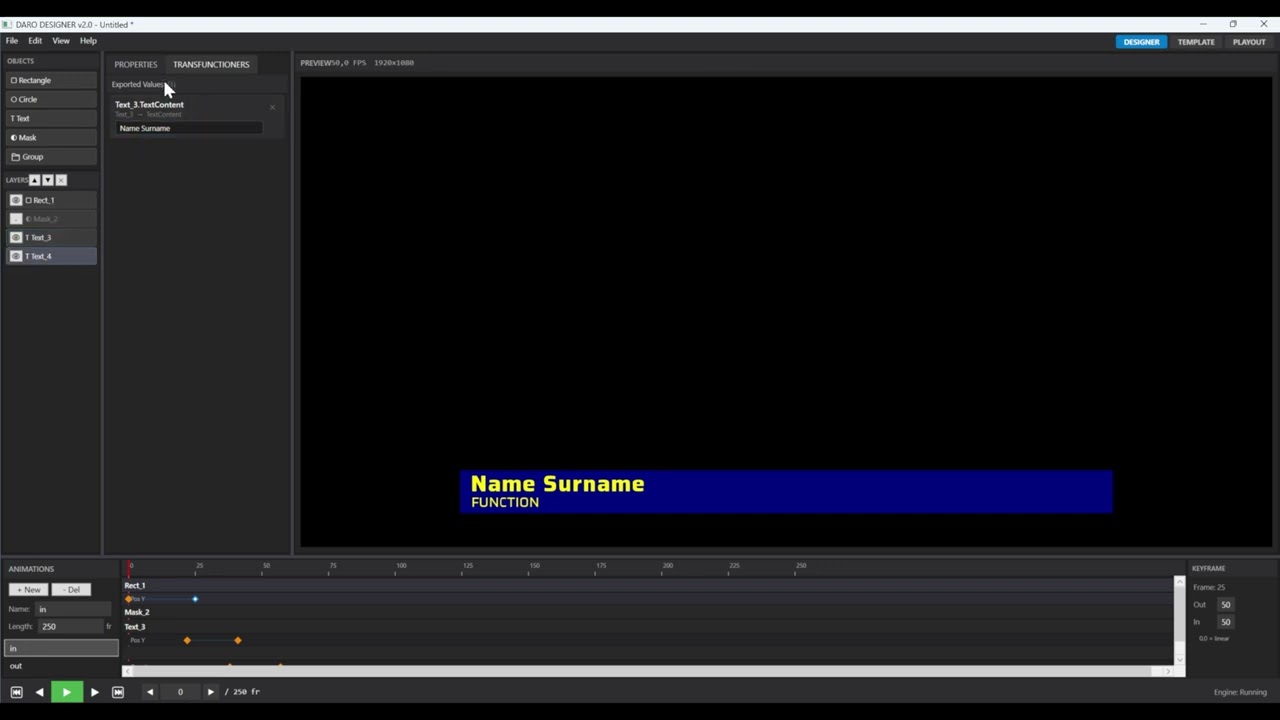
- Visual Designer — WYSIWYG editor with timeline, keyframe animation, and real-time preview
- Layer System — Rectangles, circles, text, images, video, masks, and groups (up to 64 layers)
- Template System — Create reusable templates with fill forms and named property bindings (transfunctioners)
- Playout Engine — Playlist management with cue/take/clear workflow, auto-advance, and looping
- Spout Output — Send rendered frames to OBS, vMix, CasparCG, or any Spout receiver
- Spout Input — Receive live video streams from other Spout senders and use them as layer textures (e.g., live camera feeds, other applications)
- Video Support — MP4, MOV, ProRes 4444, Apple Animation with alpha channel support
- Mosart Automation — TCP command interface for newsroom automation integration
- REST API Middleware — ASP.NET Core service for external system integration (Octopus NRCS, etc.)
- Edge Antialiasing — Shader-based smoothing with configurable quality levels
- 3D Transforms — Full rotation on all axes with anchor point control
- Windows 10/11 (x64)
- Visual Studio 2022 or later with:
- C++ Desktop Development workload
- .NET Desktop Development workload
- .NET 10 SDK
- DirectX 11 compatible GPU
# Clone the repository
git clone https://github.com/TN000/DaroEngine2.git
cd DaroEngine2

# Build the full solution
msbuild DaroEngine2.slnx /p:Configuration=Debug /p:Platform=x64
Output:
- Engine DLL:
bin/Debug/DaroEngine.dll - Designer App:
Designer/bin/Debug/net10.0-windows/DaroDesigner.exe
- Run
DaroDesigner.exe - File > New Scene to create a new project
- Add layers using the layer panel
- Animate with the timeline at the bottom
- Switch to PLAYOUT tab for live playback
DaroEngine2 separates design from playout — a designer creates animated scenes and templates once, and an operator can then use them live with just a few clicks. No technical knowledge needed during the broadcast.
  PREPARATION (before show)              LIVE (during broadcast)

  ┌──────────┐   ┌──────────────┐       ┌──────────────────────┐
  │  Design   │──>│  Create      │       │      PLAYOUT         │
  │  Scenes   │   │  Templates   │       │                      │
  │  (.daro)  │   │  (.dtemplate)│       │  ┌────────────────┐  │
  └──────────┘   └──────────────┘       │  │ Playlist:      │  │
                                         │  │  1. Lower Third│  │
                                         │  │  2. Full Screen│  │
                                         │  │  3. Score      │  │
                                         │  │  4. Outro      │  │
                                         │  └────────┬───────┘  │
                                         │           │          │
                                         │    [Cue Next]       │
                                         │    [>> TAKE <<]     │
                                         │    [Clear]          │
                                         └──────────┬───────────┘
                                                    │ Spout
                                         ┌──────────▼───────────┐
                                         │   OBS / vMix / etc.  │
                                         └──────────────────────┘
- Design a Scene — Open the visual editor, add layers (text, images, shapes, video), animate them on the timeline with keyframes
- Create a Template — Build a fill form in the Template Maker that maps input fields to scene properties (e.g., a "Name" field that controls the text layer)
- Save — Scene as
.daro, template as.dtemplate. These are your reusable building blocks
File locations: The playout template browser looks for files in:
Documents\DaroEngine\Templates\
├── Lower Thirds\
│   ├── breaking-news.dtemplate
│   └── breaking-news.daro
├── Fullscreen\
│   ├── opener.dtemplate
│   └── opener.daro
└── ...
Save your .dtemplate and .daro files into Documents\DaroEngine\Templates\. You can organize them into subfolders — the playout browser will show the folder structure as a tree. Each template links to its scene file via the LinkedScenePath property set in the Template Maker.
Once your templates are ready, going live is simple — the operator just works with a playlist:
- Enable Playout — Click Enable Daro Playout. The designer preview will shut down to free the rendering engine for live output
- Start the Engine — Click Run Daro Engine to initialize the rendering engine for playout
- Browse Templates — In the PLAYOUT tab, pick a template from the library
- Fill In — Type the text (headline, name, score...) into the form fields
- Add to Playlist — Click + Add to Playlist. Repeat for all graphics you'll need during the show
- Cue Next — Double-click an item to load it into the engine, ready to go
- Take — One click to play the animation on air. The graphic renders and streams via Spout to OBS in real time
- Clear — Remove the graphic from output when done
- Repeat — Cue the next item and take again. With auto-advance enabled, the next item cues automatically
The entire live workflow is Cue → Take → Clear, making it fast enough for live news, sports, or event production. The playlist can be prepared in advance or built on the fly during the show.
- Install the Spout plugin for OBS
- In DaroDesigner, go to the PLAYOUT tab
- Check Enable Spout and set a sender name (default:
DaroPlayout) - In OBS, add a Spout2 Capture source
- Select the sender name from the dropdown
- Your graphics are now live in OBS with full alpha transparency
| Component | Technology | Description |
|---|---|---|
| DaroEngine | C++ / DirectX 11 | Native rendering engine compiled as a DLL. Handles all GPU rendering, text layout (DirectWrite), video decoding (Media Foundation + FFmpeg), and Spout output. |
| DaroDesigner | C# / WPF | Visual designer application. Scene editor, timeline, template maker, and playout engine. Communicates with the engine via P/Invoke. |
| GraphicsMiddleware | ASP.NET Core | REST API service with SQLite database. Bridges external systems (newsroom, automation) with the playout engine. |
The engine exports a C API with Daro_* prefix and __stdcall calling convention. Key functions:
- Lifecycle:
Daro_Initialize(),Daro_Shutdown() - Rendering:
Daro_BeginFrame(),Daro_EndFrame(),Daro_Present() - Layers:
Daro_SetLayerCount(),Daro_UpdateLayer(),Daro_ClearLayers() - Playback:
Daro_Play(),Daro_Stop(),Daro_SeekToFrame() - Textures:
Daro_LoadTexture(),Daro_UnloadTexture() - Spout:
Daro_EnableSpoutOutput(),Daro_ConnectSpoutReceiver() - Frame Buffer:
Daro_LockFrameBuffer(),Daro_UnlockFrameBuffer()
See Engine/DaroEngine.h for the full API reference.
The GraphicsMiddleware is an ASP.NET Core service that acts as a bridge between external systems (newsroom, automation) and DaroDesigner. It provides a REST API and stores playlist items in a SQLite database.
cd GraphicsMiddleware
dotnet run
This starts the service on http://localhost:5000 with:
- REST API for creating and managing playlist items (
/api/items) - Control endpoints for remote playout commands (
/api/control/cue,/play,/stop, etc.) - Spout control for enabling/disabling output remotely
- Web dashboard at
http://localhost:5000for quick testing
| Method | Endpoint | Description |
|---|---|---|
| POST | /api/items |
Create a playlist item (template path, scene path, filled data) |
| GET | /api/items/{id} |
Get item by ID |
| GET | /api/items |
List all items |
| DELETE | /api/items/{id} |
Delete item |
| POST | /api/control/cue |
CUE — load item into playout |
| POST | /api/control/play |
PLAY — take on air |
| POST | /api/control/stop |
STOP — clear output |
# 1. Create a playlist item
curl -X POST http://localhost:5000/api/items \
  -H "Content-Type: application/json" \
  -d '{
    "name": "Breaking News",
    "templateFilePath": "path/to/template.dtemplate",
    "linkedScenePath": "path/to/scene.daro",
    "filledData": { "title-tf": "Breaking News", "subtitle-tf": "Live report" }
  }'

# 2. CUE the item (returns item ID from step 1)
curl -X POST http://localhost:5000/api/control/cue -d '"ITEM-GUID"'

# 3. PLAY — take on air
curl -X POST http://localhost:5000/api/control/playDaroDesigner includes a TCP server (port 5555) for newsroom automation integration:
Octopus NRCS ──> GraphicsMiddleware (REST :5000) ──> Mosart ──> DaroDesigner (TCP :5555)
Commands: CUE, PLAY, STOP, PAUSE, CONTINUE — see CONTRIBUTING.md for protocol details.
Community contributions welcome in any of these areas:
- EBU OGraf support — render HTML-based
.ograf.jsongraphics packages and/or export DaroEngine templates as OGraf web components - Multi-resolution support (4K, custom resolutions)
- Configurable frame rates (25p, 30p, 50p, 60p)
- NDI output (alternative to Spout)
- GPU-accelerated text effects (drop shadows, outlines, gradients)
- Plugin system for custom layer types
- Web-based remote control panel
- Linux / cross-platform rendering backend (Vulkan)
- Audio support
- Ticker / crawl layer type
- Clock / countdown layer type
- Data binding (RSS feeds, APIs, spreadsheets)
- Multi-language UI
Have an idea? Open an issue to discuss it.
We welcome contributions! Please read CONTRIBUTING.md for guidelines on setting up your development environment, code style, and how to submit pull requests.
This project is licensed under the MIT License — see LICENSE for details.