There is currently a divergence between IoT suppliers while the users are looking for convergence and interoperability. While Azure IoT Central is delivering capabilities that are attractive to a wide set of users, it is unlikely to reach the same smart manufacturing depth delivered by the ThinkIQ Manufacturing Platform and the CESMII Smart Manufacturing Innovation Platform (SMIP).
- The functionality will be implemented by connecting the ThinkIQ Manufacturing Platform or the CESMII Smart Manufacturing Innovation Platform (SMIP) to Azure IoT through the Azure IoT Central API.
- The ThinkIQ Platform and CESMII SMIP Information Model Editor and Model Storage will be enhanced to configure integration with Azure IoT Central.
Simulating Azure IoT Devices
- To demo a fictitious trucking company that operates refrigerated trucks, this repo contains a utility to simulate the trucks (on apps.azureiotcentral.com)
- Trucks (Devices) have optimal temperature, geo-location, states, and command properties
- Azure IoT Central can also export the data, which would be stored the data on Azure Event Hub
Connector
- A connector was built and on a SMIP test system. It is located in the ThinkIQ.Azure.Connector
- When running, the connector automatically detects the connection to Azure IoT Central.
- Running the connector will connect the trucks (Azure IoT devices) to Azure IoT Central and begin sending truck state, cooling system state, content state, content temperature, location, and events.
Reading from Azure IoT Central and Writing to ThinkIQ Platform/CESMII SMIP
- Within the Platform/SMIP, a Library is created to store the objects
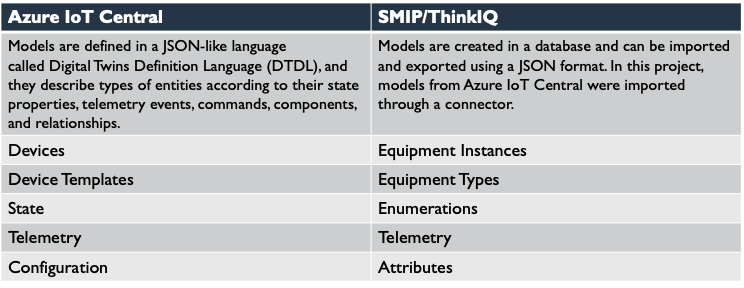
- Device Templates (from Azure IoT) are used to create Equipment Types
- The Trucks are created as instances of Trucks (as Equipment) on Platform/SMIP
- Trailers are created as composite equipment
- Data from Azure Event Hub is written to the Platform/SMIP
- Truck Content Temperature is written as a attribute (float) on the Truck trip and is historized into the time-series store on the Platform/SMIP
- Telemetry populates the Geo-Location attribute
- Truck State populates State attribute
- Any configuration change on an Azure IoT device (e.g. truck) will be updated on the Platform/SMIP
- This project was completed in mid-2022. Azure IoT Central APIs may have changed since this project was finalized. Users may encounter errors if Azure IoT Central APIs have changed.
This project is written in C# using Visual Studio 2019, .NET Standard 2.1 and .NET Core 3.1. It also requires access to Azure IoT Central.
At this time, this project can only run on an instance of the CESMII SMIP or a licensed ThinkIQ Manufacturing Platform product (https://thinkiq.com/why-thinkiq/products/) because it requires connection to the underlying framework and database of those products.