Home
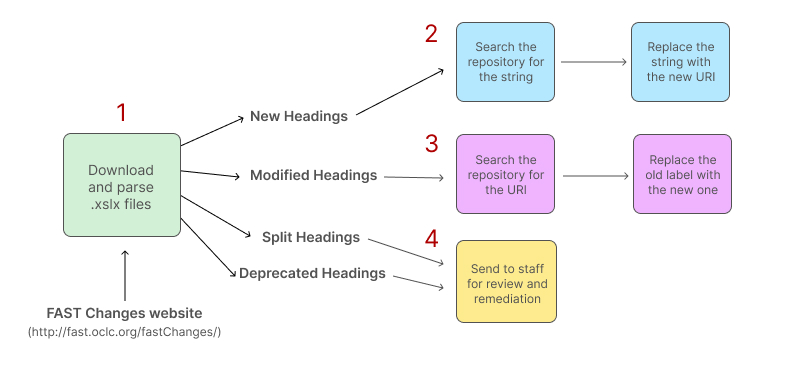
Note: I have numbered the steps 1 to 4 for convenience. In practice, steps 2-4 occur simultaneously and are processed by Sidekiq.
Visit the FAST Changes webpage and parse the HTML for links to the relevant Excel files. Then download the files and parse them for applicable changes.
"New Headings" are when FAST assigns a URI to an entity that did not previously have one. In this case, we need to search for the (literal) string, then swap it out with the URI. See the New and Modified Headings page for more.
"Modified Headings" are when FAST updates the human-readable label associated with a URI, such as updating the label with someone's death date (e.g. "Elizabeth II, Queen of Great Britain, 1926-" to "Elizabeth II, Queen of Great Britain, 1926-2022"). Since we display these labels to end-users, we need to update them by simply reindexing them. During reindexing, Hyrax will hit the FAST API and thus index the updated label.
See the New and Modified Headings page for more.
When FAST Updater finds split or deprecated headings, it will email a configured email address (see Configuration) a list of headings along with any suggestions from FAST. Then someone with the relevant permissions can use the "Replace or Delete FAST URIs" tool to make the necessary changes.