The Orbit Camera controller package contains a script providing functionality for a multi-purpose camera controller.
The camera controller can be configured to replicate various types of camera movements based on a pivot object.
It can automatically change height to match any surface and automatically zoom in and out to prevent clipping inside of level geometry.
Open the Package Manager and click the '+' button.
Choose 'add package from git URL...' then paste the git URL of this repository and press 'Add'.

git URL: https://github.com/Umbrason/OrbitCameraController.git
The easiest way to create an Orbit Camera is to use an existing camera as a base.
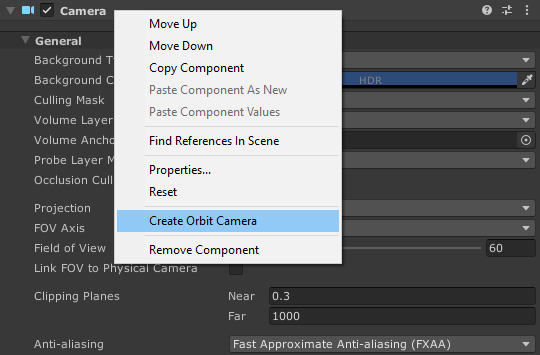
To convert an existing camera into an Orbit Camera you can use the 'Create Orbit Camera' context menu option of the camera component.
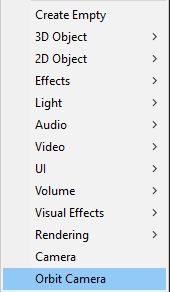
It's also possible to create an Orbit Camera from scratch using the 'GameObject/Orbit Camera' context menu option.
This will instantiate an Orbit Camera with its own camera component.
The Orbit Camera can be configured on the OrbitCamera component located on the pivot gameObject of the camera setup.
The settings are split into three categories, which are movement, rotation and zoom.
Movement

Of the movement settings the more interesting options to consider are the 'Surface Follow Type' and 'Collision Detection'
These options change how the camera matches its height to the geometry its moving on.
If 'Surface Follow Type' is 'None', the camera controller will not change its height to match the level geometry.
The colision detection changes, how the camera determines, when to adjust its height.
If 'sweep test' is selected, the camera will only adjust its height if the sweep test determines, thats the pivot is inside of a collider.
Otherwise the camera will always change height to match the heighest point inside of the 'Surface Check Range'.
Rotation
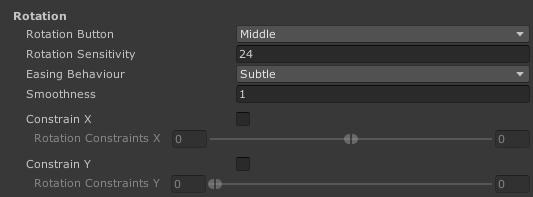
When the 'Contrain X' or 'Constrain Y' options are ticked, the camera rotation will be limited to the specifed ranges on their respective axis.
Of the rotation settings the most interesting option is the 'Easing Behaviour' which changes, when smoothing is to the rotation speed of the camera.
The option 'Subtle' means that smoothing is only applied, when the player is not holding the 'rotation button', allowing for a smooth stop of the camera rotation.
Zoom

The zoom settings contain a zoom range slider which specified the minimum and maximum zoom distance.
It also contains an options for collision detection methods, which decide when the camera should avoid clipping into geometry.
If its set to none, the zoom will never change to prevent clipping.
Set to 'Sweep Test', the camera will only zoom in to prevent clipping, if its inside of a collider.
And if its set to 'Raycast from Center', it will zoom in, whenever a collider is between the camera and its center.