 An online personal website for every Github user.
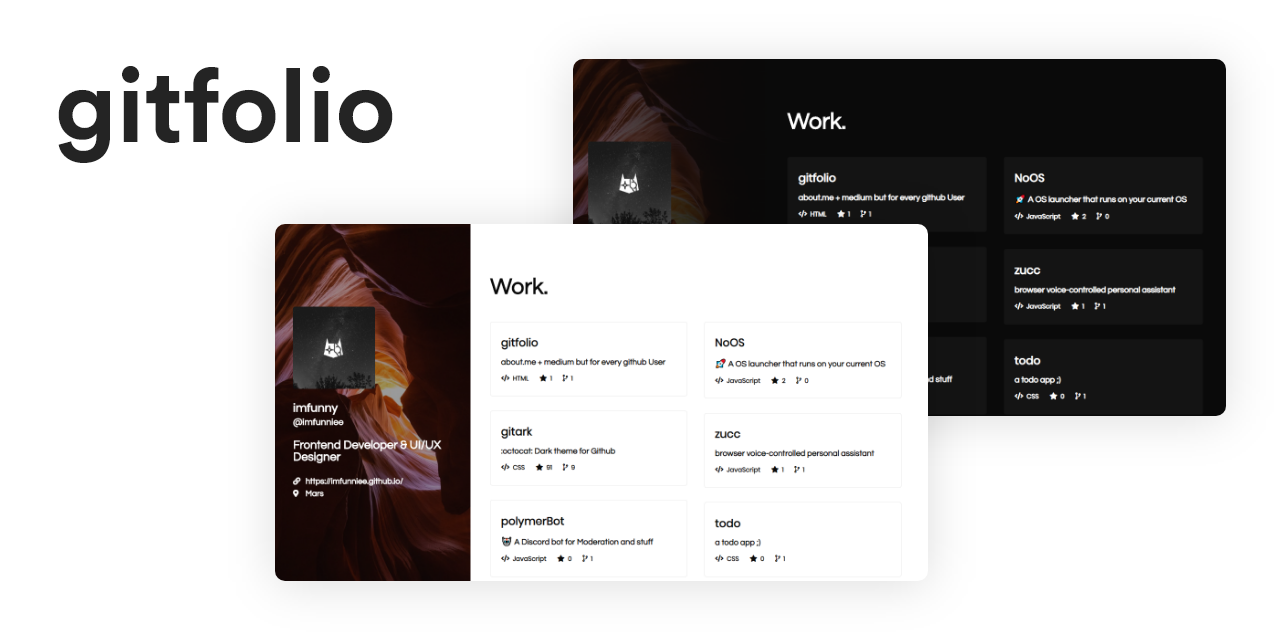
A personal portfolio website for every GitHub user
Quick Start • Features • Customization • Local Development • Deployment



Gitfolio is a zero-configuration personal portfolio website that automatically fetches and displays your GitHub profile and repositories. No coding required—just use it and showcase your work to the world in seconds.
Perfect for developers, open-source contributors, and anyone who wants a professional GitHub portfolio without the hassle.
Get your portfolio up and running in 30 seconds:
Simply change {username} to your GitHub username:
https://gitfolio-online.vercel.app/user/{username}
# Or use the short version
https://gitfolio-online.vercel.app/u/{username}
That's it! 🎉
Switch between light and dark themes with a single URL parameter.
Automatically fetches your latest GitHub activity (with smart caching).
Built with Vercel Edge Network for lightning-fast global performance.
Fine-tune every aspect of your portfolio with URL parameters.
No configuration files, no build steps, no deployment needed—just use it.
Choose which repositories to display (include/exclude forks, limit count).
Switch between built-in themes:
https://gitfolio-online.vercel.app/u/{username}?theme=dark
https://gitfolio-online.vercel.app/u/{username}?theme=light
Control whether to display forked repositories:
https://gitfolio-online.vercel.app/u/{username}?includeFork=true
https://gitfolio-online.vercel.app/u/{username}?includeFork=false
| Parameter | Type | Description | Default | Example |
|---|---|---|---|---|
username |
string | Your GitHub username | - | wangningkai |
theme |
string | Built-in theme name | dark |
dark, light |
includeFork |
boolean | Display forked repositories | false |
true, false |
repoNum |
number | Number of repositories to display | 30 |
10, 20, 50 |
cache_seconds |
number | Cache duration in seconds | 1800 |
600, 3600 |
Combine multiple parameters:
https://gitfolio-online.vercel.app/u/wangningkai?theme=light&includeFork=true&repoNum=50
Check out these live examples:
- wangningkai - Full portfolio with forks
- torvalds - Linux creator's profile
- gaearon - React core team member
Want to run Gitfolio locally? Follow these steps:
- Node.js 12+
- GitHub Personal Access Token (optional, but recommended for higher API limits)
# Clone the repository
git clone https://github.com/wangningkai/gitfolio-online.git
cd gitfolio-online

# Install dependencies
npm installCreate a .env file:
# GitHub Personal Access Token (optional)
GITHUB_TOKEN=your_github_token_here

# Custom cache duration (seconds, optional)
CACHE_SECONDS=1800# Start the development server
npm run dev
# Or start with specific port
PORT=3000 npm run devVisit http://localhost:3000/u/{username} to see your portfolio.
# Build the project
npm run build

# Start production server
npm startClick the button below to deploy to your own Vercel instance:
Why deploy your own instance?
- Avoid rate limits: GitHub API has a 5,000 requests/hour limit
- Custom configuration: Full control over caching and themes
- Privacy: Your own instance with your own analytics
- Branding: Add your own domain and customization
Gitfolio works on any Node.js hosting platform:
- Netlify: Connect your Git repository
- Heroku: Use Heroku Buildpack for Node.js
- Railway: One-click deploy from GitHub
- Render: Deploy as a Node.js service
- Self-hosted: Run on any VPS or server
The GitHub API has rate limits (5,000 requests/hour). If many users share the same instance, you might encounter rate limit errors during peak hours. Deploying your own instance ensures consistent performance.
Currently, Gitfolio supports built-in light/dark themes. Custom theme support is planned for future releases.
Gitfolio automatically fetches your latest GitHub data. Changes may take up to 30 minutes to appear (configurable with cache_seconds parameter).
Yes, by default Gitfolio displays up to 30 repositories. You can adjust this with the repoNum parameter (max 100 to ensure performance).
Currently, you can only show/hide all forks. Selective repository hiding is planned for future releases.
Contributions are welcome! Here's how you can help:
Before reporting bugs, please read How To Ask Questions The Smart Way.
Report bugs via:
- GitHub Issues (preferred)
- Email: i@ningkai.wang
- Fork the repository
- Create a feature branch:
git checkout -b my-feature - Commit your changes:
git commit -am 'Add some feature' - Push to the branch:
git push origin my-feature - Submit a pull request
- Follow Prettier code style
- Write clear commit messages
- Test thoroughly before submitting
I open-source almost everything I can, and I try to help everyone using these projects. This takes time, and the service is provided for free.
If you find Gitfolio useful and want to support its development:
- Star the repo on GitHub: ⭐
- Share it with your friends and colleagues: 🚀
- PayPal: paypal.me/wangningkai
- WeChat & AliPay: pay.ningkai.wang
Your support helps me continue creating and maintaining open-source projects! ❤️
GPL-3.0 License - see LICENSE for details.
- Inspired by the original Gitfolio project
- Built with Vercel
- Powered by GitHub REST API
Made with ❤️ and JavaScript by @wangningkai and the open-source community.