


This webserver contains the web interface for GPS guided navigation. The web interface using roslibjs to communicate with the ROS running on the robot. Therefore, this requires the robot run rosbridge_server. The interface uses Google Map javascript to display the robot and get geolocation of the waypoints.
Open mars.html in a web browser will give you the following interface
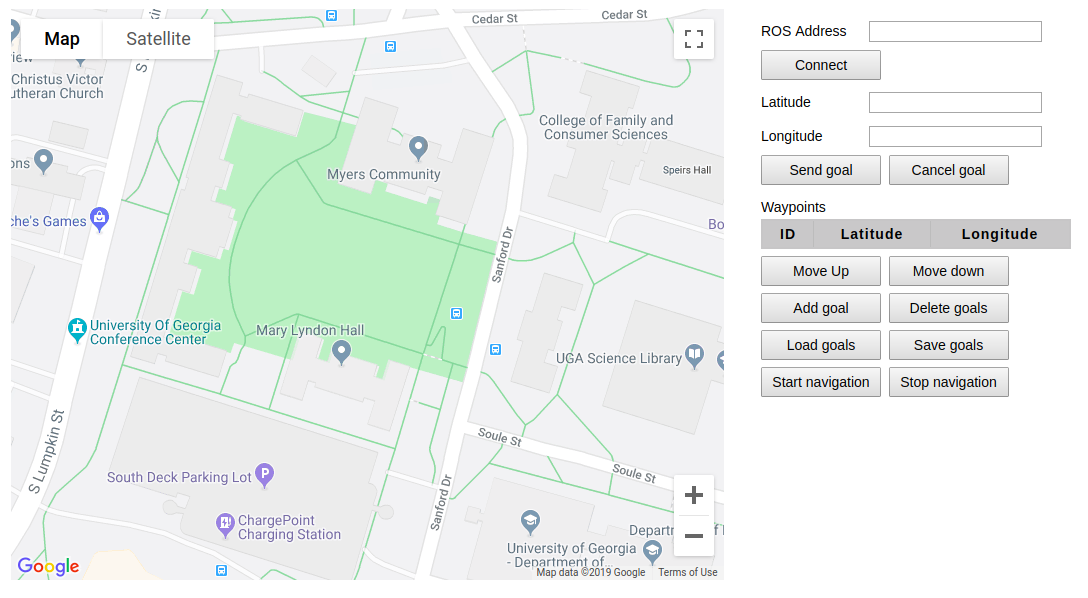
Connect your robot using the IP address of the ROS master. When you successfully connect to your ROS master, the Connect button
becomes Disconnect. After getting connected with your robot, the web interface will subscribe to /fix and /odom topic to get the
location (latitude and longitude) and heading of the robot. So make sure your robot publishes these topics. An arrow will be
shown in the Google map to indicate the real-time position and heading.
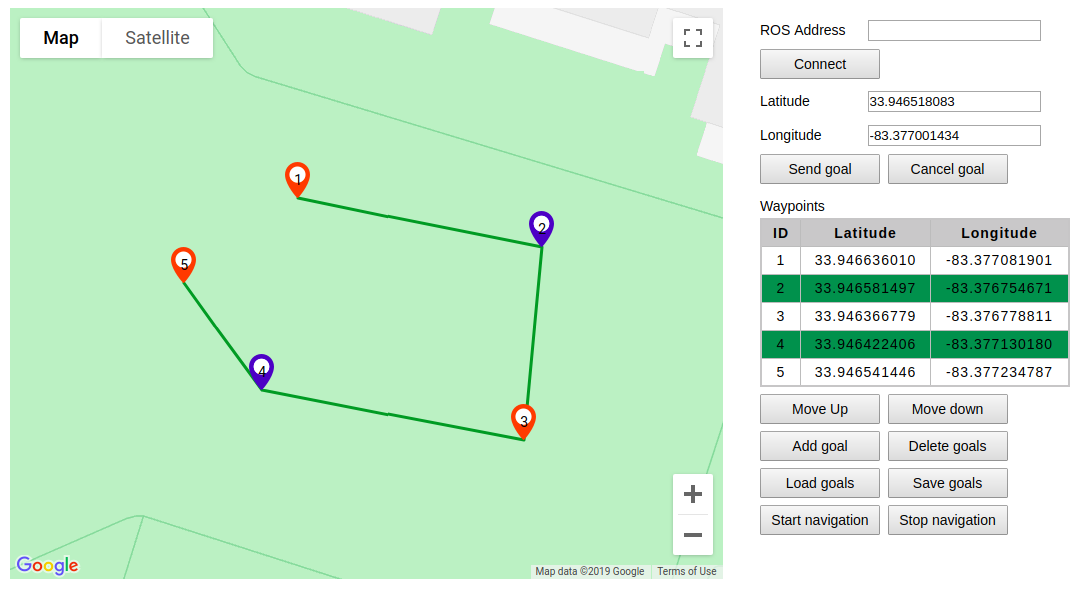
Waypoints can be added by clicking on the Google map or add the current robot location as a waypoint using the Add goal.
Lines will join the waypoints to indicate the path of the robot will travel through.
The latitude and longitude of the waypoints will be shown in the Waypoints table.
The number on the waypoint indicates the sequence of the waypoints that the robot will navigate to.
You can load waypoints from a text file using the Load goals button. The text file should have one or more lines and each line is one
waypoint with latitude and longitude, which is separated by a comma. For example, 34.23453543, -83.21234343 is a waypoint whose
latitude is 34.23453543 and longitude is -83.21234343.

You can delete waypoints, change the order of the waypoints and move the waypoints on the map.
- You can drag the waypoint on the map to change the location of the waypoint.
- You can select/deselect a waypoint by clicking the waypoint. The selected waypoints will change to blue color. The selected waypoint will be highlighted in blue color in the
Waypointstable. - You can delete the selected waypoints using the
Delete goalsbutton. - You can change the order of the waypoints by moving up/down the selected waypoints using the
Move upandMove downbutton.
To save your current waypoints, a text file will be generated and downloaded. The text file stores the latitude and longitude of all the waypoints and each line is one waypoint.
33.946587608,-83.377054746
33.946565357,-83.376791889
33.946411829,-83.376942093
33.946351752,-83.377070839
33.946316152,-83.376746292
33.946480806,-83.376657779To start navigation, click the Start navigation. The web interface creates a MoveBaseClient and sends MoveBaseGoal to the robot. To run the navigation, the robot needs to run move_base or a node that provides MoveBaseServer.