A plug-in for Stingray that adds easing math functions to Lua, Flow and C.
You can use these easing functions to smoothly interpolate numeric values along a curve between a start and end value, like one of these:
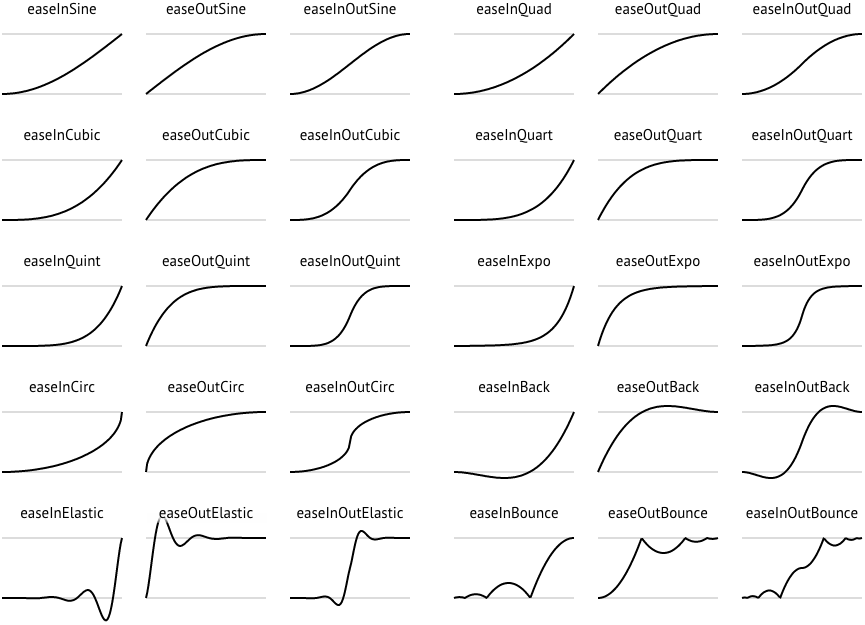
(source: http://easings.net/)
These easing curves are particularly useful for moving a camera smoothly between two viewpoints without jarring starts and stops, but you can use them for any kind of parametric animation you need in your project.
-
Download the latest release from the Releases tab of this repo, and extract it to disk.
Or, get a clone of this repo and run
make.rbto build its binaries from scratch. -
Open the Stingray Editor, and go to the Plugin Manager (Alt+Shift+P).
-
Click Add Plugin, browse to the folder you extracted (or the
pluginfolder of this repo if you built it yourself), and select theeasing.stingray_pluginfile. -
This plug-in adds a resource folder that contains its custom Flow node definitions. If you want to use these Flow nodes in your project, you'll have to add this resource folder to your
boot.packagefile (or to another package that you load in later). Add the following line to the bottom of the file:flow_node_definitions = ["easing-resources/*"]
This plug-in adds the following functions to the Lua environment:
stingray.Easing.ease_ratio( mode, time_ratio ) : number
modeis the easing mode (see below.)time_ratiois the delta-time value, expressed as a number between 0 and 1. This is basically the X axis of the curve images above, where 0 is all the way to the left and 1 is all the way to the right.- The return value is the result of the interpolation for the selected curve, expressed as a number between 0 and 1. Basically the Y axis of the curves above. You can apply this ratio yourself to whatever data you're animating.
This is the handiest function if you're manipulating the time value you pass in to a linear interpolation function on a vector, matrix or quaternion (see below).
stingray.Easing.ease_values( mode, start_value, end_value, time_ratio ) : number
modeis the easing mode (see below.)start_valueis the numeric start value for the interpolation.end_valueis the numeric end value for the interpolation.time_ratiois the delta-time value, expressed as a number between 0 and 1. This is basically the X axis of the curve images above, where 0 is all the way to the left (and will result in returning thestart_value) and 1 is all the way to the right (and will result in returning theend_value).- The return value is the interpolation for the selected curve between the
start_valueand theend_value. Basically the Y axis of the curves above.
stingray.Easing.ease_values_over_time( mode, start_value, end_value, total_time, elapsed_time ) : number
modeis the easing mode (see below.)start_valueis the numeric start value for the interpolation.end_valueis the numeric end value for the interpolation.total_timeis the total amount of time that the animation should take to move from the start value to the end value.elapsed_timeis the delta-time value, expressed as a number between 0 andtotal_time. This is basically the X axis of the curve images above, where 0 is all the way to the left (and will result in returning thestart_value) andtotal_timeis all the way to the right (and will result in returning theend_value).- The return value is the interpolation for the selected curve between the
start_valueand theend_value. Basically the Y axis of the curves above.
Mode names
The mode parameter can be any of the following constants:
stingray.EasingMode.LINEARstingray.EasingMode.QUADRATIC_INstingray.EasingMode.QUADRATIC_OUTstingray.EasingMode.QUADRATIC_IN_OUTstingray.EasingMode.CUBIC_INstingray.EasingMode.CUBIC_OUTstingray.EasingMode.CUBIC_IN_OUTstingray.EasingMode.QUARTIC_INstingray.EasingMode.QUARTIC_OUTstingray.EasingMode.QUARTIC_IN_OUTstingray.EasingMode.QUINTIC_INstingray.EasingMode.QUINTIC_OUTstingray.EasingMode.QUINTIC_IN_OUTstingray.EasingMode.SINE_INstingray.EasingMode.SINE_OUTstingray.EasingMode.SINE_IN_OUTstingray.EasingMode.CIRCULAR_INstingray.EasingMode.CIRCULAR_OUTstingray.EasingMode.CIRCULAR_IN_OUTstingray.EasingMode.EXPONENTIAL_INstingray.EasingMode.EXPONENTIAL_OUTstingray.EasingMode.EXPONENTIAL_IN_OUTstingray.EasingMode.ELASTIC_INstingray.EasingMode.ELASTIC_OUTstingray.EasingMode.ELASTIC_IN_OUTstingray.EasingMode.BACK_INstingray.EasingMode.BACK_OUTstingray.EasingMode.BACK_IN_OUTstingray.EasingMode.BOUNCE_INstingray.EasingMode.BOUNCE_OUTstingray.EasingMode.BOUNCE_IN_OUT
For example:
local interpolated_value = stingray.Easing.ease_values( stingray.EasingMode.QUADRATIC_IN_OUT, 10, 20, 0.25 )
print(tostring(interpolated_value)) -- 11.25The easing functions are exposed to Flow through two nodes: Math > Ease and Math > Ease Over Time.

- Choose the easing function you want to use from the Easing Mode list.
- The Start Value and End Value are optional; you can leave them at 0 and 1.
- Use the node on the left if you want to provide the delta-time value for the calculation, expressed as a number between 0 and 1. This is basically the X axis of the curve images above, where 0 is all the way to the left (and will result in returning the
start_value) and 1 is all the way to the right (and will result in returning theend_value). - As an alternative, so that you don't have to calculate the ratio yourself, you can use the node on the right to pass in a start time and the total time that you want the transformation to take (in seconds). The node will calculate the delta-time (i.e. the location on the X axis of the curve images above) based on these values.
- The Result is the interpolation between the start value and the end value at the specified delta time along the curve you've chosen. Basically the Y axis of the curves above.
- The Ease Over Time node emits the Done event when the total time has elapsed since the start time.
If you're writing your own plug-in in C, you can call these easing functions through this plug-in's API. Retrieve its API from the engine by calling the PluginManagerApi::next_plugin_api() function, passing the EASING_API_ID below. Cast the pointer returned by the engine into this struct definition:
unsigned EASING_API_ID = 0x1ed2147a;
struct easing_api {
	enum EASING_MODE {
		EASING_MODE_LINEAR,
		EASING_MODE_QUADRATIC_IN,
		EASING_MODE_QUADRATIC_OUT,
		EASING_MODE_QUADRATIC_IN_OUT,
		EASING_MODE_CUBIC_IN,
		EASING_MODE_CUBIC_OUT,
		EASING_MODE_CUBIC_IN_OUT,
		EASING_MODE_QUARTIC_IN,
		EASING_MODE_QUARTIC_OUT,
		EASING_MODE_QUARTIC_IN_OUT,
		EASING_MODE_QUINTIC_IN,
		EASING_MODE_QUINTIC_OUT,
		EASING_MODE_QUINTIC_IN_OUT,
		EASING_MODE_SINE_IN,
		EASING_MODE_SINE_OUT,
		EASING_MODE_SINE_IN_OUT,
		EASING_MODE_CIRCULAR_IN,
		EASING_MODE_CIRCULAR_OUT,
		EASING_MODE_CIRCULAR_IN_OUT,
		EASING_MODE_EXPONENTIAL_IN,
		EASING_MODE_EXPONENTIAL_OUT,
		EASING_MODE_EXPONENTIAL_IN_OUT,
		EASING_MODE_ELASTIC_IN,
		EASING_MODE_ELASTIC_OUT,
		EASING_MODE_ELASTIC_IN_OUT,
		EASING_MODE_BACK_IN,
		EASING_MODE_BACK_OUT,
		EASING_MODE_BACK_IN_OUT,
		EASING_MODE_BOUNCE_IN,
		EASING_MODE_BOUNCE_OUT,
		EASING_MODE_BOUNCE_IN_OUT,
	};

	float(*ease_ratio)(EASING_MODE mode, float time_ratio);
	float(*ease_values)(EASING_MODE mode, float start_value, float end_value, float time_ratio);
	float(*ease_values_over_time)(EASING_MODE mode, float start_value, float end_value, float total_time, float elapsed_time);
};No sweat!
-
Stingray already has linear interpolation (lerp) functions for interpolating vertices, quaternions and matrices. These are available in Lua (e.g.
stingray.Vector3.lerp()), Flow (e.g. the Vector3 > Lerp node), and C++ (e.g.stingray_plugin_foundation::lerp()). Get started by setting up one of these guys to interpolate your data linearly between your start and end points over time. -
Use the stuff in this plug-in to get an easing ratio for delta-time value you're passing in to the linear interpolate function, using a start value of 0 and an end value of 1. This gives you the interpolation ratio for whichever curve you've chosen at that moment in time.
-
Take that ratio, multiply it by your original delta-time value, and pass the result of that multiplication in to the lerp function as the delta-time.
Voilá! You've effectively added easing to the linear interpolation by controlling the rate at which the time advances for the calculation.
You can also take advantage of this effect to tweak your easing results in other ways -- if you can't quite get the effect you're looking for, you can always run a ratio result back through another pass of the same easing function or a different function, or average the results of two different functions... Try it out to come up with some interesting combinations!
Requires Stingray 1.8 or later.
The implementations used in this plug-in come from: