Skip to content

daydensteve/BepInEx.GraphicsSettings


Repository files navigation

Unity graphics settings plugin for BepInEx

Exposes unity's graphics settings and some other values for editing in ConfigurationManager.

How to use

  1. Install BepInEx
  2. Download the latest release
  3. Put the dll file in the bepinex/plugins folder
  4. Install ConfigurationManager
  5. Open ConfigurationManager in game and change the settings

Settings

Display mode can be set to either fullscreen, windowed, or borderless window.
Background optimization only disables anti-aliasing at the moment.
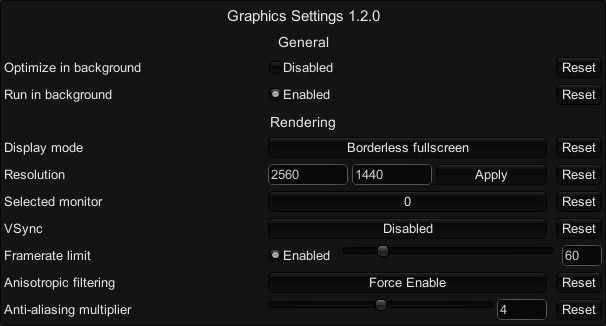
settings list

About

Unity graphics settings plugin for BepInEx

Resources

License

Stars

Watchers

Forks

Releases

No releases published

Packages

No packages published

Languages

  • C# 66.9%
  • PowerShell 18.7%
  • Groovy 7.2%
  • Shell 7.0%
  • Batchfile 0.2%