



Welcome to Den.Dev.Grunt API - the unofficial way to use official undocumented Halo APIs. Here be a lot of dragons.
Note
This is a hobby project that is not intended for production or customer-critical applications. Use at your own risk.
This API enables a developer to:
- Get stats on matches you played.
- Get your personal player stats.
- Track your campaign progress.
And more!
| Component | Description |
|---|---|
Den.Dev.Grunt |
The core library, written in C#, that wraps the Halo Infinite web APIs. |
Den.Dev.Grunt.Zeta |
Experimental ground for the Den.Dev.Grunt library. It's a project where wrapped APIs from Den.Dev.Grunt are tested in a more real scenario. |
Den.Dev.Grunt.Librarian |
Code generator that produces production-quality API client modules from endpoint definitions. Uses Scriban templates to generate strongly-typed C# code with XML documentation. |
The Librarian is a tool that automatically generates production-quality API client code from the Halo Infinite endpoint definitions. It fetches the latest endpoint configuration from the Halo API and generates strongly-typed C# module classes.
- Automatic endpoint discovery - Fetches all 177+ endpoints from the live Halo API
- Strongly-typed responses - Maps endpoints to specific response types via
response-types.json - HTTP method inference - Intelligently detects GET, POST, PUT, DELETE based on method names
- XML documentation - Generates proper
<summary>,<param>, and<returns>tags - Module grouping - Organizes endpoints into logical modules (Economy, Stats, GameCms, etc.)
- Scriban templates - Clean, maintainable template syntax for code generation
- CLI support - Configurable output directory, dry-run mode, and response type mappings
# Navigate to the Librarian project
cd Den.Dev.Grunt/Den.Dev.Grunt.Librarian

# Generate to default output directory (./Output/Generated)
dotnet run

# Generate with response type mappings
dotnet run -- --response-types response-types.json

# Preview without writing files
dotnet run -- --dry-run

# Generate to a custom directory
dotnet run -- --output C:\MyGeneratedCode| Option | Short | Description |
|---|---|---|
--output |
-o |
Output directory for generated files (default: ./Output/Generated) |
--response-types |
-r |
Path to response-types.json mapping file |
--dry-run |
-d |
Preview output without writing files |
--help |
-h |
Show help message |
The response-types.json file maps endpoint IDs to their response types:
{
  "Economy_GetActiveBoosts": "ActiveBoostsContainer",
  "Economy_AiCoreCustomization": "AiCore",
  "Stats_GetMatchHistory": "MatchHistoryResponse"
}
Endpoints without explicit mappings default to object with a TODO comment for manual review.
The Librarian generates partial class files that can be integrated into the main Den.Dev.Grunt project:
Output/Generated/
├── EconomyModule.Generated.cs
├── GameCmsModule.Generated.cs
├── StatsModule.Generated.cs
├── UgcModule.Generated.cs
├── UgcDiscoveryModule.Generated.cs
└── ...
Each generated file follows the existing module patterns with proper inheritance from ModuleBase, XML documentation, and strongly-typed return values.
/// <summary>
/// Calls the Economy_GetActiveBoosts endpoint.
/// </summary>
/// <param name="player">The player's numeric XUID.</param>
/// <returns>An instance of HaloApiResultContainer containing the response.</returns>
public async Task<HaloApiResultContainer<ActiveBoostsContainer, RawResponseContainer>> GetActiveBoosts(string player)
{
    return await this.GetAsync<ActiveBoostsContainer>(
        $"/hi/players/xuid({player})/boosts",
        useClearance: true);
}The core requirement to use the endpoints in the library is to have a Spartan token, that is provided by the Halo Infinite service.
There are two ways to experiment with the library:
- Bring your own Spartan token. That means that you can obtain it on your own through man-in-the-middle inspection of the app/game traffic (what Julia Evans described in her blog post), or by grabbing it from the Halo Waypoint site. Read more on that in the section below.
- Executing the full authentication flow yourself. This is a bit more complex, but doable because Den.Dev.Grunt API wraps all the required methods out-of-the-box. You are still using your own identity and account, but will be generating a new Spartan token for your requests. For details, see section below.
If you want to bring your own token, you carry the responsibility of acquiring and getting an up-to-date version of the Spartan token (they expire frequently). The easiest way to do that is by looking at the Halo Waypoint site through the lens of your browser's Network Inspector.
Look for API calls that return JSON data, and in some of the request headers you will notice a particularly interesting one - x-343-authorization-spartan. That's what you need.
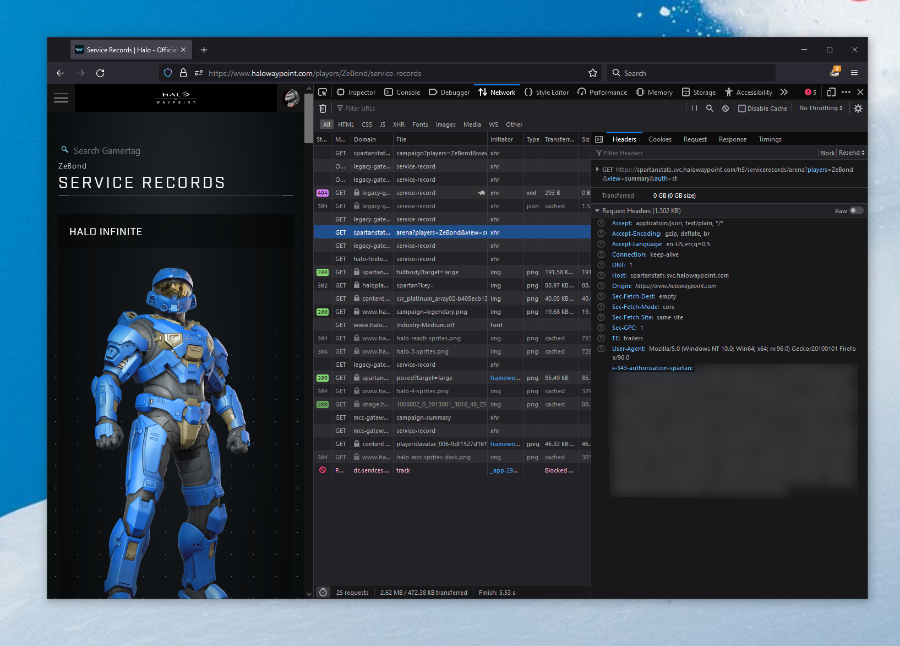
I'll say it again - this token is not long-lived and if you see calls failing with 401 Unauthorized, that means you need a new token.
Some API calls are also requiring you include another header - 343-clearance. This token is obtained through a separate API call, but you can also grab it from the Halo Waypoint site. If you look for it in the network inspector, you will get the 343-clearance header as well.
Once you have the Spartan and clearance tokens, you are good to go, and can now call the API endpoints from Den.Dev.Grunt:
HaloInfiniteClient client = new("<YOUR_SPARTAN_TOKEN>", clearanceToken: "<YOUR_CLEARANCE_TOKEN>");

// Try getting actual Halo Infinite data.
Task.Run(async () =>
{
    var example = await client.Stats.GetMatchStats("21416434-4717-4966-9902-af7097469f74");
    Console.WriteLine("You have data.");
}).GetAwaiter().GetResult();IMPORTANT: The instructions below are using Visual Studio 2019, but are going to work with Visual Studio 2022, which you can download for free.
If you want to automatically generate the Spartan token, you can do so with the help of Den.Dev.Grunt API without having to worry about doing any of the REST API calls yourself. Before you get started, make sure that you register an Azure Active Directory application. You will need it in order to log in with your Microsoft account, that will be used to generate the token. Because this is just for you, you can use https://localhost as the redirect URI when you create the application, unless you're thinking of productizing whatever you're building.
With the application created, in the Den.Dev.Grunt.Zeta project create a client.json file, that has the following contents:
{
  "client_id": "<YOUR_CLIENT_ID_FROM_AAD>",
  "client_secret": "<YOUR_SECRET_FROM_AAD>",
  "redirect_url": "<YOUR_REDIRECT_URI_FROM_AAD>"
}
When you add the configuration file to your project, make sure that it's Build Action is set to None and Copy to Output Directory is Copy if newer.
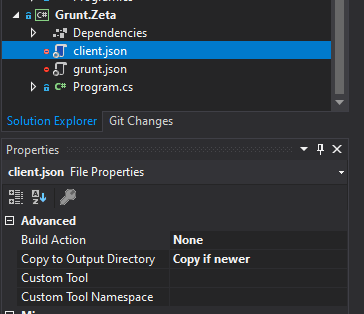
With the file there, you can now run through the authentication flow, that is powered by Den.Dev.Grunt's helper methods:
ConfigurationReader clientConfigReader = new();
var clientConfig = clientConfigReader.ReadConfiguration<ClientConfiguration>("client.json");

XboxAuthenticationClient manager = new();
var url = manager.GenerateAuthUrl(clientConfig.ClientId, clientConfig.RedirectUrl);

HaloAuthenticationClient haloAuthClient = new();

OAuthToken currentOAuthToken = null;

var ticket = new XboxTicket();
var haloTicket = new XboxTicket();
var extendedTicket = new XboxTicket();

var xblToken = string.Empty;
var haloToken = new SpartanToken();

if (System.IO.File.Exists("tokens.json"))
{
    Console.WriteLine("Trying to use local tokens...");
    // If a local token file exists, load the file.
    currentOAuthToken = clientConfigReader.ReadConfiguration<OAuthToken>("tokens.json");
}
else
{
    currentOAuthToken = RequestNewToken(url, manager, clientConfig);
}

Task.Run(async () =>
{
    ticket = await manager.RequestUserToken(currentOAuthToken.AccessToken);
    if (ticket == null)
    {
        // There was a failure to obtain the user token, so likely we need to refresh.
        currentOAuthToken = await manager.RefreshOAuthToken(clientConfig.ClientId, currentOAuthToken.RefreshToken, clientConfig.RedirectUrl, clientConfig.ClientSecret);
        if (currentOAuthToken == null)
        {
            Console.WriteLine("Could not get the token even with the refresh token.");
            currentOAuthToken = RequestNewToken(url, manager, clientConfig);
        }
        ticket = await manager.RequestUserToken(currentOAuthToken.AccessToken);
    }
}).GetAwaiter().GetResult();

Task.Run(async () =>
{
    haloTicket = await manager.RequestXstsToken(ticket.Token);
}).GetAwaiter().GetResult();

Task.Run(async () =>
{
    extendedTicket = await manager.RequestXstsToken(ticket.Token, false);
}).GetAwaiter().GetResult();

if (ticket != null)
{
    xblToken = manager.GetXboxLiveV3Token(haloTicket.DisplayClaims.Xui[0].Uhs, haloTicket.Token);
}

Task.Run(async () =>
{
    haloToken = await haloAuthClient.GetSpartanToken(haloTicket.Token);
    Console.WriteLine("Your Halo token:");
    Console.WriteLine(haloToken.Token);
}).GetAwaiter().GetResult();

HaloInfiniteClient client = new(haloToken.Token, extendedTicket.DisplayClaims.Xui[0].Xid);

// Test getting the clearance for local execution.
string localClearance = string.Empty;
Task.Run(async () =>
{
    var clearance = (await client.Settings.ActiveClearance("1.6")).Result;
    if (clearance != null)
    {
        localClearance = clearance.FlightConfigurationId;
        client.ClearanceToken = localClearance;
        Console.WriteLine($"Your clearance is {localClearance} and it's set in the client.");
    }
    else
    {
        Console.WriteLine("Could not obtain the clearance.");
    }
}).GetAwaiter().GetResult();

// Try getting actual Halo Infinite data.
Task.Run(async () =>
{
    var example = await client.Stats.GetMatchStats("21416434-4717-4966-9902-af7097469f74");
    Console.WriteLine("You have stats.");
}).GetAwaiter().GetResult();
The code above will try to read tokens locally and refresh them, if available.
👋 NOTE
This is worth additional investigation, but it seems that if the clearance (
343-clearanceheader) is used, it needs to be activated at least once with the game before the API access is granted. That is, you need to launch the game at the latest build on your account before you can start querying the API. If you are running into issues with the API and are getting403 Forbiddenerrors, make sure that you start Halo Infinite at least once before retrying.
Once you have the Spartan token, you are good to go and can start issuing API requests. Keep in mind that the Spartan token does expire, so you will need to refresh it along other tokens as well.
Complete list of endpoints can be obtained by querying the official Halo Infinite API, that also helpfully contains all the metadata and requirements for each:
https://settings.svc.halowaypoint.com/settings/hipc/e2a0a7c6-6efe-42af-9283-c2ab73250c48The endpoint above does not require authentication and can be queried in the open. You can also peruse an offline version of the API response in the library.
You can read the docs on the Den.Dev.Grunt docs website.
Q1: Is this in any way endorsed by Halo Studios or Microsoft?
No. Not at all. This is something that I've put together myself by inspecting network traffic. This project is not funded, supported, or otherwise endorsed by either 343 Industries or Microsoft.
Q2: Something is broken and my production site that uses your library doesn't work. Can you help?
Don't use any of this code in production. It's nowhere near stable, and will never be.
Q3: Some API endpoint is not working anymore or returns an unexpected result. What's up with that?
Open an issue so that I can investigate.
Q4: How do I contact the author?
Open an issue or reach out on the website.
Q5: Can this be used for commercial purposes?
Absolutely not. This project is exploratory in nature. It has no guarantees, implied or otherwise, of your ability to consume the API. It does not give you any permission to use this in commercial projects, and neither does it guarantee API access or stability. If you are looking at building something serious using the Halo API, you need to reach out to 343 Industries.
Contributions are welcome, but please first open an issue so that we can discuss before writing any code.