A Neovim plugin that extends fzf-lua with reusable, persistent grep context and a fuzzy-selectable UI for switching between them.
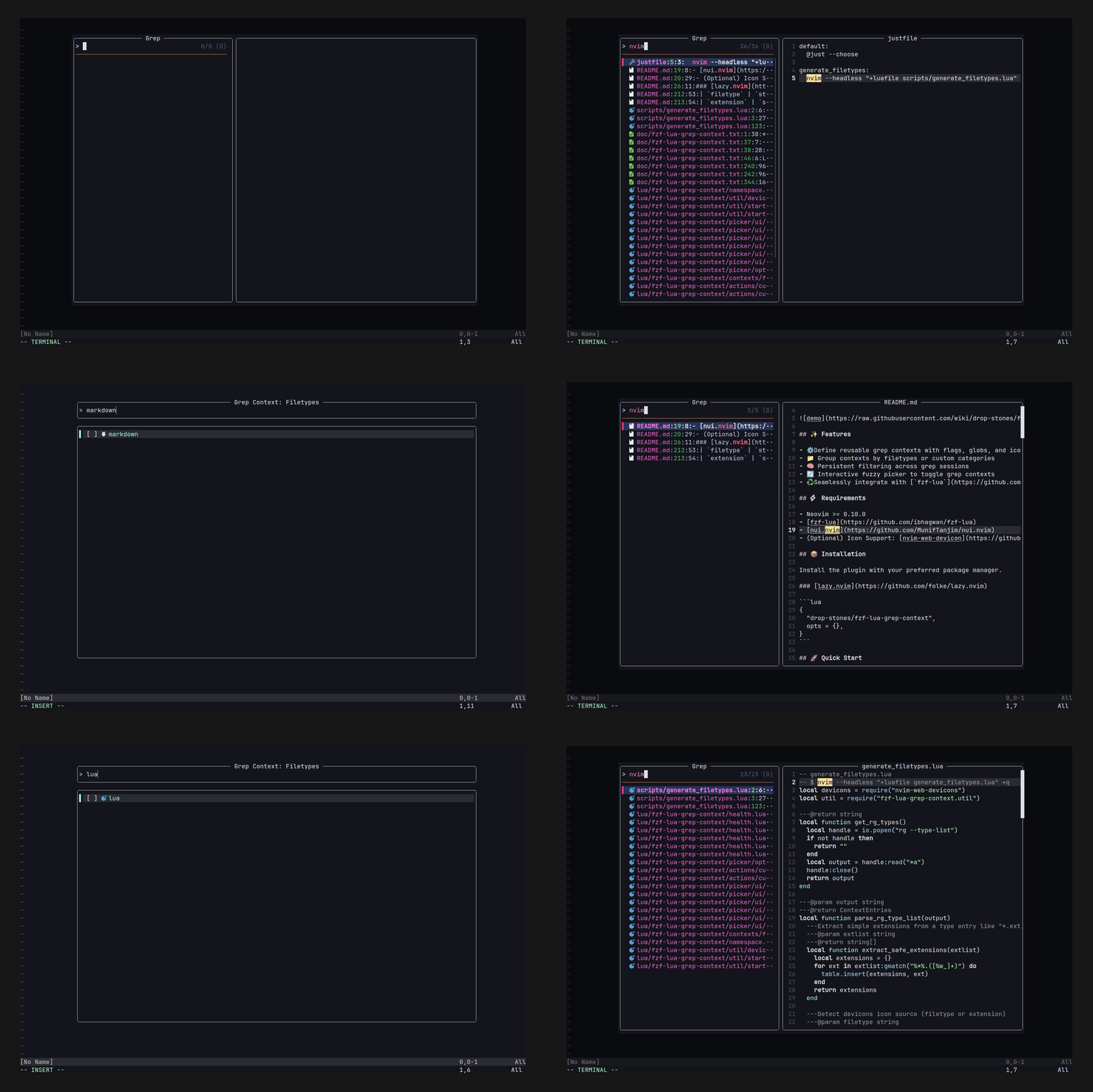
- ⚙️ Define reusable grep contexts with flags, globs, and icons
- 📁 Group contexts by filetypes or custom categories
- 🧠 Persistent filtering across grep sessions
- 🔄 Interactive fuzzy picker to toggle grep contexts
- ♻️ Seamlessly integrate with
fzf-luato transform your grep command dynamically
- Neovim >= 0.10.0
- fzf-lua
- nui.nvim
- (Optional) Icon Support: nvim-web-devicon
Install the plugin with your preferred package manager.
{
  "drop-stones/fzf-lua-grep-context",
  opts = {},
}This plugin lets you filter grep targets interactively with a fuzzy-selectable UI.
- Disable fzf-lua's automatic glob injection via
rg_glob = false - Inject grep context flags/globs using
fn_transform_cmd - Assign a key (e.g.,
<C-t>) to launch the context picker - Optionally set the built-in
filetypesgroup as the default
{
  "ibhagwan/fzf-lua",
  dependencies = { "drop-stones/fzf-lua-grep-context" },
  opts = {
    grep = {
      rg_glob = false, -- 1. Disable automatic --iglob injection by fzf-lua
      fn_transform_cmd = function(query, cmd, _)
        -- 2. Load grep-context module in runtime
        -- This ensures the plugin is available when used from inside fzf-lua sessions
        vim.opt.rtp:append(vim.env.FZF_LUA_GREP_CONTEXT)
        return require("fzf-lua-grep-context.transform").rg(query, cmd)
      end,
      actions = {
        -- 3. Open grep context picker with <C-t>
        ["ctrl-t"] = function() require("fzf-lua-grep-context").picker() end,
      },
    },
  },
},
{
"drop-stones/fzf-lua-grep-context",
opts = {
picker = {
default_group = "filetypes", -- 4. Built-in filetype-aware filtering
},
},
}Note
The plugin sets vim.env.FZF_LUA_GREP_CONTEXT automatically on startup.
Make sure to call fn_transform_cmd after the plugin is loaded.
You can customize the plugin behavior using the contexts and picker options.
Expand to see the list of all the default options below.
Default Options
{
  border = "rounded", -- Border style for the picker window
  contexts = {
    default = {
      title = "Default",
      entries = {},
    },
    filetypes = {
      title = "Filetypes",
      entries = { ... }, -- See full list by `:lua print(vim.inspect(require("fzf-lua-grep-context.contexts.filetypes")))`
    },
  },
  picker = {
    default_group = "default",
    title_fmt = " Grep Context: %s ",
    keymaps = {
      { "<Down>", function() require("fzf-lua-grep-context.actions").move_down() end, mode = { "n", "i" } },
      { "<Up>", function() require("fzf-lua-grep-context.actions").move_up() end, mode = { "n", "i" } },
      { "<C-j>", function() require("fzf-lua-grep-context.actions").move_down() end, mode = { "n", "i" } },
      { "<C-k>", function() require("fzf-lua-grep-context.actions").move_up() end, mode = { "n", "i" } },
      { "<C-d>", function() require("fzf-lua-grep-context.actions").half_page_down() end, mode = { "n", "i" } },
      { "<C-u>", function() require("fzf-lua-grep-context.actions").half_page_up() end, mode = { "n", "i" } },
      { "<Tab>", function() require("fzf-lua-grep-context.actions").toggle_select() end, mode = { "n", "i" } },
      { "<CR>", function() require("fzf-lua-grep-context.actions").confirm() end, mode = { "n", "i" } },
      { "<Esc>", function() require("fzf-lua-grep-context.actions").exit() end, mode = { "n", "i" } },
      { "j", function() require("fzf-lua-grep-context.actions").move_down() end, mode = "n" },
      { "k", function() require("fzf-lua-grep-context.actions").move_up() end, mode = "n" },
      { "gg", function() require("fzf-lua-grep-context.actions").move_top() end, mode = "n" },
      { "G", function() require("fzf-lua-grep-context.actions").move_bottom() end, mode = "n" },
      { "q", function() require("fzf-lua-grep-context.actions").exit() end, mode = "n" },
    },
    checkbox = {
      mark = "x",
      hl = { fg = "#3CB371" },
    },
  },
}The contexts table defines reusable grep filters grouped by name.
If you only need one group, define contexts directly with title and entries:
contexts = {
  title = "Default",
  entries = { ... },
}
This is equivalent to:
contexts = {
  default = {
    title = "Default",
    entries = { ... },
  },
}
Call with:
require("fzf-lua-grep-context").picker()
-- or
require("fzf-lua-grep-context").picker("default")Define multiple named context groups:
contexts = {
  group1 = {
    title = "Group 1",
    entries = { ... },
  },
  group2 = {
    title = "Group 2",
    entries = { ... },
  }
}
To launch a specific group in the picker:
require("fzf-lua-grep-context").picker("group1")You can also add your own entries to the built-in filetypes group:
contexts = {
  filetypes = {
    entries = {
      custom = {
        label = "My Custom",
        filetype = "mytype",
        globs = { "*.mytype" },
      },
    },
  },
}Each entry in entries defines how grep commands should behave for a specific target.
| Key | Type | Description |
|---|---|---|
label |
string |
Display name shown in the picker |
filetype |
string? |
Used to fetch icon from nvim-web-devicon |
extension |
string? |
Used to fetch icon from nvim-web-devicon |
icon |
{ [1]: string, [2]: string}? |
Override the icon symbol ([1]) and its highlight group ([2]) |
flags |
string[]? |
Extra flags passed to all commands unless overridden |
globs |
string[]? |
Glob patterns to filter files |
commands |
table<string, { flags?: string[], globs?: string[] }>? |
Per-command override for flags and globs |
Warning
If both icon and filetype/extension are provided, the icon takes precedence.
Example:
entries = {
lua = {
label = "Lua",
filetype = "lua",
-- extension = "lua",
-- icon = { "", "DevIconLua" },
commands = {
rg = { flags = { "--type", "lua" } },
git_grep = { globs = { "*.lua" } },
},
},
}The picker table controls the context selection UI.
You can customize the default group, title format, and keymaps:
picker = {
  default_group = "default", -- the group to show by default
  title_fmt = " Grep Context: %s ", -- Display format where `%s` is replaced with the group `title`
  keymaps = {
    { "<Tab>", function() require("fzf-lua-grep-context.actions").toggle_select() end, mode = { "n", "i" } },
    { "<CR>", function() require("fzf-lua-grep-context.actions").confirm() end, mode = { "n", "i" } },
    { "<Esc>", function() require("fzf-lua-grep-context.actions").exit() end, mode = { "n", "i" } },
    -- more keymaps...
  },
  checkbox = {
    -- Customize the checkmark character and highlight used in the picker
    mark = "x", -- You can use any symbol, such as "✓", "✔" or "✗"
    hl = { fg = "#3CB371" }, -- Highlight settings for the mark (e.g., color, bold, italic)
  },
}To use grep contexts during fzf-lua searches, inject filters using fn_transform_cmd.
grep = {
  rg_glob = false, -- disable fzf-lua’s default glob injection
  fn_transform_cmd = function(query, cmd, _)
    -- ensure grep contexts are available during runtime
    vim.opt.rtp:append(vim.env.FZF_LUA_GREP_CONTEXT)
    return require("fzf-lua-grep-context.transform").rg(query, cmd)
  end
}fn_transform_cmd = function(query, cmd, _)
vim.opt.rtp:append(vim.env.FZF_LUA_GREP_CONTEXT)
return require("fzf-lua-grep-context.transform").git_grep(query, cmd)
endThe plugin introduces a border option to handle cases when fzf-lua profiles (e.g., border-fused) return a function instead of a value that nui.nvim accepts.
By default, the fallback border style is "rounded".
Accepted values are the same as nui.nvim border styles (https://github.com/MunifTanjim/nui.nvim/tree/main/lua/nui/popup#borderstyle).
You can override this with your own preference:
border = "single", -- fallback if fzf-lua provides a functionRun :checkhealth fzf-lua-grep-context to check runtime path and dependencies.
This project is licensed under the MIT License - see the LICENSE file for details.