________ __ ___, / ____/ /_ ___ ____ _/ /_/ __ )____ _ __ / / / __ \/ _ \/ __ `/ __/ __ / __ \| |/ / / /___/ / / / __/ /_/ / /_/ /_/ / /_/ /> <` \____/_/ /_/\___/\__,_/\__/_____/\____/_/|__| |
Catalogue your own movie review inside your terminal. 

pipx install cheatbox
|
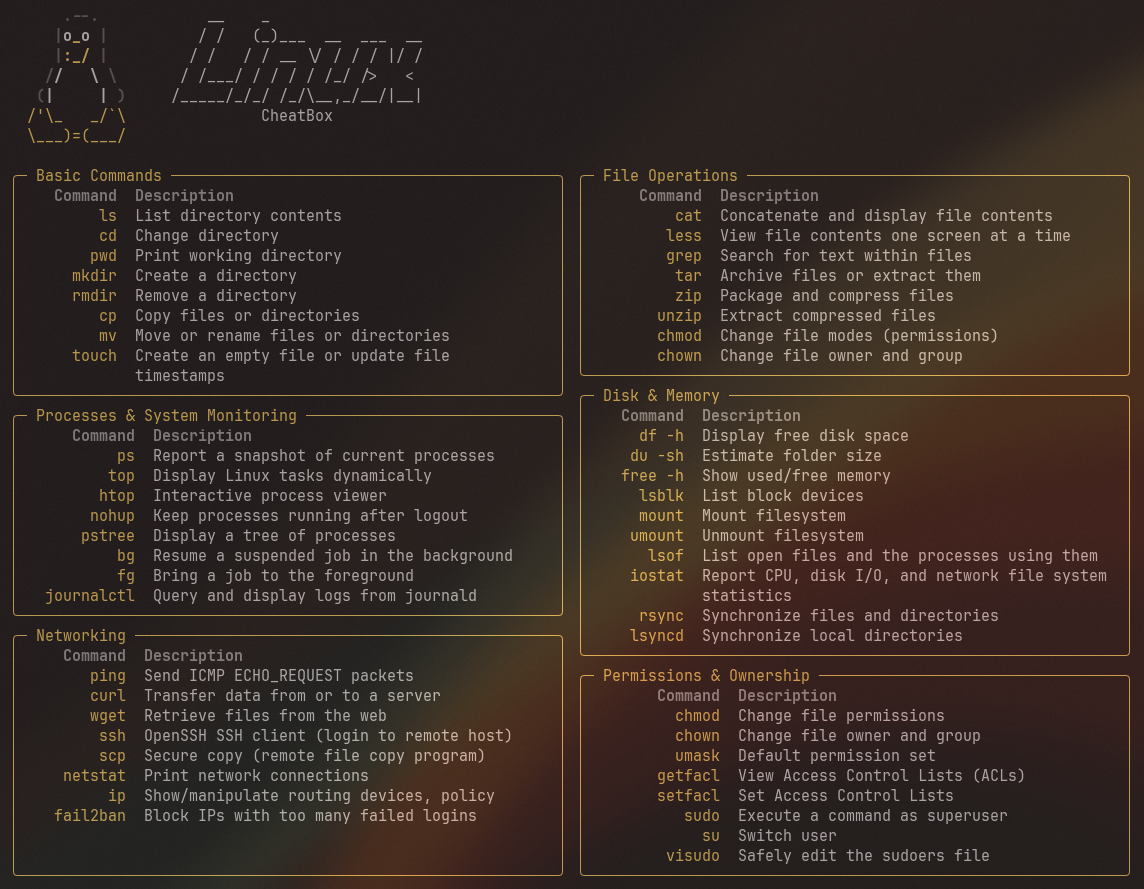
| Features | Notes |
|---|---|
| List Down Cheatsheet | Using pick to list down all available cheatsheet |
I am currently in my job hunting phase. When scrolling on Linkedin, I keep on seeing these Linux Cheatsheet post.
Since a lot of them have different and unconsistent style, I think I can remake them using my own style - aka. terminal style.
P/S: If you want to connect, this is my Linkedin -> Fatinul
NOTE: Have
uvinstalled
👣 Steps
- Clone the repo first
git clone https://github.com/fatinul/cheatbox
cd cheatbox
uv sync
uv run cheatbox
NOTE: You should see every available cheatsheets after run the code above
-
Create a json file with the domain name
(linux.json, docker.json, ..)inside thedata/directory -
Edit the template below.
📋 JSON template
| Key | Note |
|---|---|
| LOGO | The logo of the cheatsheet, only edit the string inside [..] of "ascii". It uses rich for color |
| TITLE | Similar guide with the LOGO, however not recommend to add any color |
| STYLE | command_width: left column of each box, outer_width: overall bento box width, primary_color: Overall color of border, TITLE, etc.. |
| COMMAND | Can see the boilerplate of Linux Basic Command. Just change the command & description. Can add as many as you want but recommended to have around 6 box/subdomain/category |
{
  "LOGO": [
    {
      "ascii": [
        "    [bold black].--. [/]",
        "   [bold black]|[white]o[/][yellow]_[/][white]o[/] |[/]",
        "   [bold black]|[yellow]:_/[/] |[/]",
        "  [bold black]/[white]/   \\ [/]\\ [/]",
        " [bold black]([white]|     |[/] )[/]",
        "[yellow]/'\\_   _/`\\ [/]",
        "[yellow]\\___)=(___/[/]"
      ]
    }
  ],
  "TITLE": [
    {
      "ascii": [
        "    __    _                 ",
        "   / /   (_)___  __  ___  __",
        "  / /   / / __ \\/ / / / |/ /",
        " / /___/ / / / / /_/ />   <  ",
        "/_____/_/_/ /_/\\__,_/__/|__|  "
      ]
    }
  ],
  "STYLE": {
    "command_width": 8,
    "outer_width": 120,
    "primary_color": "yellow"
  },
  "Basic Commands": [
    {
      "command": "ls",
      "description": "List directory contents"
    },
    {
      "command": "cd",
      "description": "Change directory"
    },
    {
      "command": "pwd",
      "description": "Print working directory"
    }
  ],
  "File Operations": [
    {
      "command": "cat",
      "description": "Concatenate and display file contents"
    },
    {
      "command": "less",
      "description": "View file contents one screen at a time"
    },
    {
      "command": "grep",
      "description": "Search for text within files"
    }
  ]
}
-
After finish editing the
.jsonfile, runuv run cheatboxto choose your json file name -
FINISH. Post on Linkedin or do whatever you want! Have a pull request so others can share your cheatsheet too!
cheatbox is inspired by the common cheatsheet posts in the Linkedin feed and also BENTOBOX.
GPL-3.0