This bot reads everything in your twitch chat and learns how to speak. Just type "!yap" in chat. This is a Windows only application.

- Download and install both x86 & x64 versions of Microsoft Visual C++ Redistributable
- Download the latest release
- After it's installed, run the shortcut from your desktop or start menu app list. Happy yappin'
- The install will live at
YourUserName\AppData\Roaming\YapBot. User specified install locations are planned for the future
- Train Yap Bot by just typing in chat. All chatter's messages will be added to the database
- This app runs locally without communicating with AI models or large language models (LLMs)
- When Yap Bot is run, it'll use previous chat messages to formulate a new, randomized message
- In addition to being able to run the bot with "!yap", you can also give it a starting point for the sentence it generates. e.g. "!yap dingus"
- These messages can only start with a word that has previously started a chat message, so don't expect every word to work unless it has been indexed
- You can "train" the bot by feeding it chat messages with a starting word you'd like to add with the database. e.g. "dingus poop fart butt"
- The core script is built on TwitchMarkovChain in python. Many, many details and "hidden" options are listed on this repo
- The installer, client app,updater & tray app are built using Rust
Yap Bot Installer v5.1.1.exeis responsible for making sure python and necessary dependencies are installed toUser\AppData\Roaming\YapBot- Included binaries:
TwitchYapBot.exe,YapBotUpdater.exe&YapBotTray.exe - Included files & folders:
TwitchMarkovChain&yap_icon_purple.ico
- Included binaries:
TwitchYapBot.exeis responsible for running the python chat bot, (TwitchMarkovChain.py) showing its output, shutting it down, restarting it, and editing its settings. In Yap Bot's previous rendition, these settings had to be changed manually in a .json fileYapBotUpdater.exeresponsible for automatically updatingTwitchYapBot.exeto the newest versionYapBotTray.exeis a standalone binary that runs Yap Bot in the Windows system tray. We switch betweenTwitchYapBot.exe&YapBotTray.exebased on the user's settings, or when they press the "to tray" button in the GUI
Yap Bot Installer:

TwitchYapBot:
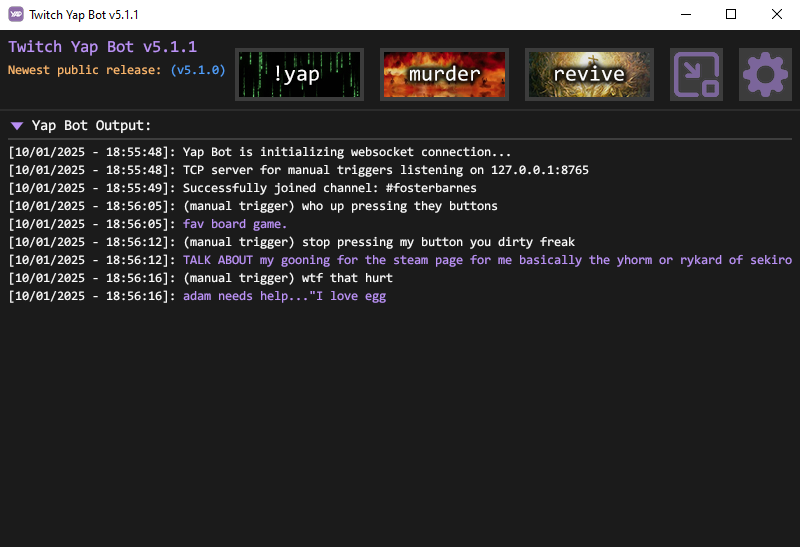
YapBotUpdater:

YapBotTray:
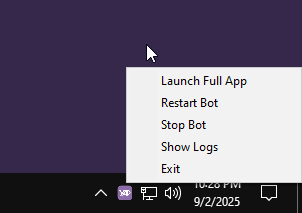
If you have any issues, create an issue from the Issues tab and I will get back to you as quickly as possible.
If you'd like to support me, follow me on twitch: https://www.twitch.tv/fosterbarnes
or if you're feeling generous drop a donation: https://coff.ee/fosterbarnes
- If you encounter this error when launching Yap Bot:
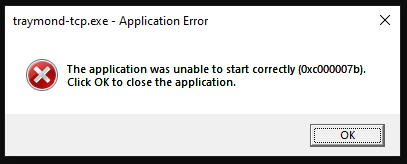
- Download and install vc_redist.x86.exe then restart the app
-
Starting in v5.0.3, Windows may incorrectly flag the installer as a virus. You may need to allow your browser to download it. If Windows blocks it from running, click the windows security notification that pops up, then allow it to run. More info on setting exclusions in Windows Security if needed: https://www.elevenforum.com/t/add-or-remove-exclusions-for-microsoft-defender-antivirus-in-windows-11.8797/
This is a known problem with the app, but not much can be done about it. Fixing this false flag would mean paying hundreds of dollars a year for code-signing. The component that's most likely triggering antivirus is traymond-tcp. Yap Bot is built on the egui library, which does not have the ability to natively minimize windows to the system tray. To be able to add this feature, I had to fork the original build of traymond and edit it to be able to communicate with Yap Bot. The original traymond waits for a set keyboard combination from the user, then minimizes the selected window to tray when those keys are pressed. Because of this keyboard monitoring, some anti-viruses interpret this as malicious and attempt to block it. In it's current re-worked state, we don't even use the key-combo function, and just use it to receive commands from Yap Bot, then minimize Yap Bot to tray, but this original code remains in the project.
All of that being said, always exercise caution when running unknown apps from github. This app and traymond-tcp are completely open source, so feel free to go through the code and build for yourself if you're worried about anything malicious.
- Improve UI experience for entering configuration details
- Auto-add bot account when authenticating oauth & access token
- Check & warn when using main account for yap bot
- Added automatic update checking
- Correctly pass cooldown value as an integer
- Display cooldown one time per cooldown period if bot is activated during this period
- Fix bug where bot would sometimes say "I haven't extracted "" from chat yet." when generate message is sent
- Implements manual trigger functionality for Yap Bot via file and TCP methods to enable external or GUI-based activation
- Various fixes
- Added Settings menu
- Improved UI
- Added fun stuff
- Automatic version checking and installation
- Automatically updates TwitchYapBot
- Code refactoring
- Display settings icon in the settings window instead of egui default
- Changes settings cog button rendering method because it looked crusty
- Fixed bug where clicking the cancel button in settings would make the settings window black and fail to close it
- Improved debug console output
- App now creates a log file and prints debug output. Saves the most recent 10 run logs and deletes the oldest one if necessary
- Made the output section collapsable. Fade in/out animation when hiding/showing
- Added sound effects. Changed file name formatting for sounds
- Dynamically add sound effects when compiling instead of using a static array
- Properly check for the current version being newer than the newest public release
- The repeated logic for centering the window is now stored in
center_window.rsand called when needed elsewhere
- Allow users to set a generation timer with a randomized number of seconds
- Set generation timer minimum to 5 seconds instead of 30
- Added setting in UI for randomized generation timers
- Timers now have an on/off checkbox instead of having the user enter a negative number to disable it
- Added a tip that explains what these settings do when hovering over the checkbox
- Added tips on hover for all bot settings
- Allows user to generate a new bot token from the GUI. Not having this button was an oversight
- Change "Authentication" -> "Access Token" in settings to be more clear
- Don't show "#" prefix in channel name settings
- Added option to start app minimized to tray
- Added button to minimize to tray
- Added
traymond-tcp.exeas a resource. This binary is based on traymond. It has been forked to have TCP functionality - Update installer to install
traymond-tcp.exe - Update updater to install and/or update
traymond-tcp.exe - Added option to automatically close when OBS or Streamlabs OBS close
- Added "first launch" setting and popup for announcing new features after updating
- Fix issue where desktop and start menu shortcuts are sometimes not created
- Improved installer logic and reliability
- Checks for installed versions of x86 & x64 builds of Microsoft Visual C++ Redistributable. Installs them if necessary
- Checks for installed versions of x86 & x64 builds of Microsoft Visual C++ Redistributable. Installs them if necessary
- OBS monitoring PowerShell process runs hidden with no window shown
- A new standalone binary that will run the Python bot and live in the Windows system tray with no GUI. You are still able to open the GUI from the tray app, however, and vice versa
- This app still respects the "close when OBS closes" setting, as well as the "start app to tray" setting
- Improved efficiency for OBS exit monitoring. Completely re-wrote the logic for OBS monitoring to be more simple and efficient
- Completely re-wrote the logic and method for minimizing to tray.
traymond-tcpis no longer used. During testing I found that minimizing egui apps to the system tray will use WAY more CPU resources than it should (up to around 10% CPU usage). This had nothing to do with the code itself, but is a limitation of egui itself. We now use a custom binary calledYapBotTray.exethat is able to run the bot itself, and launch the main GUI application. This new tray app only uses a few MB of RAM, and ~0% of the CPU. - Added window state debug logging (minimized, un-minimized etc.)
- Removes the need to download and install
traymond-tcp.exe - Installs the new tray app:
YapBotTray.exe - Installs the icon used by the tray app:
yap_icon_purple.ico
- Removes the need to install
traymond-tcp.exe - Installs the new tray app:
YapBotTray.exe - Installs the icon used by the tray app:
yap_icon_purple.ico
