Builder CI is an automated build system designed to support Continuous Integration (CI) across various types of development projects. It was created with the goal of simplifying and automating build pipelines in a more efficient way than traditional tools like Jenkins.
It’s designed to optionally integrate with Redmine via a dedicated plugin, allowing better visibility into builds directly within project management workflows.
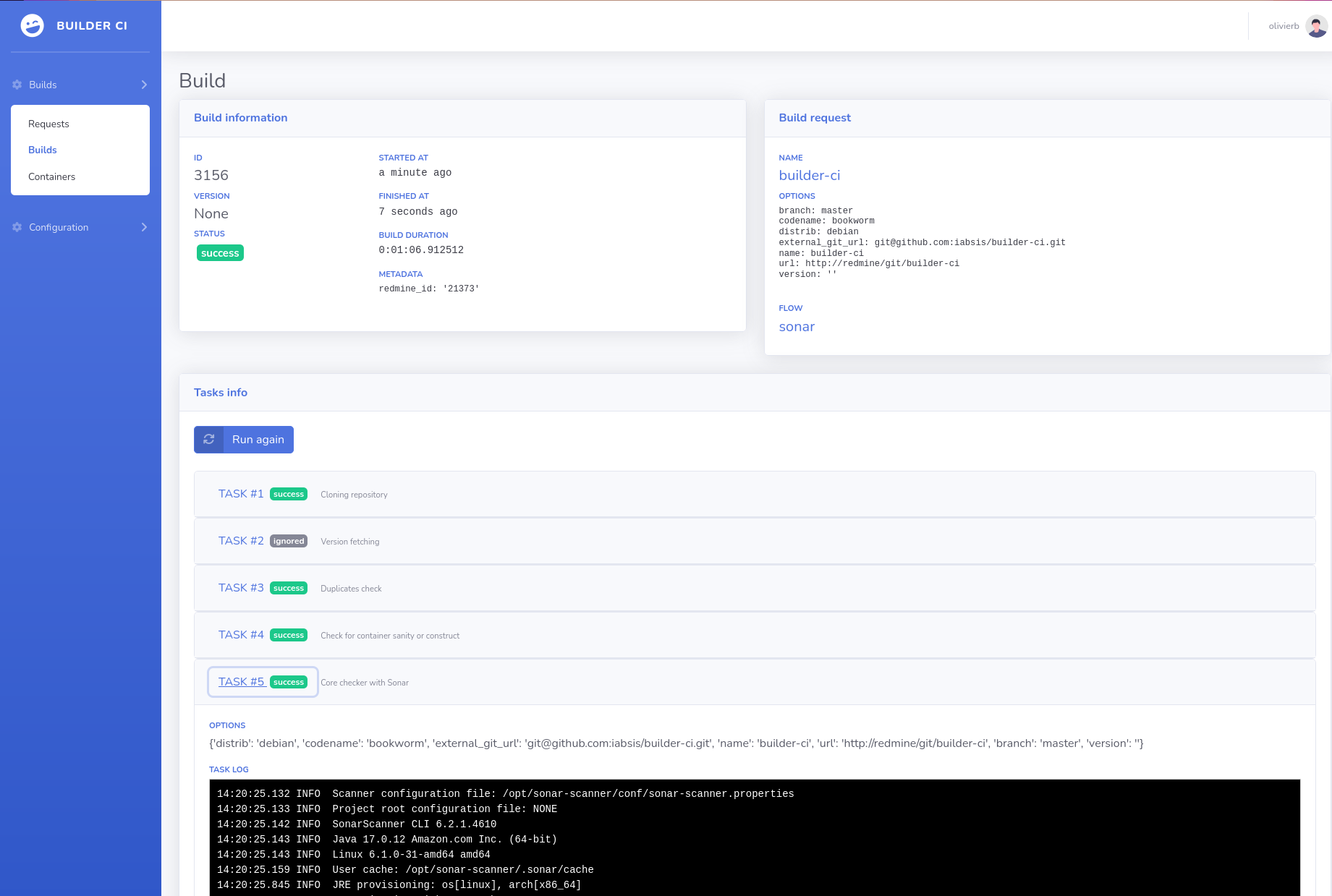
- Create any script to create your package (e.g.,
.deb,.rpm) - Exposes a REST API to trigger builds
- Modular and extensible — build your own flow
- Lightweight: built with Python and minimal dependencies
- Easy to install and update with a single command on Debian Bookworm
- Uses PostGreSQL, Django and Podman.
- Commands are run in container for more safety.
- "Build as Code": configure builds using a
builder.ymlfile - Trigger multiple flow in one commit
- Automatic podman container build, based on advance rules
Note: All commands should be run as
root.
echo "deb [trusted=yes] https://projects.iabsis.com/repository/builder-ci/debian bookworm main" > /etc/apt/sources.list.d/iabsis.list
apt update && apt install builder-ci postgresql redis nginx
This will return error since database is not yet configured, ignore for now and go to next step
su - postgres
createuser --pwprompt builder
createdb -O builder builderNow edit /etc/builder-ci/builder-ci.conf and change the following lines.
DATABASE_NAME=builder
DATABASE_USER=builder
DATABASE_PASSWORD=builder
ALLOWED_HOSTS=mybuilder.com
Now fix the previous error with apt -f install
Create a simple nginx configuration that will be used also serve static files.
server {
    listen 80;
    server_name mybuilder.com;

    location /static/ {
        alias /usr/share/builder-ci/statics/;
    }

    location / {
        proxy_set_header Host $host;
        proxy_pass http://127.0.0.1:8000;
        proxy_http_version 1.1;
        proxy_set_header Upgrade $http_upgrade;
        proxy_set_header Connection "upgrade";
    }
}
If you need to setup letsencrypt certificate, install python3-certbot-nginx and run certbot --nginx.
set -a ; . /etc/builder-ci/builder-ci.conf
cd /usr/share/builder-ci/
. ./venv/bin/activate # Dont forgot the first dot
python3 manage.py createsuperuser
And login with your super user.
The first step consist into declare container configuration. All commands will be run inside this container context for me security. Once build is finished, the container is deleted and temporary files will be lost.
- Open Configuration > Container > Create.
By example, building Debian package only requires three lines
FROM {{distrib}}:{{codename}}
ENV DEBIAN_FRONTEND "noninteractive"
RUN apt update && apt-get install -y build-essential devscripts nfs-common apt-utils equivs rsync
As you can see, we configured two variables : distrib and codename. The system will replace automatically this variables based on the build request configuration.
- Target tag: will be the tag name of the podman image that will be used locally. You can reuse variable as in Dockerfile.
- Default options: A json for the key map to get default variable, if your future build request not define it.
- Options are mandatory: define if build request requires the define the variable, otherwise fallback to default.
Once you save, you can notice the system is not building any container at this stage. Containers will be provisionned automatically during on build request.
The method consist into script that will be run inside the container. You can define as many method as you want, and method can be reused several time in flows.
- Open Configuration > Method > Create.
Choose the previously created container and define the script, back to our previous debian build package example. Note that first line must contain Shebang otherwise the system will not know how to run the script. You can put any script in any language.
#!/usr/bin/env bash

set -e

export DEBIAN_FRONTEND="noninteractive"
dpkg-buildpackage
The set -e line ensure to properly stop on error, but in can be optionnal based on your build rules.
The flow define the order of the method to be run. If you need to handle build duplication, you can add a Version file path, relative to root of your git repository, and a Version regex, used to get the version.
- Open Configuration > Method > Create.
- Version file:
debian/changelog - Version regex:
[\w-]+\s+\((\d+\.\d+.\d+(.\d+)?(-\w+)?)\) - Version mandatory: Yes
- Method: your previously create method.
- Priority: 1
Save and now your flow is fully defined.
We are now ready to create a build request.
- Open Builds > Requests > Create.
- Choose a name that qualify your project.
- Put the URL of the Git, by example:
https://github.com/streadway/hello-debian - Ref name:
master - Flow: select the previously created flow.
- Options:
{"distrib": "debian", "codename": "bookworm"}
Yes. It's used in production with frameworks like Laravel, Symfony, Ionic, Flutter, NestJS, Angular, and React across platforms such as Android, Debian, Ubuntu, Red Hat, and CentOS.
Yes, contain is run as priviledged mode, you can install podman client and you will be able to run container.
Yes, we did a Redmine plugin. Once installed, create API key and configure
REDMINE_URL=https://<your redmine host>
REDMINE_KEY=<your redmine key>
Yes, you can configure SSO like Keycloak by configuring OpenID in configuration.
OPENID_ID=sso
OPENID_NAME="<display name on login page>"
OPENID_CLIENT_ID=<your keycloak client ID>
OPENID_SECRET=<your keycloak secret>
OPENID_CONFIGURATION_URL="https://<your keycloak url>/realms/<your keycloak realm>/.well-known/openid-configuration"
We welcome contributions of all kinds — including code, documentation, bug reports, and feature suggestions.
While formal contributing guidelines are coming soon, you can:
- Fork the repository
- Create a new branch for your changes
- Open a pull request
- Share feedback via comments or discussions
We expect not loading any library from CDN, instead use npm install into sbadmin2 folder and export
the module with webpack. Add the import into index.js and run npx webpack.
Builder CI is licensed under the GPL-3.0 License.