This is a library, that provides styleable UI Elements for XMPP over Websockets using xmpp-ftw and angular-xmpp-services.
Try here: http://datenkueche.com/buddycloud/v8/ For testing, open the "login" dropdown and click "sign in". At the moment username and password are prefilled. You can play with a real account with real data.
Known bugs: search is not working at the moment
Screenshot
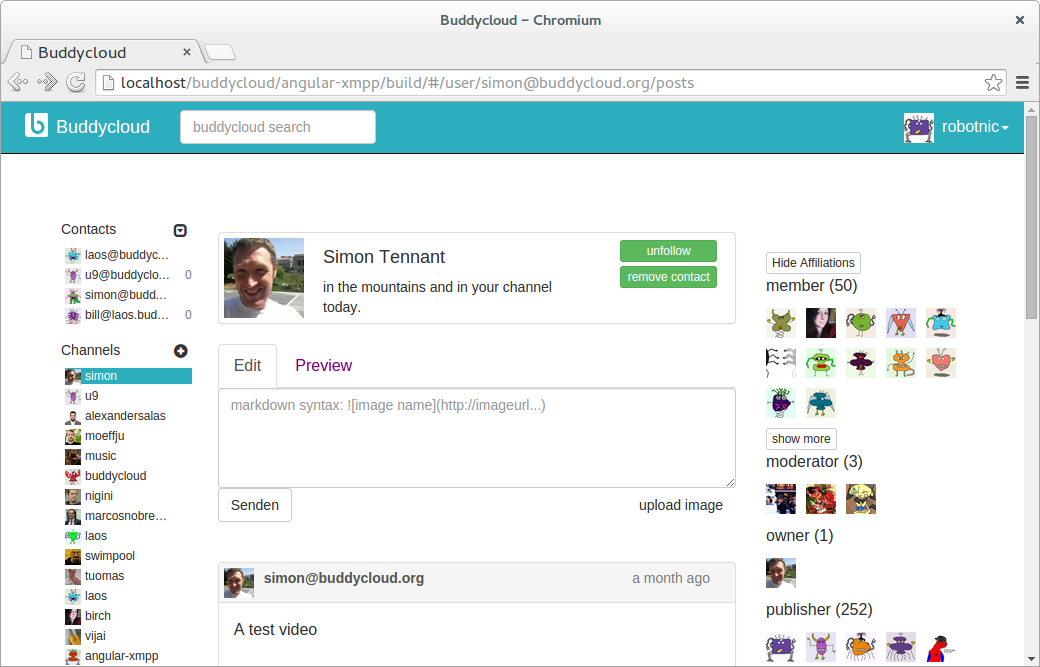
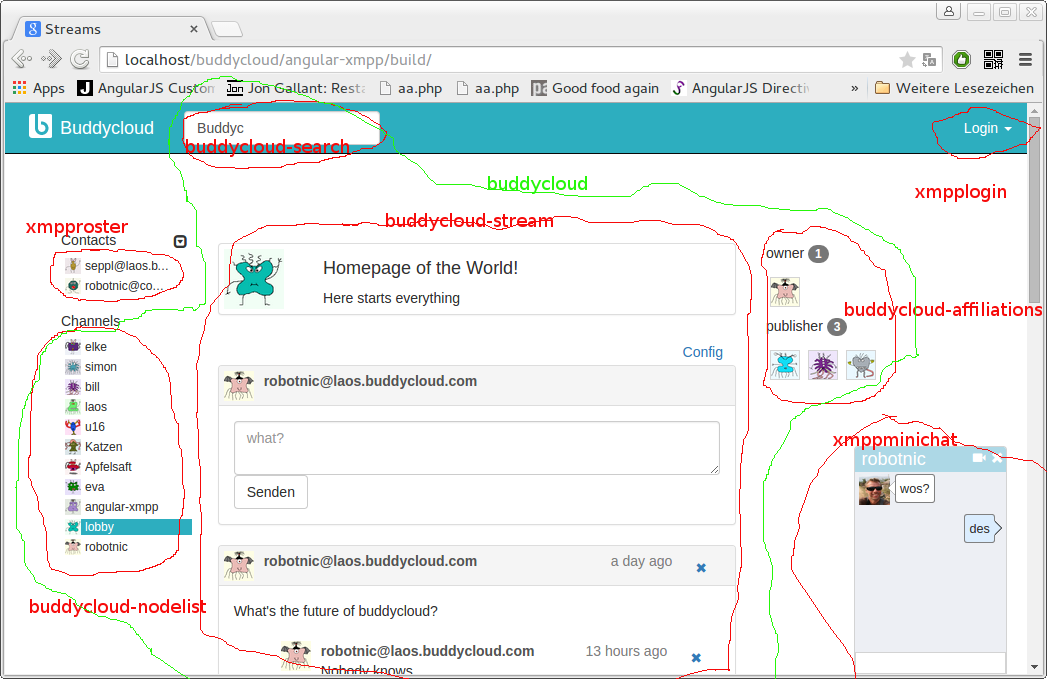
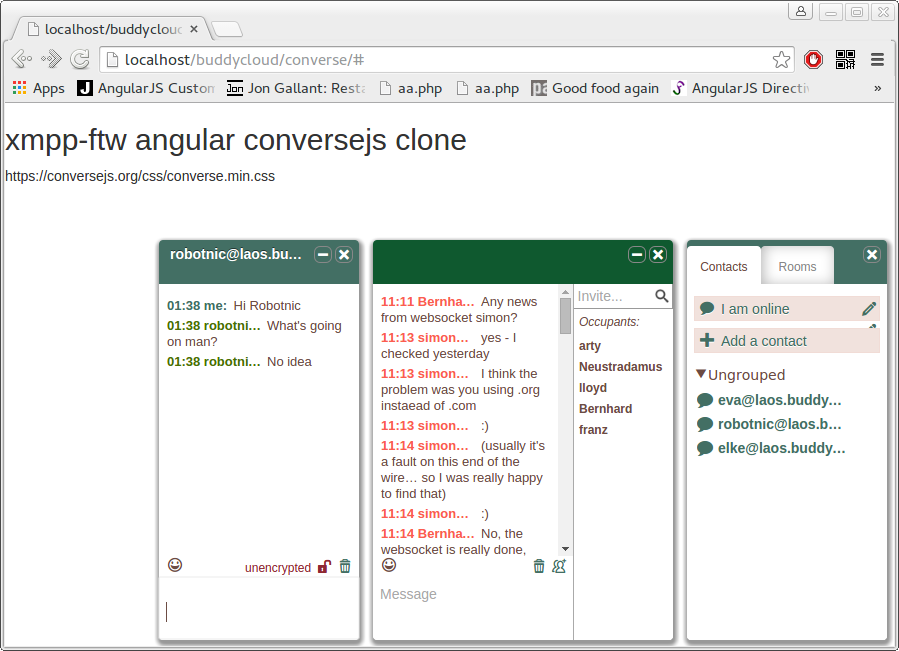
depending on your design skills (conversjs clone - prove of concept)
bower install angular-xmpp
To see the buddycloud example (screenshot) open
bower_components/angular-xmpp/index.html
in your browser.
To connect to the xmpp server we need an [xmpp-ftw server](You will maybe find something like tha://github.com/xmpp-ftw/xmpp-ftw-demo/). You can install that on your localhost. To make buddycloud working read this posting !!!
host: xmpp-ftw server address
defaultdomain: if the is no "@"sign in the login name the defaultdomain will be added.
<xmpp host="https://laos.buddycloud.com">
    <xmpplogin defaultdomain="laos.buddycloud.com"></xmpplogin>
    <xmpproster></xmpproster>
</xmpp>
plunker (no styling)
plunker (bootstrap styling)
angular.module("XmppApp", ["AngularXmpp", 'templates-app'])
      .controller("page", function($scope) {
        $scope.openchat = function(jid) {
          console.log("openchat", jid, $scope.chat);
          $scope.chat.openchat(jid);
        }
        $scope.initchat = function(chat) {
          $scope.chat = chat;
        }
});<xmpp host="http://datenkueche.com:3002" defaultdomain="laos.buddycloud.com">
<xmpplogin></xmpplogin>
<xmpproster onopenchat="openchat(jid)"></xmpproster>
<xmppminichat oninit="initchat(scope)"></xmppminichat>
</xmpp>plunker (default styling)
Use the attribute 'template-url' to replace the html template by your own html. Here a small example how to start.
<xmpproster onopenchat="openchat(jid)" template-url="roster.html"></xmpproster>It's very handy to use the build in angular json formatter.
<pre>{{xmpp.model.roster|json}}</pre>
You also can use a json-formatter plugin to observe the model as in this example:
Say hello to the developers hangout.
<xmpp host="https://laos.buddycloud.com" anonymous="true">
    <xmppmuc room="seehaus@channels.buddycloud.com" nick="guest"></xmppmuc>
</xmpp>
plunker (explore the model)
plunker (simple template)
<xmpp host="https://laos.buddycloud.com">
    <xmpplogin></xmpplogin>
    <buddycloud node="/user/robotnic@laos.buddycloud.com/posts">
        <buddycloud-stream></buddycloud-stream>
    </buddycloud>
</xmpp>
plunker (working example)
plunker (model + post field )
<input ng-mode="node"/>
<buddycloud node="node" onchangenode="nodechangedinsidedirective(node)">
    <buddycloud-stream></buddycloud-stream>
</buddycloud>
In your controller
...
$scope.node="/user/robotnic@laos.buddycloud.com/posts";
$scope.nodechangedinsidedirective=function(node){
    //change hashtag or whatever
}The templates include all the javascript that has to be done and tries to keep the html simple. Your part is to give them a style.
git clone https://github.com/robotnic/angular-xmpp
The structure comes from ng-boilerplate. All the angular factorys are in a seperate project called angular-xmpp-services.
js, html and less lives together and build a directive
├── app.js
├── buddycloud
│   ├── buddycloud.js
│   └── buddycloud.less
├── buddycloud-nodelist
│   ├── buddycloud-nodelist.js
│   ├── nodelist.less
│   └── template.tpl.html
....
├── minichat
│   ├── minichat.js
│   ├── minichat.less
│   └── template.tpl.html
├── navbar
│   └── template.tpl.html
├── xmppcore
│   └── xmppcore.js
If you want to make changes to this repository. You have to run the grunt task builder.
grunt watch --forceThe result is in the "build" folder
If you are happy with your work run
grunt compileThis will make more optimation.