


Note: This repository is a fork of the original pblxptr/ecoNET-300-Home-Assistant-Integration. Most of the work was done by @pblxpt, and we are very grateful for their efforts. Additionally, I maintained and supported this code up to version v0.3.3.
| Home Assistant | ecoNET300 | device |
|---|---|---|
 |
 |
 |
The ecoNET300 Home Assistant Integration allows local control and monitoring of ecoNET300 devices directly from Home Assistant. It communicates over your local network via the ecoNET-300's native REST API, avoiding any external cloud services.
- Local Operation: No dependency on econet24.com cloud services
- Easy Configuration: Integrate directly via Home Assistant UI
- Dynamic Entity Creation: 165+ entities auto-discovered from your boiler's menu (v1.2.0+)
- Boiler Control: Turn your boiler ON/OFF directly from Home Assistant
- Real-time Monitoring: Monitor temperatures, fuel levels, and system status
- Comprehensive API Access: Access to 80+ API endpoints
- Multiple Entity Types: Sensors, Binary Sensors, Switches, Select, and Number entities
- Parameter Locking: Device-side locks reflected in Home Assistant UI
- Repair Issues: Automatic connection failure detection with one-click fix
- Diagnostics Support: Download comprehensive diagnostics for troubleshooting
The integration supports 6 languages with comprehensive translations:
| Language | Code | Status | Coverage |
|---|---|---|---|
| 🇬🇧 English | en |
✅ Complete | Base language |
| 🇵🇱 Polish | pl |
✅ Complete | Full translation |
| 🇨🇿 Czech | cs |
✅ Complete | 348 parameters |
| 🇫🇷 French | fr |
✅ Complete | 876 parameters |
| 🇺🇦 Ukrainian | uk |
✅ Complete | 855 parameters |
- ecoMAX810P-L TOUCH controller from Plum Sp. z o.o.
- ecoMAX850R2-X pellet boiler controller
- ecoMAX360 boiler controller
- ecoMAX860P2-N boiler controller
- ecoMAX860P3-V boiler controller
- ecoSOL500 solar collector system controller
- ecosol301
- ecoSOL solar thermal controller
- SControl MK1 control module
- Other ecoNET300 compatible devices
- Install and configure HACS.
- Add this repository as a custom repository using:
https://github.com/jontofront/ecoNET-300-Home-Assistant-Integration
- In HACS, search for "ecoNET300", install the integration.
- Restart Home Assistant.
- Download or clone this repository.
- Copy
custom_components/econet300into your<config_directory>/custom_components/.
<config directory>/
|-- custom_components/
|   |-- econet300/
|       |-- [...]
- Restart Home Assistant.
v1.2.0 introduces significant new features including 165+ dynamic entities, parameter locking, and repair issues system.
Good news: No manual migration required! Your existing configuration will continue to work.
After upgrading:
- Restart Home Assistant
- Check Settings → Devices → ecoNET300 for new entities
- New CONFIG category entities are disabled by default - enable as needed
| What Changes | Details |
|---|---|
| Existing entities | Continue working unchanged |
| Entity IDs | Stable, no changes |
| New entities | Auto-discovered, CONFIG disabled by default |
| Configuration | Preserved, no reconfiguration needed |
Integrate ecoNET300 via the user interface:

Manual Configuration Steps
Apart from using 'My button' (in case it doesn't work) you can also perform the following steps manually:
- Go to Settings > Devices & Services in Home Assistant.
- Click Add Integration.
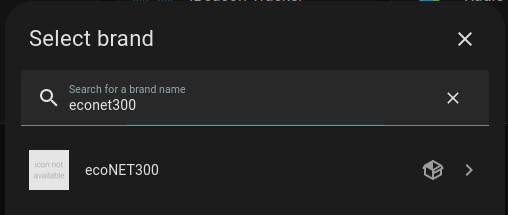
- Search and select "ecoNET300".
- In the bottom right, click on the Add Integration button.
- From the list, search and select "ecoNET300".
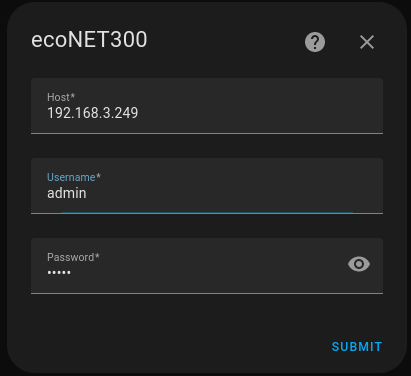
- Enter your local device IP/domain and local credentials (not econet24.com credentials). "Submit".
Host: Local IP/domain of your device.
Username: Local username (NOT the username that you use to login to econet24.com!).
Password: Local password (NOT the password that you use to login to econet24.com!).
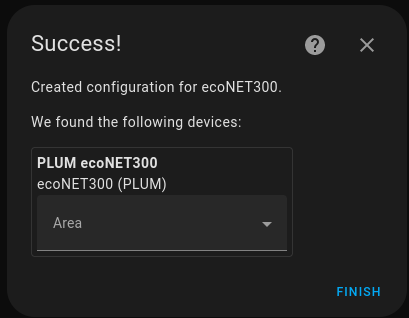
- Your device should now be available in your Home Assistant installation.
The integration provides multiple entity types:
| Type | Count | Description |
|---|---|---|
| Sensors | 50+ | Temperature, status, system info |
| Binary Sensors | 25+ | Pumps, fans, connections |
| Switches | 1 | Boiler ON/OFF control |
| Select | 1+ | Heater mode, dynamic parameters |
| Number | 15+ | Temperature setpoints |
Starting with v1.2.0, the integration automatically discovers 165+ additional entities from your boiler's remote menu via the mergedData API endpoint:
- Automatic Type Detection: Parameters become Number, Switch, Select, or Sensor entities
- Category Grouping: CONFIG entities disabled by default, enable as needed
- Parameter Locking: Locked parameters show lock icon and become unavailable
- Mixer Support: Entities correctly assigned to Mixer 1-4 devices
- ecoSTER Detection: Entities only created when ecoSTER panel is connected
📖 Complete Entity Reference - Full list of all entities with descriptions
The integration includes comprehensive diagnostics support to help troubleshoot issues. Download detailed system information including entity states, API data, and configuration details.
📖 Complete Diagnostics Documentation
- Go to Settings > Devices & Services in Home Assistant
- Find your ecoNET300 integration
- Click the Download diagnostics button
- Share the redacted diagnostics file for support
Features:
- ✅ Automatic sensitive data redaction
- ✅ Complete API endpoint data
- ✅ Entity states and attributes
- ✅ System configuration details
ecoNET-300-Home-Assistant-Integration/
├── custom_components/econet300/     # Home Assistant integration
├── docs/                            # Complete documentation
├── scripts/                         # Development and utility scripts
├── tests/                           # Integration tests
└── [standard project files]
- test_api_endpoints.py - Test all API endpoints and validate responses
- check_translations.py - Validate translation files for consistency
- language_finder.py - Find and analyze language-specific content
- README.md - Scripts documentation and usage instructions
- ENTITIES.md - Complete entity reference (sensors, switches, numbers)
- MIGRATION.md - Migration guide for upgrading between versions
- DIAGNOSTICS.md - Diagnostics documentation and troubleshooting
- DYNAMIC_ENTITY_VALIDATION.md - Dynamic entity system (v1.2.0+)
- API_V1_DOCUMENTATION.md - Complete API documentation (80+ endpoints)
- devices/ - Device-specific documentation (ecoMAX, ecoSOL)
For detailed version information and changelog, see CHANGELOG.md.
- Dynamic Entity System: 165+ entities auto-discovered from
mergedDataAPI endpoint - 80+ API Endpoints: Comprehensive access to all boiler parameters
- Parameter Locking: Device-side locks reflected with lock icons in Home Assistant
- Complete Boiler Status Codes: All 27 operation status codes supported
- Repair Issues System: Automatic connection failure detection with one-click fix
- Reconfiguration Flow: Update connection settings after initial setup
- Boiler Control: Turn boiler ON/OFF directly from Home Assistant
- Temperature Setpoints: Full control over heating and hot water temperatures
- Mixer Support: Smart entity creation for up to 6 mixer temperature setpoints
- ecoSTER Integration: Support for 8 room thermostats
- ecoSOL 500 Support: Solar collector system integration
- Multi-language: 6 language support (English, Polish, Czech, French, Ukrainian)
- Diagnostics Support: Comprehensive diagnostics for troubleshooting
We welcome contributions! Please feel free to submit a Pull Request. For major changes, please open an issue first to discuss what you would like to change.
- Fork the repository
- Create a feature branch
- Make your changes
- Test thoroughly
- Submit a pull request
Use the provided scripts in the scripts/ directory to test API endpoints and validate translations.
- @jontofront - Current maintainer and developer
- @pblxpt - Original developer and maintainer up to v0.3.3
- @KirilKurkianec - Contributor and supporter
- ecoNET300 Community - For testing, feedback, and support
- Plum Sp. z o.o. - For creating the ecoNET300 system
This integration is not officially affiliated with or endorsed by Plum Sp. z o.o. Use at your own risk. The developers are not responsible for any damage to your equipment or system.
If you encounter any issues or have questions:
- Check the API Documentation
- Search existing Issues
- Create a new issue with detailed information about your problem
This README was last updated on 2025-01-28 with v1.2.0 release.