
AGENTS.db is a vectorized, flatfile database for your LLM to query and store context.


It’s designed for agent systems that need:
- A read-only, canonical knowledge base (the Base layer).
- Append-only layers for new notes, derived summaries, and proposals.
- Clear provenance (who/what wrote a chunk, and what sources it came from).
- Fast local search.
This repo is currently targeting the spec in docs/RFC.md.
AGENTS.md is a great standard - good job! However, beyond a small code base it quickly breaks down and the llm will need to start branching off to look elsewhere for the context it needs.
AGENTS.db is a one stop shop for context. All the benefits of AGENTS.md but in a single, structured, vectorized, flatfile database.
So why is it spread across multiple files? Think of your project knowledge as “chunks” stored in layer files that are source control safe:
- Base:
AGENTS.db(immutable; source of the truest truth). - User:
AGENTS.user.db(append-only; durable human additions). - Delta:
AGENTS.delta.db(append-only; reviewable proposed additions). - Local:
AGENTS.local.db(append-only; ephemeral/session notes/Don't commit to source control).
When searching across layers, higher-precedence layers win:
local > user > delta > base
AGENTS.db is immutable? Why?
AGENTS.db is your absolute source of truth. It should contain real documentation from the code base, ideally written and verified by humans. Therefore, it should take top priority when the LLM is comparing 2 conflicting contexts.
Use the user layer for good context, delta for proposed good context (like a pull request) and finally local for your own, personal context.
For more information about how best to use layers, see docs/WORKFLOW.md
Install a prebuilt release (macOS/Linux/Windows via Git Bash) into ~/.local/bin:
curl -fsSL https://raw.githubusercontent.com/krazyjakee/AGENTS.db/main/scripts/install.sh | bash
agentsdb --help
Get setup:
Set up your embedding options. This stores the options in AGENTS.local.db which isn't supposed to be committed to source control.
agentsdb options wizardThis scans your repo for common documentation files (wide net) and creates AGENTS.db, your source of absolute truth.
agentsdb initPromote your options to store them permanently in AGENTS.user.db.
agentsdb promote --from AGENTS.local.db --to AGENTS.user.db --ids 1See available commands:
agentsdb --helpThe easiest way to add more content is to run the mcp (agentsdb serve) and have your llm add the content. If you want to do it manually, you can also use the web ui (agentsdb web) or just use the CLI.
Compile directly from file paths and/or inline text (no intermediate JSON manifest).
agentsdb compile --out AGENTS.db --dim 128 --element-type f32 AGENTS.md docs/RFC.mdagentsdb compile --out AGENTS.local.db --text "Project note: layers are append-only."Notes:
- If embeddings aren’t provided,
compileuses the configured embedder from rolled-up options (default: deterministic built-in hash embedder). compileappends to an existing--outfile by default; use--replaceto overwrite.
agentsdb validate AGENTS.db
agentsdb inspect AGENTS.dbYou use semantic search in the web ui, or using the CLI below.
Search just the base layer:
agentsdb search --base AGENTS.db --query "something awesome"Search across multiple layers:
agentsdb search \
  --base AGENTS.db \
  --user AGENTS.user.db \
  --delta AGENTS.delta.db \
  --local AGENTS.local.db \
--query "what is precedence?" -k 5Export layers to a stable JSON/NDJSON format:
agentsdb export --dir . --format json --layers base,user,delta,local --out agentsdb-export.jsonImport an export file into a writable layer (append-only):
agentsdb import --dir . --in agentsdb-export.json --dedupeDangerous escape hatch (writes to AGENTS.db):
agentsdb import --dir . --in agentsdb-export.json --allow-baseShow the effective rolled-up options (and which layer provided the last patch):
agentsdb options showInteractive setup (recommended):
agentsdb options wizardSet a local override (writes to AGENTS.local.db):
agentsdb options set --scope local --backend hash --dim 128Set a shareable default (writes to AGENTS.user.db):
agentsdb options set --scope user --backend hash --dim 128Advanced: write the options record manually (equivalent to agentsdb options set):
agentsdb write AGENTS.local.db \
  --scope local \
  --kind options \
  --content '{"embedding":{"backend":"hash","dim":128}}' \
  --confidence 1.0 \
--dim 128By default, agentsdb uses the all-minilm-l6-v2 model. Additional backends are described below:
cargo build -p agentsdb-cli --features all-embeddersBackends supported when enabled: hash, ort, candle, openai, voyage, cohere, anthropic, bedrock, gemini.
Remote providers read the API key from an env var (defaults: OPENAI_API_KEY, VOYAGE_API_KEY, COHERE_API_KEY, ANTHROPIC_API_KEY, GEMINI_API_KEY), configurable via agentsdb options set --api-key-env ....
Environment Variables: See .env.example for a complete list of all environment variables, including API keys for embedding providers and AWS Bedrock configuration.
Local model downloads can be pinned/verified:
agentsdb options allowlist list
agentsdb options allowlist add --scope local --model all-minilm-l6-v2 --revision main --sha256 <sha256>
Offline backends: You don't need a model to embed documents in agentsdb. In this case, use the hash backend and set your dim to 128.
Layers are append-only, but records are still "editable":
- Edit: append a new chunk with the same id; the newest chunk with that id in the layer is the effective version.
Options records are excluded from search results by default (unless filtered by --kind options).
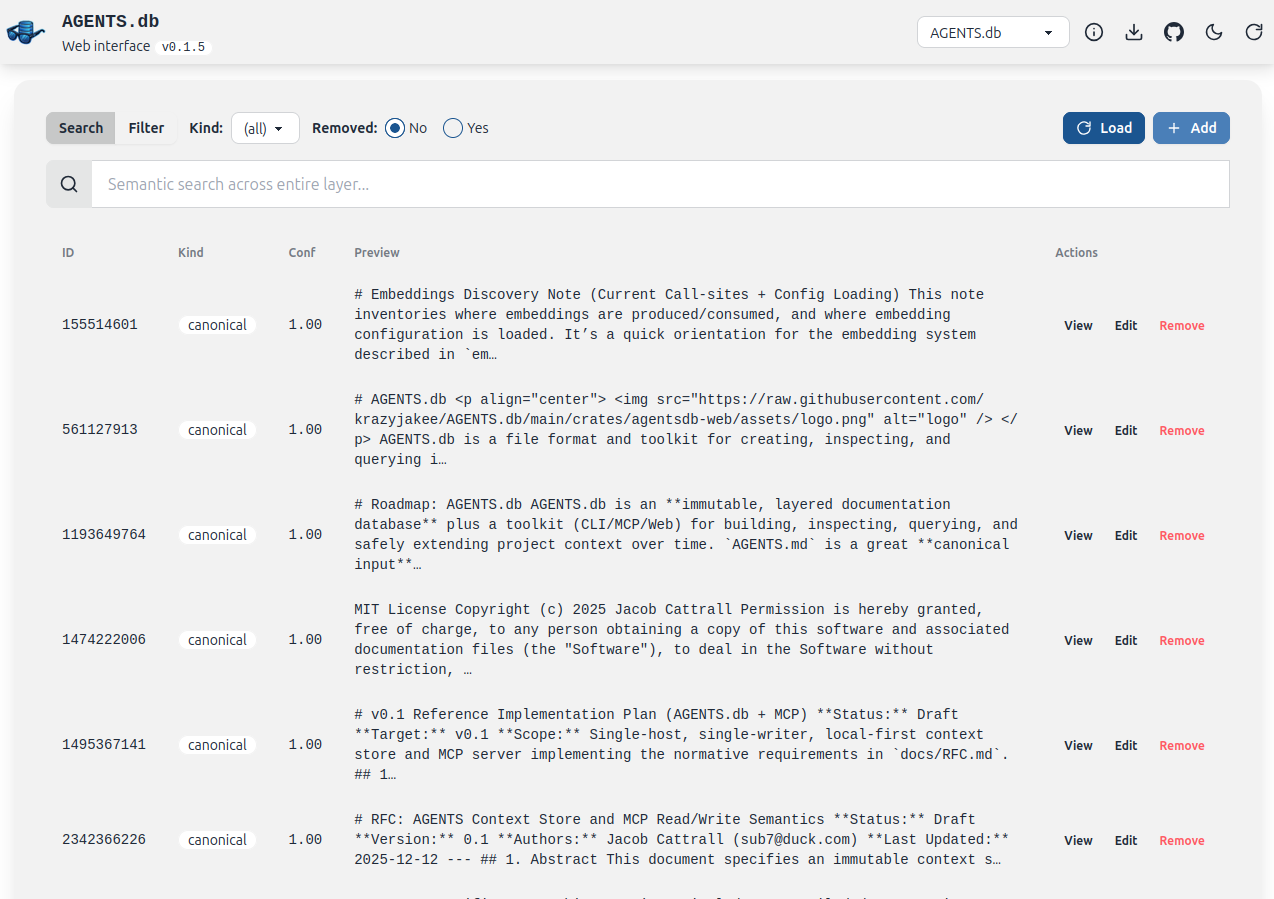
agentsdb web launches a local Web UI for browsing layers under a root directory and appending/editing chunks in writable layers (AGENTS.local.db / AGENTS.delta.db).
- "Edit" appends a new version with the same id.
- "Export" downloads the selected layer as JSON/NDJSON; "Import" appends from an export file (append-only).
agentsdb web --root . --bind 127.0.0.1:3030
agentsdb serve starts an MCP server over stdio (intended to be launched by an MCP-capable host).
agentsdb serve --base "$PWD/AGENTS.db" --local "$PWD/AGENTS.local.db"The target API surface is described in docs/RFC.md (e.g. agents_search, agents_context_write).
agentsdb exposes an MCP stdio server via agentsdb serve. To hook it up, install agentsdb, make sure you have a base layer (AGENTS.db) plus at least one writable layer (AGENTS.local.db and/or AGENTS.delta.db), then register a server that runs agentsdb serve with absolute paths.
Example server command:
agentsdb serve \
  --base "$PWD/AGENTS.db" \
  --local "$PWD/AGENTS.local.db" \
--delta "$PWD/AGENTS.delta.db"Add a global MCP server entry:
codex mcp add agentsdb -- agentsdb serve --base "$PWD/AGENTS.db" --local "$PWD/AGENTS.local.db" --delta "$PWD/AGENTS.delta.db"Add an MCP server (pick --scope project or --scope user as desired):
claude mcp add --transport stdio --scope project agentsdb -- agentsdb serve --base "$PWD/AGENTS.db" --local "$PWD/AGENTS.local.db" --delta "$PWD/AGENTS.delta.db"Add an MCP server (defaults to --scope project):
gemini mcp add --transport stdio --scope project agentsdb agentsdb serve --base "$PWD/AGENTS.db" --local "$PWD/AGENTS.local.db" --delta "$PWD/AGENTS.delta.db"Common commands:
cargo test
cargo fmt --all
cargo clippy --all-targets --all-features- Spec and semantics:
docs/RFC.md - Planned scope:
docs/Reference Implementation.md - Looking for a workflow/mental model of how to lean into this approach? See
docs/WORKFLOW.md
MIT. See LICENSE.

