HarmonyChain is a supply chain management system designed to streamline and optimize the flow of goods and information. It promotes seamless collaboration between suppliers, manufacturers, and distributors, ensuring efficiency, reliability, and flexibility in managing supply chain operations.


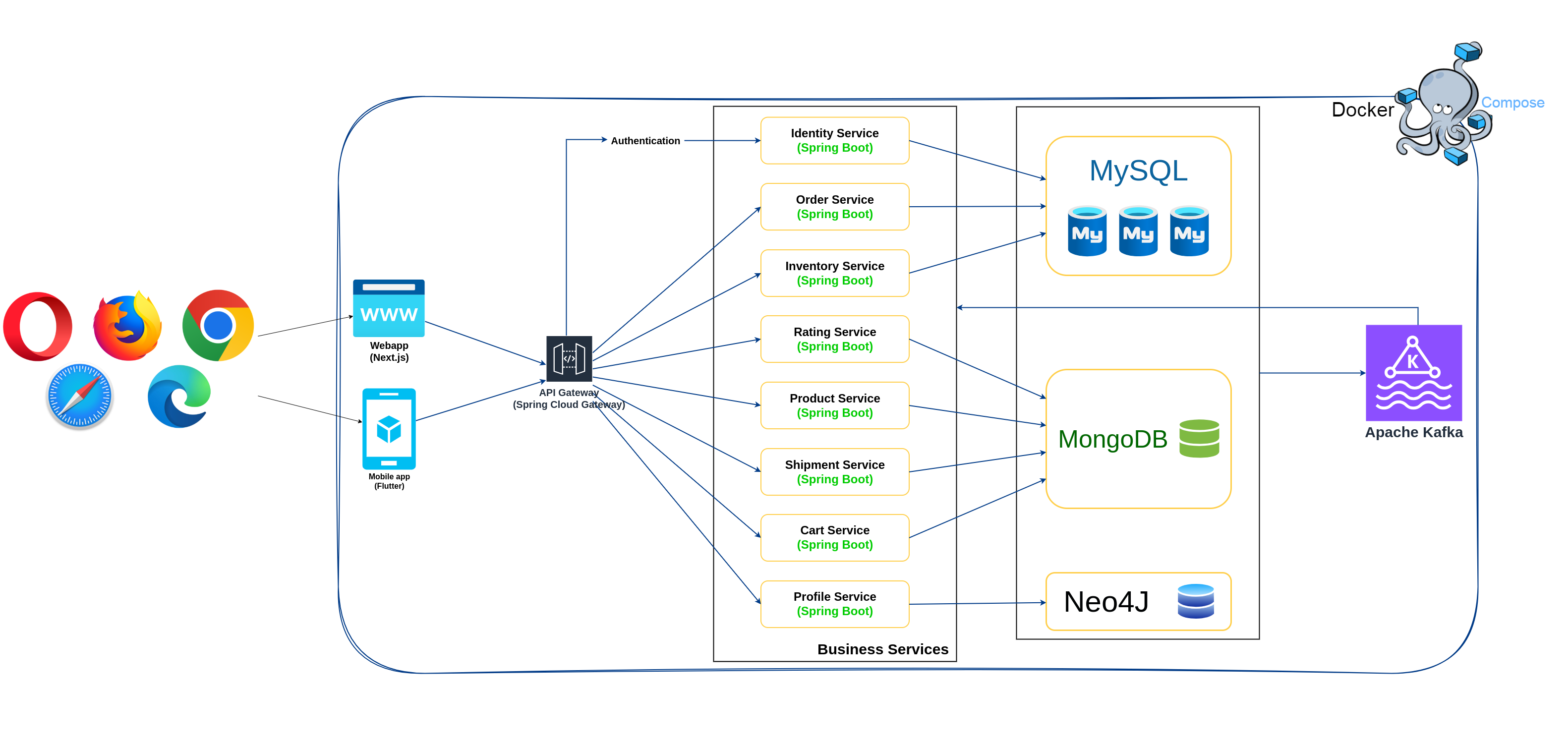
- Java 21
- Spring boot 3.3.4
- Next.js
- Kafka
- Keycloak (Soon)
- Elasticsearch (Soon)
- SonarCloud (Soon)
- OpenTelemetry (Soon)
- Grafana, Loki, Prometheus, Tempo (Soon)
- Get the latest source code
- Add the following records to your host file:
127.0.0.1 api.harmony.local
127.0.0.1 identity
127.0.0.1 storefront
127.0.0.1 backoffice
127.0.0.1 phpmyadmin.scms.local
- Open terminal of your choice, go to project directory, run
./start-harmony.sh, wait for all the containers up and running
./start-harmony.shWarning: To run all the containers, you need a minimum of 16GB of RAM.
Note: If you use Linux, you may need to run
chmod +x ./start-harmony.shto make the script executable. Run./stop-harmony.shto stop all the containers.
- All the containers up and running then we start to get sample data for the services. Open terminal of your choice, go to project directory,
run
./start-data.sh, wait for all the services to get the sample data.
./start-data.shNote: If you use Linux, you may need to run
chmod +x ./start-data.shto make the script executable.
- docker-compose.yml for all core services
- docker-compose.services.yml exclude application services
- Give us a star
- Reporting a bug
- Participate discussions
- Propose new features
- Submit pull requests. If you are new to GitHub, consider to learn how to contribute to a project through forking
By contributing, you agree that your contributions will be licensed under MIT License.