AneuPy is an open-source software tool designed to generate both idealized and patient-specific geometries of abdominal aortic aneurysms (AAA). It utilizes the Python interface of the SALOME platform to provide versatile geometry creation options suitable for research, educational purposes, and computational analyses.

AneuPy not only facilitates the generation of AAA geometries but also ensures that the output is ready for various simulation types:
- Fluid and Solid Domain Preparation: Generates distinct geometries suitable for fluid dynamics analyses, structural mechanics, or fluid-structure interaction (FSI) simulations.
- Multiple Export Formats: Supports exporting geometries in .IGES, .STEP, and .STL formats, providing compatibility with a wide range of FEA (Finite Element Analysis), CFD (Computational Fluid Dynamics), and FSI simulation software.
- Optimized for Analysis: Geometries are prepared with considerations for computational efficiency and accuracy, ensuring that they are ready to be integrated into simulation workflows without additional preprocessing.
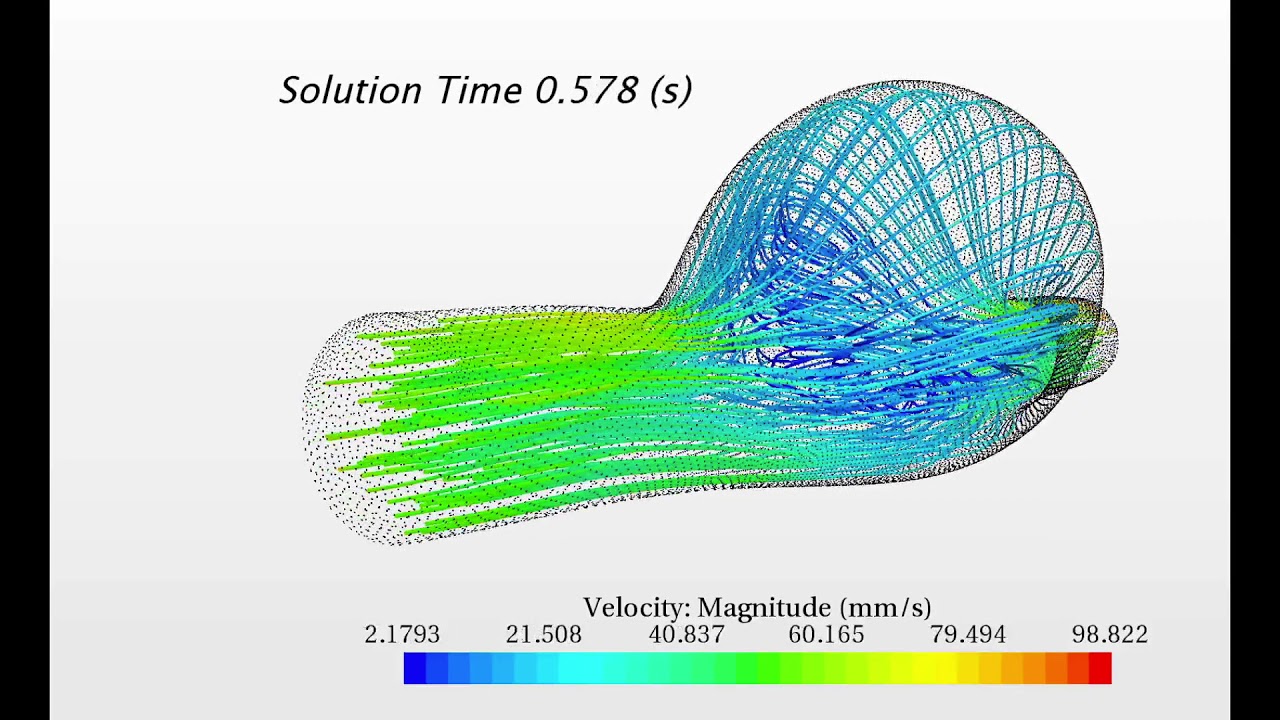
To see AneuPy's geometries in action within an FSI simulation, click on the image below to watch our detailed demonstration on YouTube:
- Multi-Layered Domain Generation: AneuPy is capable of generating detailed multi-layered domains that mimic the main layers of an artery. This includes:
- Intima: The innermost layer, often affected in vascular diseases.
- Media: The middle layer, crucial for structural integrity and elasticity.
- Adventitia: The outer layer, providing additional support and structure.
- Intraluminal thrombus: A blood clot attached to an arterial wall, with blood flowing around it at its distal end. These layered models are vital for studies involving detailed mechanical and physiological properties of vascular tissues and are crucial for realistic FEA, CFD, and FSI simulations. The image below shows a sagittal view of a computational mesh for an idealized AAA geometry generated with AneuPy where the three main layers are visible.
AneuPy offers three main functionalities:
- Idealized Manual Geometry Generation (
Idealized_manual.py):- Allows users to manually input the cross sections (XYZ locations) and radii to generate idealized AAA geometries. The
Idealized_manual.pymodule uses the parameterization shown below to generate the AAA geometries:
- Allows users to manually input the cross sections (XYZ locations) and radii to generate idealized AAA geometries. The

- Idealized Automatic Geometry Generation (
Idealized_automatic.py):- Streamlines the geometry creation process using parameters defined in
Params_Idealized_Automatic.json, including length, radii, and wall thicknesses. This method is ideal for simulations where standard geometrical parameters are needed. This script simplifies the creation of idealized geometries by utilizing predefined parameters:length: Total length of the aneurysmradius_nondilated: Non-dilated radius of the aneurysmradius_dilated: Radius of the aneurysm sacwall_thickness_intima: Wall thickness of the intimawall_thickness_media: Wall thickness of the mediawall_thickness_adventitia: Wall thickness of the adventitiawall_thickness_ILT: Wall thickness of the intraluminal thrombus (ILT)x_shift: Assymetry of the AAA sac in the X-directiony_shift: Assymetry of the AAA sac in the Y-direction
- Streamlines the geometry creation process using parameters defined in
The figure below shows different idealized AAA geometries generated with the Idealized_automatic.py module:

- Patient-Specific Geometry Generation (
Patient_specific.py):- Generates geometries from patient-specific data derived from centerlines, wall area, and length measurements of the AAA, with the option to include thrombus area if available. This method allows for high fidelity modeling of individual anatomical features which can be critical in patient-specific simulation studies.
The image below shows two illustrative examples generated with Patient_specific.py:

Before you can use AneuPy, ensure that your system meets the following prerequisites:
-
Python 3:
- AneuPy requires Python 3. Ensure you have Python 3 installed on your system. You can download Python 3 from the official Python website.
- To verify Python is installed, run the following command in your terminal or command prompt:
Ensure that the output indicates a Python 3 version.
python --version
# or
python3 --version
-
SALOME:
- AneuPy utilizes the SALOME platform for geometric modeling. Install SALOME version 9.11.0 or newer. You can download it from the SALOME website.
- Follow the installation instructions provided on the SALOME website to ensure it is correctly installed on your system.
Once you have the prerequisites installed, you can install AneuPy by cloning its repository:
git clone https://github.com/mdeluci/aneupy.git
cd aneupyBefore running the AneuPy scripts, make sure that the paths to Python and SALOME are correctly exported in each of the shell script files you will use. Each shell script is configured to run a specific Python script within the SALOME environment:
Run_Idealized_Manual.shRun_Idealized_Automatic.shRun_Patient_Specific.sh
Edit these files to ensure that they correctly point to the locations where Python and SALOME are installed on your system. This typically involves setting or modifying the PATH, PYTHONPATH, and LD_LIBRARY_PATH environment variables within these scripts.
To run the AneuPy scripts, navigate to the test directory containing your cloned repository and execute the appropriate shell script for the task you want to perform. You can run the scripts directly from the command line.
./Run_Idealized_Manual.shthis script does not require any additional parameters and will execute with predefined settings. It will produce .IGES, .STL and .STEP files for the solid and fluid domain of the aneurysm.
You have two options for running the Idealized Automatic script:
- Manually inputting the parameters:
./Run_Idealized_Automatic.sh --length 120 --radius_nondilated 3 --radius_dilated 8 --wall_thickness_intima 0.5 --wall_thickness_media 0.3 --wall_thickness_adventitia 0.7 --wall_thickness_ILT 2 --x_shift 1.5 --y_shift 2.0 - Using a configuration file:
./Run_Idealized_Automatic.sh --config_file ./Params_Idealized_Automatic.json
The Patient-Specific script allows for the generation of geometries based on detailed patient-specific data. This script is highly configurable, enabling the use of preloaded datasets or custom data placed in the data directory according to the script settings. Below you can see the workflow followed by the Patient_specific.py module to generate AAA geometries from patient-specific data:

- Preloaded Data: You can choose between two preloaded sets of centerlines and corresponding wall and lumen areas. This allows for flexibility in simulating different patient scenarios without needing to source additional data.
- Section Placement: The script supports two modes for placing sections:
- Z-direction: Sections are placed along the Z-direction, suitable for more straightforward, aligned geometries.
- Tangent to the Centerline: Sections follow the tangential direction of the centerline, offering a more accurate and patient-specific representation, especially in cases of complex aneurysm paths.
To run the script with these configurations, simply execute the following command:
./Run_Patient_Specific.shIt might be helpful to include additional notes or a troubleshooting section to assist users in resolving common issues they might encounter.
## Notes and Troubleshooting

- Ensure that all paths set in the shell scripts accurately reflect your system's configuration.
- If you encounter permission errors, you may need to make the shell scripts executable. You can do this with the command `chmod +x Run_*.sh`.
- For any errors related to Python dependencies or SALOME functionalities, ensure that all required libraries are installed and accessible.
This work is licensed under a Creative Commons Attribution-NonCommercial-NoDerivatives 4.0 International License.


