in this project we will build a Graph object to run algorithms on and creating a GUI to intract with the Graph , adding/deleting nodes and edges or running some algorithms
we have a few problems to solve in our case, most of the problems are conneted to the algorithms part(what to use and how to code them) and some of them are related to the objects we need to build like the nodes or the graph , what fiealds each object will contain ,ehat data strucure we shood use and extra...
before the object implamantsion we we need to decide which Algorithmems to use in the Algorithmems part the assigment.
is_connected - we need to find if the is connected, we used kosaraju Algorithmem for this https://www.geeksforgeeks.org/connectivity-in-a-directed-graph/ ass explind in this articale we need to find the strongly connected componnents of the graph if there is only one, then the graph is connected
the shrtest path problem - https://en.wikipedia.org/wiki/Dijkstra%27s_algorithm we used dijkstra Algorithmem with hashmaps to solve the problem.
find the center - to find the center we simply find the shortest path of all the nodes to all oter nodes
tsp- we used a greedy Algorithmem that always go to the closest city left using shortest path distance
to implament the geo_location we simply store the x y z values of the point. to implament the EdgeData we store the id of the src and the dst. in the node data we used hashmap data sturccture to store the edges the comes out of the node and anouter hashmap for the ones that comes out of the node. if the Graph we also have an hashnap that stores each node by its id as the key and the node as the value. the use of hashmap in both cases are because of the runtime that we needed to have on some of the functions
double x = the x value of the poin in the 3Dspace;
double y = the y value of the poin in the 3Dspace;
double z = the z value of the poin in the 3Dspace;
HashMap<Integer, EdgeData> edges = an hashmap of all the edges the comes out of the node;
HashMap<Integer, EdgeData> edges_in =an hashmap of all the edges the comes in the node;
int edge_num = the number of edges the node is the src part;
int edgeIn_num = the number of edges the node are the dest part;
static int amount = the amount of nodes created;
int key = the id of the node;
GeoLocation point = the point in 3Dspace of the node;
double weight = the weight of the node;
String info = info of the node;
int tag = a tag if the node;
int src = the id of src  node;
int dest= the id of dest node;
double weight = the weight of the edge- how much is the cost to travel on this connction;
int tag = a tag of the edge;
String info =an info about the edge;
HashMap<Integer, NodeData> G= a hash map of all the Vertex in the graph ;
int node_num = 0;
int node_num_max=0;
int edge_num = 0;
int MC = 0;
DWG G = null;
private static final int visited = 1;
private static final int not_visited = 0;
Stack<Integer> dfs_stack = null;
private BufferedImage img = a bufferd image to sotore changes in the graph;
private Graphics2D g2 =  a grapic board to draw stuff on;
private DirectedWeightedGraph graph the graph we need draw;
is where the gui itself is building itself it says where to put each element and the action listeners
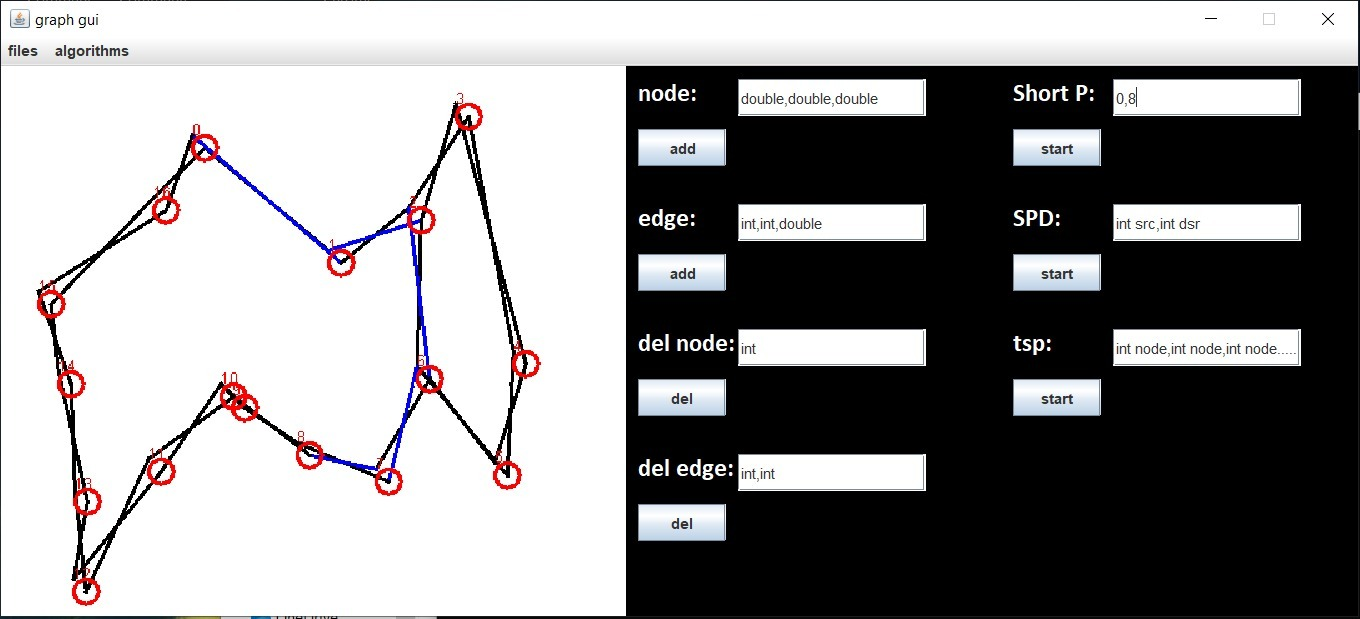
we used swing for the GUI and build two class that got used for the GUI in the end the panel and the main frame
download the github repostery and folow the how to use instructions.
first download the files form the github page than go to the cmd and go to the diractory you the Ex2.jar file in.
than run the commend
java -jar Ex2.jar (optinal-)"a file name.json"
if you enterd a file name and he was found the GUI will start with the Graph of the Json file. else you will get an empty Graph(no nodes and edges).
add node -enter 3 numbers seprated by "," like this 1.2,3,1 and they will be the X,Y,Z cords for the node.
add edge -enter two node numbers you want to conncet and the weight like this 1,2,3.4
del node -enter the node id you want to delete
del edge -enter the src and dst nodes id like this 3,4
after entering data for each commend you want press the button under the action name
in the menu you have the "file" button hover over it and you will see the load and save actions press one them in the load nevagaite to the file you want and choose it. in the save nevagaite to the place you want to save the graph choose a name.json
3 of the algorithms are in the menu under the algorithms tab you just choose what you want to run and press it is connected will show on the screen if the graph is connected and then you will need to press the show graph(also ujnder the algorithms tab) to see the graph again in the center the center node will be colored blue , if no blue is seen so there is no center found(not connected graph)
in the spd and shortest path you will need to insert the nodes indexes you want to check the shortest path on in spd and sp the answer will be shown where you enterd the data. in sp also the path will be colored blue.
1000 nodes-
shortest path - 59013900 nano sec
is connected - 31253100 nano sec
center - 566920800 nano sec
10000 nodes-
shortest path -919722500 nano sec
is connected - 156261200 nano sec
center -heap size error
100000 nodes-
shortest path - more than a coaple of minets
is connected - 722272000 nano sec
center - 566920800 nano sec
1000000 nodes-
shortest path - more than a couple of minets
is connected - 736019400 nano sec
center - more than a couple of minents