Skip to content

qhx0807/auto-deploy

Folders and files

NameName
Last commit message
Last commit date

Latest commit


History

7 Commits


Repository files navigation

轻量化前端代码自动部署

安装

npm install fe-auto-deploy -g

使用

  1. 在项目根目录新建配置文件: deploy.config.js

    module.exports = {
        projectName: 'test',
        prod: {
            localDir: '/dist',
            serveDir: '/www/wwwroot/test',
            buildScript: 'npm run build',
            sshConf: {
                host: '192.168.1.207',
                port: 22,
                username: 'root',
                password: 'password'
            }
        },
        dev: {
            localDir: '/dist',
            serveDir: '/www/wwwroot/test',
            buildScript: 'npm run build',
            sshConf: {
                host: '192.168.1.108',
                port: 22,
                username: 'root',
                password: 'password'
            }
        }
    }

    说明:

    key value
    projectName 项目名称
    prod 生成环境配置,可自己新增环境
    dev 开发环境配置,可自己新增环境
    localDir 本地需要发布的文件夹
    serveDir 服务器部署的文件夹路径
    buildScript 本地代码构建的命令 如 npm run build
    sshConf ssh连接配置
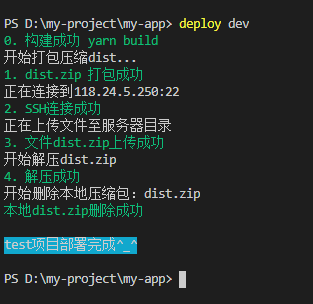
  2. 发布

deploy [env]
# deploy prod

About

基于node-ssh,archiver 的轻量化前端代码打包上传小工具

Resources

Stars

Watchers

Forks

Releases

No releases published

Packages

No packages published