I was unhappy with the Haskell scripts that are shipped with vim, therefore I decided to make my own based on idris-vim.
I hope you find this useful.
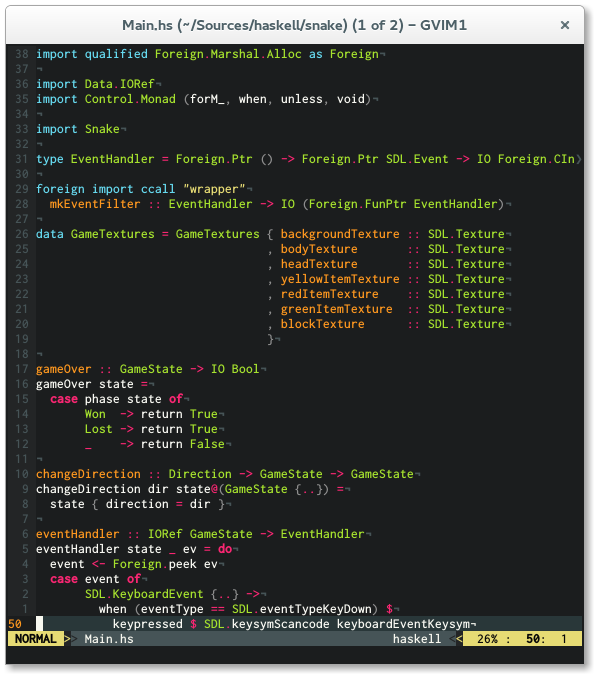
- Covers a broader spectrum of keywords
- Highlighting for new features like type families, pattern synonyms, arrow syntax, recursive do, role annotations
- More contextual highlighting (e.g. highlight 'as' or 'family' only in approriate places)
- Smarter indentation
I recommend using Pathogen for installation. Simply clone
this repo into your ~/.vim/bundle directory and you are ready to go.
cd ~/.vim/bundle
git clone https://github.com/raichoo/haskell-vim.git
Copy content into your ~/.vim directory.
Be sure that the following lines are in your
.vimrc
syntax on
filetype on
filetype plugin indent on
To enable the features you would like to use, just add the according line to your
.vimrc.
let g:haskell_enable_quantification = 1to enable highlighting offoralllet g:haskell_enable_recursivedo = 1to enable highlighting ofmdoandreclet g:haskell_enable_arrowsyntax = 1to enable highlighting ofproclet g:haskell_enable_pattern_synonyms = 1to enable highlighting ofpatternlet g:haskell_enable_typeroles = 1to enable highlighting of type roles
To configure indentation in haskell-vim you can use the following variables to change indentation depth, just add the according line to your .vimrc.
-
let g:haskell_indent_if = 3if bool >>>then ... >>>else ... -
let g:haskell_indent_case = 5case xs of >>>>>[] -> ... >>>>>(y:ys) -> ... -
let g:haskell_indent_let = 4let x = 0 in >>>>x -
let g:haskell_indent_where = 6where f :: Int -> Int >>>>>>f x = x -
let g:haskell_indent_do = 3do x <- a >>>y <- b -
let g:haskell_indent_in = 1let x = 1 >in x