org-tempus is an Emacs package to enhance Org's time tracking
features by setting thresholds for session and daily clocked time, and
sending notifications when they are reached. It optionally auto clocks
in to or out of your tasks, and adjusts timestamps accordingly.
- Thresholds for session and total daily clocked time.
- Mode line integration.
- Auto clocks in to a default task.
- Auto clocks out when idle.
- Supports different sources for detecting idleness: Emacs itself, Mutter (for GNOME), and freedesktop.org ScreenSaver.
- Sends notifications to take a break after the session threshold is reached.
- Sends notifications after a total daily time is reached.
- Sends notifications when activity is detected, but no task is clocked in.
- Optional integration with dconf. This is useful to display
org-tempusvalues in GNOME's panel, for example. It can be used with extensions such as simple-message.
- I start using my computer.
org-tempusdetects that the computer is not idle and auto clocks in to a default task. - After spending 15 minutes organizing my work, answering emails, etc., I manually clock in to another task.
- After working 15 more minutes in this task, my session reaches a 30
minutes threshold, so
org-tempussends a notification to take a break. I stop using my computer and go for a short walk. - After 4 minutes of inactivity,
org-tempusauto clocks out of the task, and adjusts the timestamp accordingly so it doesn't include the idle time. - Some minutes later I come back to my computer.
org-tempusdetects that my break was short, so it auto clocks me in to the last task, instead of the default. - (I repeat this pattern throughout the day)
- After reaching 5 hours of focused work,
org-tempussends a notification to wrap up my tasks.
With this workflow, I only have to manually clock in to the tasks I want to work on. I no longer need to clock out, or adjust timestamps manually if I forget to clock out when I stop using my computer.
All thresholds are configurable. By default, org-tempus suggests
work sessions of 30 minutes, and 5 hours of total work.
(unless (package-installed-p 'org-tempus)
  (package-vc-install "https://github.com/rul/org-tempus.git"))

(use-package org-tempus
  :init
  (org-tempus-mode 1))
MELPA integration coming soon.
org-tempus has many knobs. They are all documented, and can be
checked out with M-x customize-group or M-x apropos-variable.
These are the most relevant:
org-tempus-session-threshold-minutes: continuous session notification threshold.org-tempus-total-threshold-minutes: total daily notification threshold.org-tempus-auto-clock-enabled: master switch for auto clock in/out. It's off by default.org-tempus-auto-clock-default-task-id: Org ID of the default task for auto clock-in. You can generate one by runningorg-id-get-createon a heading.org-tempus-idle-provider: idle source (emacs,mutter,freedesktop-screensaver).org-tempus-notifications-enabled: enable/disable notifications.org-tempus-dconf-path: write mode line string to dconf (optional GNOME integration).
An example minimal configuration could look like this:
(setq
 org-tempus-auto-clock-enabled t
 org-tempus-auto-clock-default-task-id "6fc9cfbc-0cf6-4c3f-87a9-cc49a7b6ea7b"
 org-tempus-idle-provider 'mutter
 org-tempus-dconf-path "/org/gnome/shell/extensions/simple-message/message"
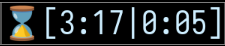
)The mode line will show the session time (S), the total time (T), and the current task's total clocked time today.

When no task is clocked in, the mode line will show the total time (T), and the break time (B).

Note: by default, org-tempus hides the stock Org mode line indicator and
replaces it with its own entry. This is recommended, but you can toggle it
off with org-tempus-hide-org-mode-line-string (and also control whether
org-tempus is added to the global mode line via
org-tempus-add-to-global-mode-string).
When thresholds are reached, the corresponding mode line section will change its color accordingly.


The legend provides reminders of what each number means: S for
session. T for total time. After getting used to these numbers, you
may want to toggle them off to save space in your mode line. Legend can
be toggled off with org-tempus-toggle-legend.

Notifications are sent when:
- Session threshold is reached
- Total time threshold is reached
- Activity is detected but no task is clocked in.
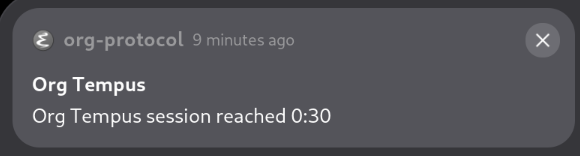
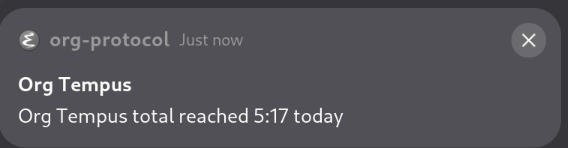
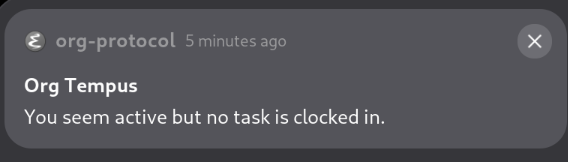
Notifications can be toggled off with org-tempus-toggle-notifications.
The optional integration with dconf allows for integration with GNOME's panel, so you can see your timers even if you aren't using Emacs.
