Editing process
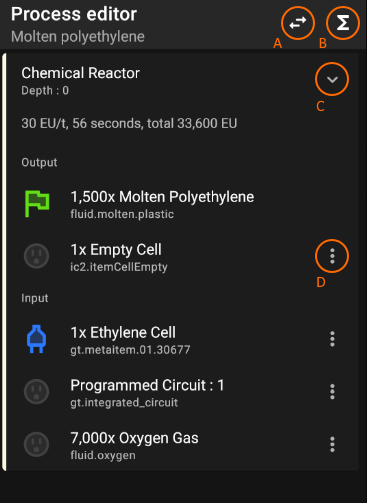
In process editor, recipes are displayed as a list, which is DFS ordered. Depth of recipe is the depth of recipe node in the DFS tree. Each recipe card shows its properties, input elements, and output elements.
Element consists of following types, item, fluid, ore dictionary name, replacement list.
Every elements in entire recipe nodes have its connection status. If one element is connected with more than one other element, it can have multiple connection statuses. Here is the all possible connection status list-
| icon | name | description |
|---|---|---|
 |
Final output | It's final output of the process, and it cannot be added or removed. |
 |
Connect to child | If input element, it means element is connected with its child recipe node's output element. Default input elements' status is this. If output element, it means element is connected with its parent recipe node's input element. Called "reversed connection", this connection is often useful for expressing particular connections such as "recycled outputs", "cell links". |
 |
Connect to parent | If output element, it means element is connected with its parent recipe node's input element. Default output elements' status is this. If input element, it means element is connected with its child recipe node's output element. |
 |
Not consumed | It means element of recipe node is not consumed during process. Marked element is not counted as base ingredient, nor byproduct. |
 |
Disconnected | If input element, this element is a base ingredient, if output, element is a byproduct. |
- recycled outputs : Byproduct output element that connected to its child recipe node's input element (e.g: Diluted sulfuric acid in default molten polyethylene process)
- cell link : Like recycled output, but with empty cell (e.g: Empty cells in default molten polyethylene process)
To connect recipe, click menu button of the target element. Connecting is only viable when connecting input to output or output to input. You can only connect existing recipe nodes when connecting to parent. Here's list of connecting methods-
| method | description |
|---|---|
| Connect to existing | Connects recipe to existing recipe node. If connecting to parent, possible depth is N < Current recipe depth, opposite is N ≥ Current recipe depth. |
| Connect to new recipe | Connects recipe with new recipe queried from local database. |
| Attach supplier | Attaches supplier recipe to element. Supplier is a special recipe that marks target element as base ingredient. It is useful to specific connections that handle multiple inputs. (e.g : Oxygen gas in default molten polyethylene process) |
| Attach process | Copies entire selected process to target element's process. (e.g : Electronic circuit, molten polyethylene process in solar panel process) |
Warning : A process cannot have same recipes. If the previously added recipe is added again, it automatically connects target element to previous recipe.
When disconnecting, In the root recipe of the recipe to be disconnected, the recipe is automatically removed if there is no connection or the connection is lost.