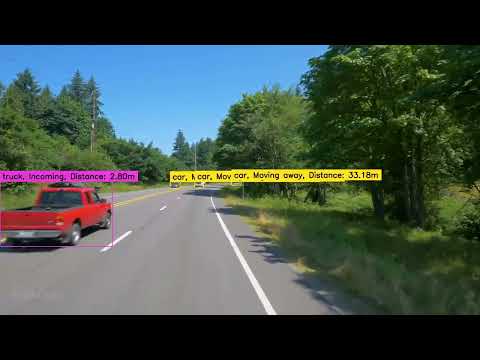
Surpass Assist is a computer vision-based solution designed to significantly enhance road safety. It uses advanced machine learning algorithms to analyze road conditions, detect lanes, track vehicles, and gather critical data to ascertain the best and safest opportunities for vehicles to overtake large trucks. The overarching goal is to minimize the occurrence of accidents and alleviate traffic congestion caused by unsafe overtaking maneuvers.
- Vehicle and Lane Detection: Surpass Assist identifies vehicles and lanes on the road accurately, even under varying weather and lighting conditions.
- Distance Tracking: The system tracks the distance between vehicles to ensure safe overtaking.
- Real-Time Data Analysis: Surpass Assist collects and processes data in real-time for immediate response and decision-making.
- Safety Alert System: Alerts are relayed to drivers on when it's safe to overtake the large trucks.
The lane detection component relies on the open-source
Ultra-Fast-Lane-Detection
(UFLD) network. Download the pretrained weights (for example
culane_18.pth) from the project's releases:
wget https://github.com/cfzd/Ultra-Fast-Lane-Detection/releases/download/v1.0.0/culane_18.pthProvide the path to the downloaded file when running the command line tool.
First install the Python dependencies using pip:
pip install -r requirements.txtAlternatively you can build a Docker image:
docker build -t surpassassist .docker run --gpus all -v $(pwd):/workdir surpassassist \
<input_video> <model_path> <lane_model> <output_video>If you don't have access to a local GPU, try running the project on a cloud notebook platform such as Google Colab or Kaggle, or any container-based GPU service.
After installing the dependencies, you can process a video directly from the terminal:
python -m surpassassist <input_video> <model_path> <lane_model> <output_video>The command loads the YOLO model, processes the video, and saves the annotated output to the location you specify. The lane model path should point to the pretrained UFLD weights you downloaded earlier.
Sicne the project is in it's infency we only a small demo available for the public: